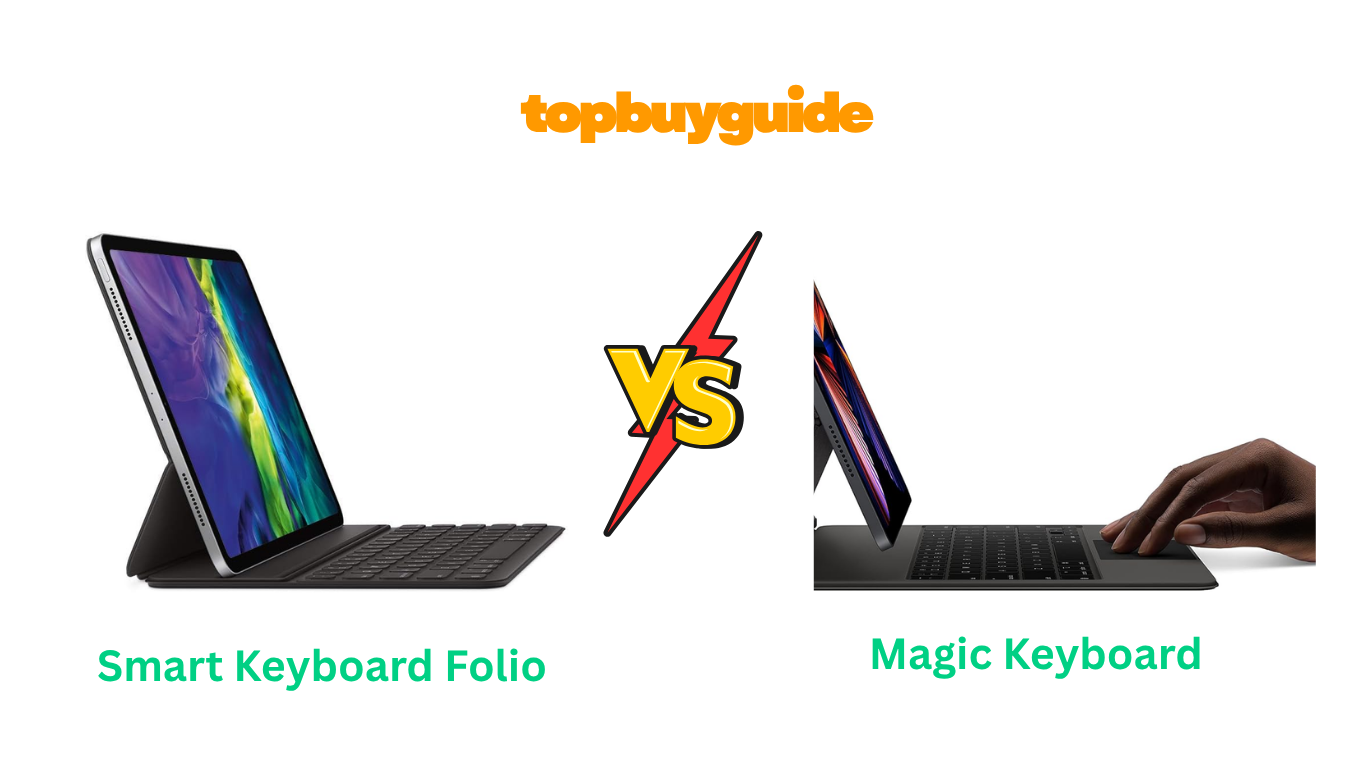
Choosing the right keyboard for your iPad can completely change your experience. Apple offers two excellent options: the Smart Keyboard Folio and the Magic Keyboard. While both turn your tablet into a more capable device, they cater to very different needs. If you’re looking for a premium, laptop-like experience with the best typing feel, the Magic Keyboard is the clear winner. Its backlit keys and built-in trackpad make it worth the investment for heavy users.
Why Do I Recommend The Magic Keyboard?
When comparing the Smart Keyboard Folio vs Magic Keyboard, the Magic Keyboard stands out for its superior features and typing comfort, making it my top recommendation for those who want a true laptop replacement experience. Here’s why it’s the better choice.
- Superior Typing Experience: The Magic Keyboard uses a scissor-mechanism, similar to what you find on MacBooks. This provides satisfying key travel and a responsive feel. In contrast, the Smart Keyboard Folio has fabric-covered keys with less travel, which can feel less comfortable for long typing sessions.
- Backlit Keys: One of the most significant advantages of the Magic Keyboard is its backlit keys. This feature is essential for typing in low-light environments, like on an evening flight or in a dimly lit room. The Smart Keyboard Folio completely lacks this feature.
- Integrated Trackpad: The Magic Keyboard includes a high-precision, multi-touch trackpad. This transforms your iPad’s user interface, allowing for cursor control and gestures just like on a laptop. This makes tasks like text editing and navigation much faster. The Smart Keyboard Folio does not have a trackpad, requiring you to touch the screen for all navigation.
- Floating Cantilever Design: The Magic Keyboard features an innovative floating design. It allows for smooth adjustment of the viewing angle, offering more flexibility than the Smart Keyboard Folio’s two fixed positions. This ensures you always have the perfect angle for your task.
- USB-C Pass-Through Charging: A dedicated USB-C port on the Magic Keyboard’s hinge allows for pass-through charging. This frees up the iPad’s own USB-C port for connecting other accessories, like external drives or displays. The Smart Keyboard Folio does not have an extra port.
- Sturdy and Stable: Due to its design and weight, the Magic Keyboard is incredibly stable, even when used on your lap. The Smart Keyboard Folio is much lighter, which can sometimes make it feel less stable and more prone to tipping.
- Premium Build Quality: The Magic Keyboard has a robust build that feels more premium and durable. While it adds more weight, it gives a sense of security and quality that justifies its higher price. The Folio, while durable, has a simpler, polyurethane construction.
Side By Side Comparison Chart: Smart Keyboard Folio vs Magic Keyboard
| Feature | Smart Keyboard Folio | Magic Keyboard |
| Typing Mechanism | Fabric-covered, membrane-style | Scissor-mechanism |
| Trackpad | No | Yes, with multi-touch |
| Backlit Keys | No | Yes, adjustable |
| Viewing Angles | Two fixed angles | Adjustable, floating cantilever |
| Extra Ports | No | 1x USB-C for pass-through charging |
| Weight | Lighter | Heavier |
| Protection | Lightweight front and back | Sturdy front and back |
| Price | More affordable | Premium price |
What Common Features Can the Smart Keyboard Folio vs Magic Keyboard Do?
Despite their differences, both the Smart Keyboard Folio and the Magic Keyboard share some core functionalities that make them excellent companions for your iPad. They are designed to integrate seamlessly into the Apple ecosystem, providing a hassle-free experience straight out of the box.
Smart Connector
Both keyboards use Apple’s Smart Connector. This is a magnetic connection on the back of the iPad that transfers both power and data. Because of this, neither keyboard requires batteries or charging. You never have to worry about a dead keyboard. Pairing is also instant; just attach your iPad, and it works immediately. There is no need to fuss with Bluetooth settings, making the setup incredibly simple and reliable.
Front and Back Protection
When not in use, both the Smart Keyboard Folio and the Magic Keyboard fold to cover the front and back of your iPad. They function as a protective case, shielding your device from scratches and minor bumps. This dual functionality as both a keyboard and a protective cover makes them convenient for travel and daily use, ensuring your expensive iPad stays safe.
Full-Size Keyboard Layout
Both options offer a full-size keyboard layout. This means you don’t have to compromise on typing comfort despite the portable form factor. The keys are well-spaced, allowing for a natural typing rhythm similar to a traditional laptop. This is a significant advantage over smaller, third-party keyboards that often have cramped layouts, leading to more typos and a less comfortable experience for extended use.
Common Features of Smart Keyboard Folio vs Magic Keyboard
| Feature | Smart Keyboard Folio | Magic Keyboard |
| Connection | Smart Connector | Smart Connector |
| Power Source | Powered by iPad | Powered by iPad |
| Pairing | Instant, no Bluetooth required | Instant, no Bluetooth required |
| Protection | Front and back cover | Front and back cover |
| Keyboard Size | Full-size layout | Full-size layout |
A Detailed Comparison Of the Smart Keyboard Folio vs Magic Keyboard
Let’s dive deeper into how these two keyboards stack up against each other in key areas.
Typing Experience
The Magic Keyboard offers a superior typing experience. Its keys use a scissor mechanism, providing 1mm of travel for a tactile and responsive feel that is very similar to typing on a modern MacBook. The keys are also backlit, which is a major advantage for working in low-light conditions.
Conversely, the Smart Keyboard Folio features keys covered in a single piece of durable, custom-woven fabric. This design creates a spill- and stain-resistant surface. However, the key travel is minimal, which can feel less satisfying and may lead to fatigue during long typing sessions.
Design and Portability
The Smart Keyboard Folio is the winner for portability. It is significantly lighter and thinner, adding very little bulk to your iPad. This makes it an ideal choice for users who prioritize a lightweight setup for travel or carrying their device around all day. It’s made from a soft-touch polyurethane material.
The Magic Keyboard, on the other hand, is much heavier and thicker. This added weight provides stability, especially on a lap, but it makes the iPad combo nearly as heavy as a MacBook Air. Its floating cantilever design looks sleek and allows for multiple viewing angles, but it comes at the cost of being less portable.
Functionality and Features
Functionality is where the Magic Keyboard truly shines. The integrated multi-touch trackpad is a game-changer, allowing for precise cursor control and enabling a full range of gestures within iPadOS. This brings the iPad experience much closer to a traditional laptop. Additionally, the extra USB-C port on the hinge for pass-through charging is a huge convenience, freeing up the iPad’s port for other accessories.
The Smart Keyboard Folio is much more basic. It lacks a trackpad, so you must rely on touching the screen for all navigation. It also doesn’t have an extra port. Its functionality is limited to typing and offering two stand angles. It’s simple and effective for typing tasks but doesn’t enhance the iPad’s capabilities in the same way the Magic Keyboard does.
Price
There is a significant price difference between the two. The Smart Keyboard Folio is the more budget-friendly option. While still a premium Apple accessory, it costs considerably less than its counterpart, making it a more accessible choice for many users.
The Magic Keyboard comes with a much higher price tag. This reflects its advanced features like the trackpad, backlit keys, and complex hinge mechanism. The cost can be a major deciding factor, and you have to weigh whether the enhanced functionality justifies the steep investment.
Conclusion
Your choice between the Smart Keyboard Folio and the Magic Keyboard depends on your priorities. The Magic Keyboard is the best option for users who want to transform their iPad into a powerful laptop replacement. With over 6,300 ratings and an average of 4.6 stars on Amazon, customers praise its excellent build quality, amazing typing feel, and the functionality of the trackpad. If you do a lot of typing and value premium features, it is worth the high price.
If portability and price are your main concerns, the Smart Keyboard Folio is an excellent choice. It offers a solid typing experience in a lightweight and slim package, providing good protection without adding bulk. It is perfect for users on the go who need a simple, reliable keyboard for occasional use.
FAQs
1. Is the Magic Keyboard worth the extra money?
If you plan to use your iPad for extensive typing, productivity tasks, or as a laptop replacement, the Magic Keyboard is worth it. Its superior typing feel, backlit keys, and trackpad significantly enhance usability. For casual use, the Smart Keyboard Folio may be sufficient.
2. Can you fold the Magic Keyboard back to use the iPad as a tablet?
No, the Magic Keyboard does not fold back flat like the Smart Keyboard Folio. To use your iPad as a tablet, you need to detach it from the magnetic keyboard. This is a key design difference to consider based on how you use your device.
3. Does the Smart Keyboard Folio offer good protection?
The Smart Keyboard Folio provides lightweight protection for the front and back of the iPad against scratches and scuffs. However, the sides of the iPad remain exposed. For more robust drop protection, you might consider a separate rugged case.
4. Do the keyboards drain the iPad’s battery?
Both keyboards draw power from the iPad via the Smart Connector. The Magic Keyboard, with its backlit keys and trackpad, will consume more power than the Smart Keyboard Folio. However, for most users, the impact on battery life is not a significant concern during a typical day of use.
5. Which keyboard is better for use on a lap?
The Magic Keyboard is more stable for lap use. Its heavier base and sturdy cantilever hinge provide a solid platform, much like a traditional laptop. The lighter Smart Keyboard Folio can feel less balanced and is more prone to tipping.
6. Are both keyboards compatible with the same iPad models?
No, compatibility varies. Each keyboard is designed for specific iPad Pro and iPad Air models and generations. Always check the product specifications to ensure the keyboard you are buying is compatible with your exact iPad model before purchasing.
7. Does the Magic Keyboard come in different colors?
Yes, the Magic Keyboard is typically available in both black and white, allowing you to match it with the color of your iPad or your personal preference. The Smart Keyboard Folio is usually only available in black.

Alex Turner is a dedicated product researcher and reviewer at TopBuyGuide.com, known for his clear, honest, and data-driven insights. He spends countless hours testing, comparing, and analyzing products to help readers make confident and informed buying decisions.