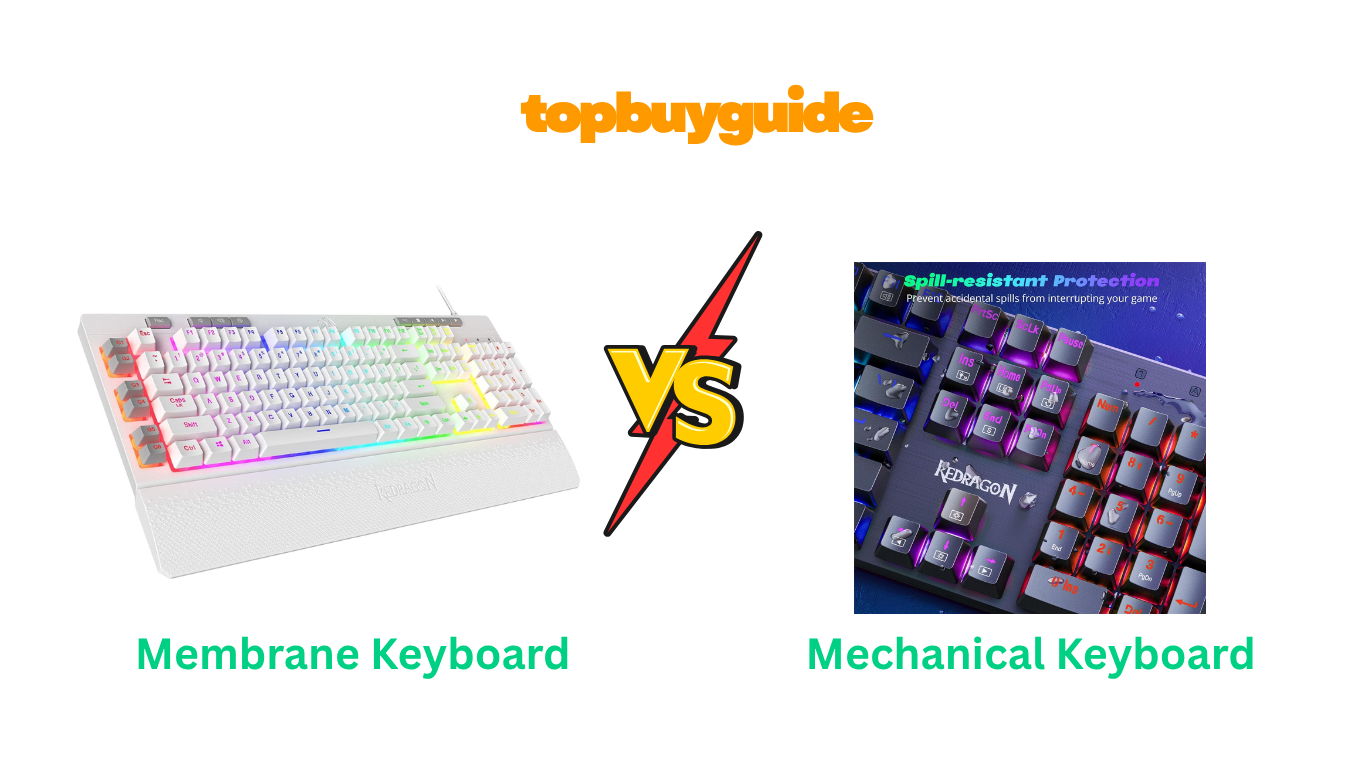
Choosing the right keyboard can transform your typing and gaming experience. While both membrane and mechanical keyboards get the job done, they offer vastly different features. For gamers and typists seeking superior performance and customization, I recommend a mechanical keyboard. The tactile feedback and durability are simply unmatched. Let’s dive into the details to see which is the right fit for you.
Why Do I Recommend The Redragon Mechanical Gaming Keyboard?
When comparing the Redragon K515 Shiva Membrane Keyboard and the Redragon K671 Mechanical Keyboard, the K671 stands out for its superior performance, durability, and customization, making it the clear winner for serious users.
- Hot-Swappable Mechanical Switches: The Redragon K671 features hot-swappable linear red switches. This means you can easily change the switches without soldering, allowing for complete customization of your typing feel. In contrast, the K515 uses fixed membrane switches, which cannot be customized or replaced, offering a less versatile experience.
- Superior Typing Feel: Mechanical switches, like the red switches in the K671, provide satisfying tactile feedback and faster response times. Each keypress is distinct and requires less force. The K515 membrane keyboard aims for a “mechanical feel” but ultimately provides a mushier, less precise typing experience common to membrane designs.
- Enhanced Durability: The Redragon K671 is built with double-shot PBT keycaps. This construction prevents the key legends from fading over time, ensuring a fresh look even after prolonged use. While the K515 also has durable keycaps, PBT is generally considered a more premium and long-lasting material than the standard ABS plastic often used.
- Full Key Anti-Ghosting: For gamers and fast typists, the K671 offers anti-ghosting across all keys. This ensures every single keypress is registered, no matter how many keys are pressed at once. The K515 membrane keyboard only offers anti-ghosting for 26 keys, which might lead to missed inputs during intense gaming sessions.
- Brighter, More Vibrant Backlighting: Customer reviews and product details indicate the K671 offers more vibrant and distinct RGB illumination. Although both have multiple modes, the mechanical design allows for brighter, clearer light to shine through the keycaps, creating a more immersive aesthetic. The K515’s lighting is divided into zones, offering less granular control.
- Ergonomic Design for Comfort: The K671 is designed with ergonomics in mind, promoting a more comfortable typing posture for long sessions. While the K515 includes a detachable wrist rest, the fundamental key travel and actuation of the K671 mechanical keyboard are generally less fatiguing.
Side By Side Comparison Chart: membrane keyboard vs mechanical
| Feature | Redragon K515 (Membrane) | Redragon K671 (Mechanical) |
| Switch Type | Membrane (Mechanical-Feel) | Hot-Swappable Mechanical (Red Switches) |
| Keycaps | Double-Shot Injection Molded | Double-Shot PBT |
| Anti-Ghosting | 26 Keys | Full Key (All Keys) |
| Programmable Keys | 4 On-board Macro Keys | Full Macro Editing Support via Software |
| Backlighting | RGB in zones, 7 preset modes | RGB, 11 preset modes |
| Customization | Limited to software macros | Hot-swappable switches, keycaps, software macros |
| Durability Test | 10 million keystrokes | Not specified, but PBT keycaps offer superior longevity |
| Wrist Rest | Detachable magnetic wrist rest | Not included |
What Common Features Can a membrane keyboard vs mechanical Keyboard Do?
Despite their internal differences, both the Redragon K515 membrane keyboard and the Redragon K671 mechanical keyboard share several features designed to enhance the user experience, particularly for gaming.
RGB Backlighting
Both keyboards come equipped with vibrant RGB backlighting. This feature allows you to customize the look of your setup, improve visibility in low-light conditions, and create an immersive gaming atmosphere. You can cycle through various preset lighting modes, adjust brightness levels, and control the speed of the lighting effects directly from the keyboard. This ensures that no matter which model you choose, you’ll have a visually appealing and personalized device.
Software Support
Redragon provides professional software for both the K515 and the K671. This software unlocks deeper customization options, allowing you to configure unique macros, remap keys, and fine-tune your backlighting effects. By using the software, you can tailor the keyboard’s performance to your specific workflow or gaming style, activating complex commands with a single click and creating a setup that is uniquely yours.
Multimedia Controls
Convenience is key, and both keyboards deliver with dedicated or integrated multimedia controls. The K515 has dedicated keys for playing, pausing, and skipping media, ensuring your gameplay or workflow is uninterrupted. Similarly, the K671 offers 12 multimedia key shortcuts accessible via the function key, giving you quick access to control volume, media playback, and other essential functions without leaving your current application.
Wired Connectivity
Both the Redragon K515 and the K671 use a standard wired USB connection. This provides a stable and lag-free connection, which is crucial for competitive gaming where every millisecond counts. You won’t have to worry about battery life or wireless interference, ensuring reliable performance whenever you need it.
Common Features of membrane keyboard vs mechanical
| Feature | Redragon K515 (Membrane) | Redragon K671 (Mechanical) |
| Brand | Redragon | Redragon |
| Connectivity | Wired USB | Wired USB |
| RGB Backlighting | Yes | Yes |
| Software Support | Yes | Yes |
| Multimedia Keys | Yes, Dedicated Keys | Yes, via FN shortcuts |
| Primary Use | Gaming | Gaming, Typing, Professional Use |
A Detailed Comparison Of the membrane keyboard vs mechanical
Typing Experience and Feel
The Redragon K515 is a membrane keyboard designed to simulate a mechanical feel. It uses a rubber dome under each key, which provides a soft and quiet keystroke. While this design is great for office environments where noise is a concern, it can feel “mushy” and less precise for fast typists or gamers. The actuation point is less distinct, meaning you have to press the key all the way down to register a command, which can lead to typing fatigue over time.
In contrast, the Redragon K671 is a true mechanical keyboard with linear red switches. These switches offer a smooth, consistent keystroke from top to bottom without a tactile bump. This allows for rapid, effortless key presses, making it ideal for fast-paced gaming and extended typing sessions. The feedback is immediate and satisfying, giving you a clear sense of when a key has been actuated. This responsiveness and tactile precision are the main reasons users prefer mechanical keyboards.
Customization and Modding
The Redragon K515 offers some customization through its software, allowing you to program its four dedicated macro keys. However, its physical customization is nonexistent. The membrane switches are built into the keyboard and cannot be changed. This means you are locked into the factory typing feel for the life of the product. While you can change the keycaps, the core experience remains the same.
The Redragon K671 shines in the area of customization. It is a hot-swappable keyboard, which is a massive advantage. This feature allows you to pull out the included red switches and replace them with any compatible 3-pin or 5-pin switches (e.g., tactile browns, clicky blues) without any soldering. This opens up a world of personalization, letting you fine-tune the keyboard’s feel to your exact preference. You can also easily replace the keycaps for a completely new look.
Durability and Lifespan
The Redragon K515 is rated for 10 million keystrokes and features double-shot injection molded keycaps, which ensures the letters on the keys won’t fade. While this is durable for a standard keyboard, it falls short of the lifespan typically offered by mechanical keyboards. The rubber domes in a membrane board can lose their springiness over time, leading to an inconsistent feel.
The Redragon K671 is built for longevity. Although a specific keystroke rating isn’t provided, mechanical switches are generally rated for 50 million or more keystrokes, making them significantly more durable. Furthermore, it uses double-shot PBT keycaps, a premium plastic that is more resistant to shine and wear than the ABS plastic on the K515. The ability to replace individual switches also means a single faulty key doesn’t render the entire keyboard useless.
Gaming Performance
The Redragon K515 is marketed as a gaming keyboard and includes features like 26-key anti-ghosting and programmable macro keys. This is sufficient for casual gaming, ensuring that most common key combinations in games will be registered correctly. However, in highly competitive, fast-paced games, the limitation of 26-key rollover could potentially lead to missed inputs.
For serious gamers, the Redragon K671 offers a clear advantage. It features full N-key rollover, meaning every key you press is registered, no matter how many are pressed simultaneously. This is critical in complex games that require many simultaneous inputs. The faster actuation and smooth travel of the linear red switches also provide a slight edge in reaction time, making it the superior choice for competitive gaming.
Conclusion
For budget-conscious users or those in a quiet office setting, the Redragon K515 Membrane Keyboard is a solid option. It offers a decent “mechanical-like” feel, useful macro keys, and a comfortable wrist rest at an affordable price of around $25.
However, for anyone serious about gaming, typing, or customization, the Redragon K671 Mechanical Keyboard is the superior choice. For just a few dollars more (priced around $30), its hot-swappable mechanical switches, full anti-ghosting, and more durable PBT keycaps provide a far better value and a significantly more premium experience that will last much longer.
FAQs
1. Is a mechanical keyboard better for gaming than a membrane keyboard?
Yes, mechanical keyboards are generally better for gaming. They offer faster response times, more precise actuation, and full-key anti-ghosting. This ensures every command is registered instantly, which is critical in competitive games. The Redragon K671, with its red switches, is a great example of an affordable gaming-focused mechanical keyboard.
2. Are membrane keyboards quieter than mechanical keyboards?
Typically, yes. Membrane keyboards, like the Redragon K515, use a soft rubber dome that muffles the sound of each keystroke, making them very quiet. Mechanical keyboards are louder, though the noise level varies by switch type. The red switches on the K671 are linear and among the quieter mechanical options.
3. What does “hot-swappable” mean on the Redragon K671?
“Hot-swappable” means you can change the mechanical switches on the keyboard without having to desolder them from the circuit board. This makes customization easy, allowing you to try different switch types (like clicky, tactile, or other linear switches) to find the perfect feel for your typing style.
4. Can I customize the RGB lighting on both keyboards?
Yes, both the Redragon K515 and K671 feature customizable RGB backlighting. You can change colors, effects, brightness, and speed. The K671 offers more preset modes (11 vs. 7), and its per-key lighting provides a more vibrant and uniform look compared to the K515’s zone-based lighting.
5. What is the main benefit of PBT keycaps on the Redragon K671?
PBT (polybutylene terephthalate) is a more durable and high-quality plastic than the standard ABS plastic used on many keyboards. PBT keycaps are resistant to the oils from your fingers, meaning they won’t develop a “shiny” look over time. They also have a slightly textured feel and are less prone to fading.
6. Are macro keys useful for non-gamers?
Absolutely! The programmable macro keys on the Redragon K515 and the software support for the K671 can be used to create shortcuts for repetitive tasks in any application. You can program them to open applications, paste common text snippets, or execute multi-step commands in software like Photoshop or Excel, boosting your productivity.
7. Which keyboard is more ergonomic?
The Redragon K515 comes with a detachable wrist rest, which provides support and can improve comfort. The Redragon K671 does not include a wrist rest but has an ergonomic design. Comfort is subjective, but the lighter actuation force of the K671’s mechanical switches may reduce finger fatigue during long typing sessions.
8. What is “anti-ghosting” and why does it matter?
Anti-ghosting, or N-key rollover, is a feature that allows a keyboard to correctly register multiple simultaneous key presses. The Redragon K671 has full N-key rollover, meaning you can press as many keys as you want at once. The K515 has 26-key rollover, which is good but could be a limitation in very complex, high-speed gaming scenarios.

Alex Turner is a dedicated product researcher and reviewer at TopBuyGuide.com, known for his clear, honest, and data-driven insights. He spends countless hours testing, comparing, and analyzing products to help readers make confident and informed buying decisions.