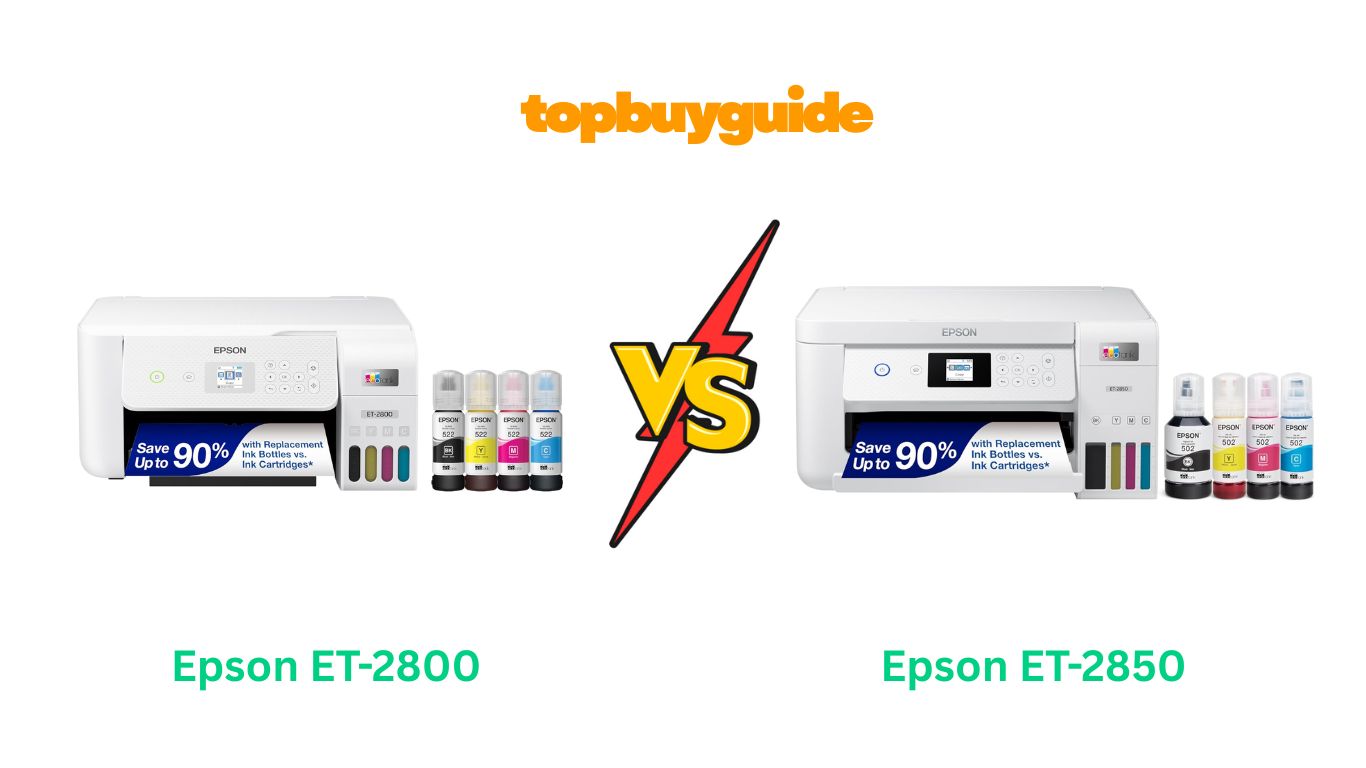
Choosing between the Epson ET-2800 and ET-2850 can feel overwhelming. Both offer the revolutionary EcoTank system with ultra-low printing costs. However, I recommend the Epson ET-2850 for most users. It features automatic duplex printing that saves time and paper, plus enhanced scanning capabilities at 1200×2400 dpi. While the ET-2800 costs less upfront, the ET-2850’s convenience features justify the small price difference for everyday users.
Why Do I Recommend The Epson ET-2850?
After extensive research and comparison, the ET-2850 stands out as the superior choice. Here’s why:
- Automatic Duplex Printing: The ET-2850 prints double-sided documents automatically, saving up to 40% on paper costs. In contrast, the ET-2800 requires manual paper flipping, which is time-consuming and error-prone.
- Superior Scanning Resolution: With hardware-level 1200×2400 dpi scanning, the ET-2850 captures fine details perfectly. The ET-2800’s 1200 dpi scanner produces blurrier images when enlarged.
- One-Click PDF Generation: The ET-2850 scans directly to PDF format with a single button press. Meanwhile, the ET-2800 requires manual file conversion, adding extra steps to your workflow.
- Faster Print Speed: The ET-2850 delivers 10.5 pages per minute in black, slightly outpacing the ET-2800’s 10 ppm.
- Enhanced Build Quality: Users consistently report the ET-2850 feels more durable with superior component quality. The ET-2800 has a basic plastic construction that feels less substantial.
- Ethernet Connectivity: The ET-2850 includes wired Ethernet alongside wireless options. This provides more stable connections for office environments compared to the ET-2800’s WiFi-only setup.
- Automatic Printhead Alignment: The ET-2850 maintains itself better with automatic alignment features. The ET-2800 requires more frequent manual maintenance interventions.
- Borderless Photo Printing: The ET-2850 excels at borderless printing for letter-sized documents. This feature works more seamlessly than the ET-2800’s borderless capabilities.
Side By Side Comparison Chart: Epson ET-2800 vs ET-2850
| Feature | Epson ET-2800 | Epson ET-2850 |
| Print Resolution | 5760 x 1440 dpi | 4800 x 1200 dpi |
| Scan Resolution | 1200 dpi | 1200 x 2400 dpi |
| Duplex Printing | Manual only | Automatic |
| Print Speed (Black) | 10 ppm | 10.5 ppm |
| Print Speed (Color) | 5 ppm | 5 ppm |
| Connectivity | WiFi, AirPrint, Wi-Fi Direct, Mopria | WiFi, AirPrint, Wi-Fi Direct, Mopria, Ethernet |
| Ink Tank Capacity | 127ml Black, 70ml CMY | 127ml Black, 70ml CMY |
| Black Page Yield | 4,500 pages | 7,500 pages |
| Color Page Yield | 7,500 pages | 6,000 pages |
| PDF Scanning | Manual conversion required | Direct PDF generation |
| Control Panel Size | Larger panel | Smaller panel (brand name above) |
| Ink Refill Method | Front-access without lifting top | Requires lifting printer top |
| Weight | 8.8 lb | Slightly heavier |
| Borderless Printing | Basic support | Enhanced letter-sized support |
| Price Range | Lower | Slightly higher (about 30% more) |
Features
Epson ET-2800
The ET-2800 represents Epson’s entry-level EcoTank offering. It delivers cartridge-free printing with refillable tanks holding 127ml of black ink and 70ml each of cyan, magenta, and yellow. The printer achieves impressive 5760 x 1440 dpi resolution, producing sharp text and detailed photos. Users can print 4,500 black pages and 7,500 color pages from included bottles. It features a 100-sheet paper tray supporting documents up to 8.5×14 inches. The 1.44-inch color LCD provides basic navigation, while WiFi connectivity enables wireless printing from smartphones and computers. The compact design suits small spaces, though the all-plastic construction feels basic.
Epson ET-2850
The ET-2850 builds upon the ET-2800’s foundation with meaningful upgrades. It prints at 4800 x 1200 dpi resolution with automatic duplex functionality, eliminating manual paper flipping. The enhanced scanner captures at 1200×2400 dpi, preserving fine details in contracts and documents. Users get 7,500 black pages and 6,000 color pages from starter bottles. The printer includes Ethernet connectivity alongside wireless options for stable network connections. Its one-button PDF scanning streamlines document archiving. The sleeker design incorporates higher-quality components for improved durability. The 1.44-inch color display matches the ET-2800, but the overall build quality feels more substantial.
What Common Epson ET-2800 vs ET-2850 Can Do?
EcoTank System Benefits
Both printers revolutionize home printing with Epson’s EcoTank technology. The refillable ink tanks eliminate expensive cartridges entirely. Each black bottle contains 127ml of pigment-based ink, while color bottles hold 70ml of dye-based ink. This design delivers up to 90% savings compared to traditional cartridge systems. The included ink equals approximately 80 individual cartridges, providing 1-2 years of typical family printing. Users simply pour ink directly into clearly marked tanks. The transparent tanks show remaining ink levels at a glance. Both models support genuine Epson T502 ink bottles for optimal performance and reliability.
All-in-One Functionality
Both printers combine printing, scanning, and copying in one compact device. The flatbed scanners accommodate documents up to A4 size. They handle various media types including plain paper, glossy photo paper, envelopes, and cardstock up to 300 g/m². The 100-sheet input tray reduces refilling frequency. Both feature dual feeding options with rear and front trays. Users can print borderless photos for professional-looking results. The heat-free Micro Piezo technology consumes less electricity than laser printers. Voice-activated printing works through Epson Smart Panel app integration. Both support mobile printing via AirPrint, Wi-Fi Direct, and Mopria standards.
Wireless Connectivity
Modern wireless features make both printers family-friendly. WiFi connectivity enables printing from anywhere in your home network. The Epson Smart Panel app provides remote control from smartphones and tablets. Users can print documents, photos, and web pages without cables. AirPrint compatibility allows seamless printing from iPhone, iPad, and Mac devices. Wi-Fi Direct creates peer-to-peer connections without requiring a router. Both printers support Mopria Print Service for Android devices. Cloud printing capabilities let you print from Google Drive, Dropbox, and other services. The setup process completes in approximately 30 minutes using the guided on-screen instructions.
Cost-Effective Operation
Both models deliver exceptional value through ultra-low running costs. The pigment black ink produces durable, smudge-resistant text on plain paper. Dye-based color inks create vibrant hues on coated paper. Replacement ink bottle sets cost around $51 and yield up to 13,500 pages combined. This translates to approximately 0.004 cents per black page and 0.008 cents per color page. The cartridge-free design eliminates waste heading to landfills. Both printers come with enough starter ink for thousands of pages. The initial investment pays off quickly for families printing 150+ pages monthly.
User-Friendly Design
Both printers prioritize ease of use. The 1.44-inch color LCD displays clear menus and instructions. Intuitive button layouts make operation straightforward. The control panels tilt for comfortable viewing whether sitting or standing. Simple icon-based navigation guides users through functions. Both support multiple paper sizes from 4×6 to legal. The transparent ink tanks prevent surprise empty-tank situations. First print-out times remain competitive for inkjet technology. Both printers operate quietly compared to laser alternatives. The compact footprints fit easily on home office desks.
Common Features of Epson ET-2800 vs ET-2850
| Feature | Epson ET-2800 | Epson ET-2850 |
| Printing Technology | Inkjet with Micro Piezo | Inkjet with Micro Piezo |
| EcoTank System | 4 built-in refillable tanks | 4 built-in refillable tanks |
| Ink Type | Pigment black, dye CMY | Pigment black, dye CMY |
| Compatible Ink | Epson T502 bottles | Epson T502 bottles |
| Paper Capacity | 100 sheets | 100 sheets |
| Maximum Paper Size | 8.5″ x 14″ | 8.5″ x 14″ |
| Display | 1.44″ color LCD | 1.44″ color LCD |
| WiFi Connectivity | Yes | Yes |
| AirPrint Support | Yes | Yes |
| Wi-Fi Direct | Yes | Yes |
| Mopria Printing | Yes | Yes |
| Voice-Activated | Yes (via Smart Panel) | Yes (via Smart Panel) |
| Cloud Printing | Yes | Yes |
| Copy Function | Yes | Yes |
| Scan Function | Flatbed | Flatbed |
| Media Support | Paper, photo paper, envelopes, cardstock | Paper, photo paper, envelopes, cardstock |
| Dual Paper Trays | Rear and front feeding | Rear and front feeding |
| Setup Time | ~30 minutes | ~30 minutes |
| Control Panel | Tilting design | Tilting design |
| Environmental Benefit | Reduces cartridge waste | Reduces cartridge waste |
| Replacement Ink Cost | ~$51 per set | ~$51 per set |
A Detailed Comparison Of the Epson ET-2800 vs ET-2850
Print Resolution
The ET-2800 achieves maximum 5760 x 1440 dpi resolution, delivering exceptionally sharp text edges and detailed photo reproduction. This higher resolution produces finer gradations in images and crisper small fonts. The ET-2850 prints at 4800 x 1200 dpi, which remains excellent for everyday documents. Despite lower specifications, many users report the ET-2850’s actual print quality matches or exceeds the ET-2800 due to superior ink formulation and processing.
Duplex Printing Capability
The ET-2800 supports only manual duplex printing, requiring users to flip paper stacks manually. This process proves time-consuming and frequently causes errors with misaligned pages or paper jams. The ET-2850 includes automatic duplex printing that handles double-sided documents effortlessly. The printer automatically feeds, prints, flips, and reprints pages without intervention. This feature saves approximately 40% on paper costs and proves invaluable for multi-page reports.
Scanning Resolution
The ET-2800’s scanner operates at 1200 dpi, adequate for basic document scanning but producing blurry details when images are enlarged. Text remains legible but lacks sharpness in reproductions. The ET-2850 features hardware-level 1200×2400 dpi scanning, capturing fine details like small contract print with exceptional clarity. The enhanced vertical resolution preserves text crispness and image details. This improvement matters significantly for archiving important documents professionally.
PDF Scanning Functionality
The ET-2800 requires manual file conversion processes after scanning. Users must scan to image format first, then use separate software to convert to PDF. This adds steps and complexity to document workflows. The ET-2850 generates PDF files directly with one-button scanning. The printer processes and saves documents in universally compatible PDF format instantly. This streamlined workflow saves considerable time when digitizing multi-page documents or creating searchable archives.
Print Speed Performance
The ET-2800 produces 10 pages per minute for black documents and 5 ppm for color prints. These speeds suffice for occasional home printing needs. The ET-2850 delivers slightly faster 10.5 ppm black printing while maintaining 5 ppm color speed. The difference appears minimal on paper but compounds over high-volume printing sessions. The ET-2850’s automatic duplex adds time versus simplex printing but eliminates manual paper handling.
Connectivity Options
The ET-2800 offers WiFi, AirPrint, Wi-Fi Direct, and Mopria connectivity for wireless printing convenience. This suite handles most home networking scenarios adequately. The ET-2850 adds Ethernet connectivity for wired network connections. The physical network port provides more stable connections in office environments with heavy wireless traffic. This additional option gives users flexibility to choose optimal connection methods for their specific situations.
Build Quality and Durability
The ET-2800 features all-plastic construction that feels basic and lightweight. The materials work fine but lack premium feel. The ET-2850 incorporates higher-quality components and more substantial construction. Users consistently report the ET-2850 feels more durable and robust. The improved build quality suggests longer operational lifespan. The slightly higher price reflects these quality improvements in materials and assembly.
Ink Tank Capacity and Yield
The ET-2800 comes with ink producing 4,500 black pages and 7,500 color pages from starter bottles. The color yield exceeds black output surprisingly. The ET-2850 reverses this ratio with 7,500 black pages and 6,000 color pages. The increased black yield better matches typical document-heavy printing patterns. Both use identical 127ml black and 70ml color bottles. The yield differences likely stem from improved efficiency rather than capacity changes.
Ink Refilling Process
The ET-2800 allows convenient ink refilling without lifting the printer’s top cover. The tank access door opens backward toward the user for easy bottle insertion. This front-loading design proves convenient in tight spaces. The ET-2850 requires lifting the entire top section to access ink tanks. The tank cover pulls forward toward the printer front. While this adds a step, the design provides better access for thorough cleaning.
Control Panel Design
The ET-2800 features a slightly larger control panel with the Epson brand name printed directly on it. The button layout provides adequate spacing. The ET-2850 has a smaller panel because the brand name appears above rather than within the control area. Both panels tilt for comfortable viewing angles. The functional differences remain minimal, with both offering intuitive navigation through menus.
Borderless Printing Capability
The ET-2800 supports basic borderless printing for photos and documents. The feature works but with some limitations on paper sizes. The ET-2850 excels at borderless printing, particularly for letter-sized and smaller documents. The improved borderless capabilities produce more professional-looking photo prints. The edge-to-edge printing eliminates white margins automatically for stunning visual presentations.
Maintenance Requirements
The ET-2800 requires manual printhead alignment and regular maintenance interventions. Users must perform cleaning cycles and adjustments periodically. The ET-2850 features automatic printhead alignment technology that maintains optimal performance with minimal user intervention. The self-maintenance capabilities reduce the frequency of manual cleaning procedures. This automation proves especially valuable for non-technical users.
Price and Value
The ET-2800 carries a lower initial purchase price, making it budget-friendly. The savings appeal to cost-conscious buyers. The ET-2850 costs approximately 30% more but includes significant feature upgrades. The automatic duplex alone justifies the price difference for regular users. Long-term value calculations favor the ET-2850 due to paper savings and reduced maintenance needs.
Suitability for Different Users
The ET-2800 works well for casual home users with basic printing needs. Students and light-duty users appreciate the lower entry cost. The ET-2850 better serves families, home offices, and small businesses requiring frequent printing. The automatic duplex and enhanced scanning justify choosing the ET-2850 for professional document handling. Power users and those printing over 150 pages monthly benefit most from the ET-2850’s advanced features.
Conclusion
After comparing specifications, features, and real-world performance, the Epson ET-2850 emerges as the clear winner for most users. Its automatic duplex printing saves hours of manual work while cutting paper costs by 40%. The superior 1200×2400 dpi scanner preserves document details perfectly. One-click PDF generation streamlines digital workflows significantly. While the ET-2800 costs less initially, the ET-2850’s convenience features and better build quality justify the small price premium. Choose the ET-2850 for hassle-free, professional-quality printing that saves time and money long-term.
FAQs
Q: What is the main difference between ET-2800 and ET-2850?
The primary difference is automatic duplex printing. The ET-2850 prints double-sided documents automatically, while the ET-2800 requires manual paper flipping. The ET-2850 also features enhanced scanning resolution at 1200×2400 dpi compared to the ET-2800’s 1200 dpi.
Q: Which printer has better print quality?
The ET-2800 has higher print resolution at 5760 x 1440 dpi versus the ET-2850’s 4800 x 1200 dpi. However, real-world testing shows the ET-2850 often produces better color accuracy and overall print quality due to improved ink formulation and processing technology.
Q: How long does the included ink last?
The ET-2800 yields 4,500 black pages and 7,500 color pages. The ET-2850 produces 7,500 black pages and 6,000 color pages. Based on typical monthly printing of 150 pages, both provide 1-2 years of ink before requiring refills.
Q: Can both printers handle photo printing?
Yes, both print photos on glossy paper up to 8.5×14 inches. The ET-2850 offers enhanced borderless printing capabilities. However, neither excels at professional photo printing compared to dedicated photo printers. They work well for casual family photos and basic graphics.
Q: Is the ET-2850 worth the extra cost?
For users printing regularly or needing double-sided documents, the ET-2850 justifies its 30% higher price. The automatic duplex saves significant time and paper costs. The improved scanning and PDF features add professional capabilities. Budget-conscious users with minimal printing needs may find the ET-2800 sufficient.
Q: Do both printers work with Mac and iPhone?
Yes, both support AirPrint for seamless printing from Mac, iPhone, and iPad devices. They also work with Windows computers, Android devices, and tablets through WiFi connectivity. The Epson Smart Panel app provides additional functionality across all platforms.
Q: How difficult is the setup process?
Both printers feature straightforward setup taking approximately 30 minutes. Users connect power, load paper, and follow on-screen instructions. The Epson Smart Panel app simplifies WiFi configuration from smartphones. Filling the initial ink tanks takes about 10 minutes.
Q: What are the ongoing ink costs?
Replacement ink bottle sets cost approximately $51 and yield up to 13,500 pages total. This translates to roughly 0.004 cents per black page and 0.008 cents per color page. Both printers deliver identical long-term ink costs, making them among the most economical printers available.

Alex Turner is a dedicated product researcher and reviewer at TopBuyGuide.com, known for his clear, honest, and data-driven insights. He spends countless hours testing, comparing, and analyzing products to help readers make confident and informed buying decisions.