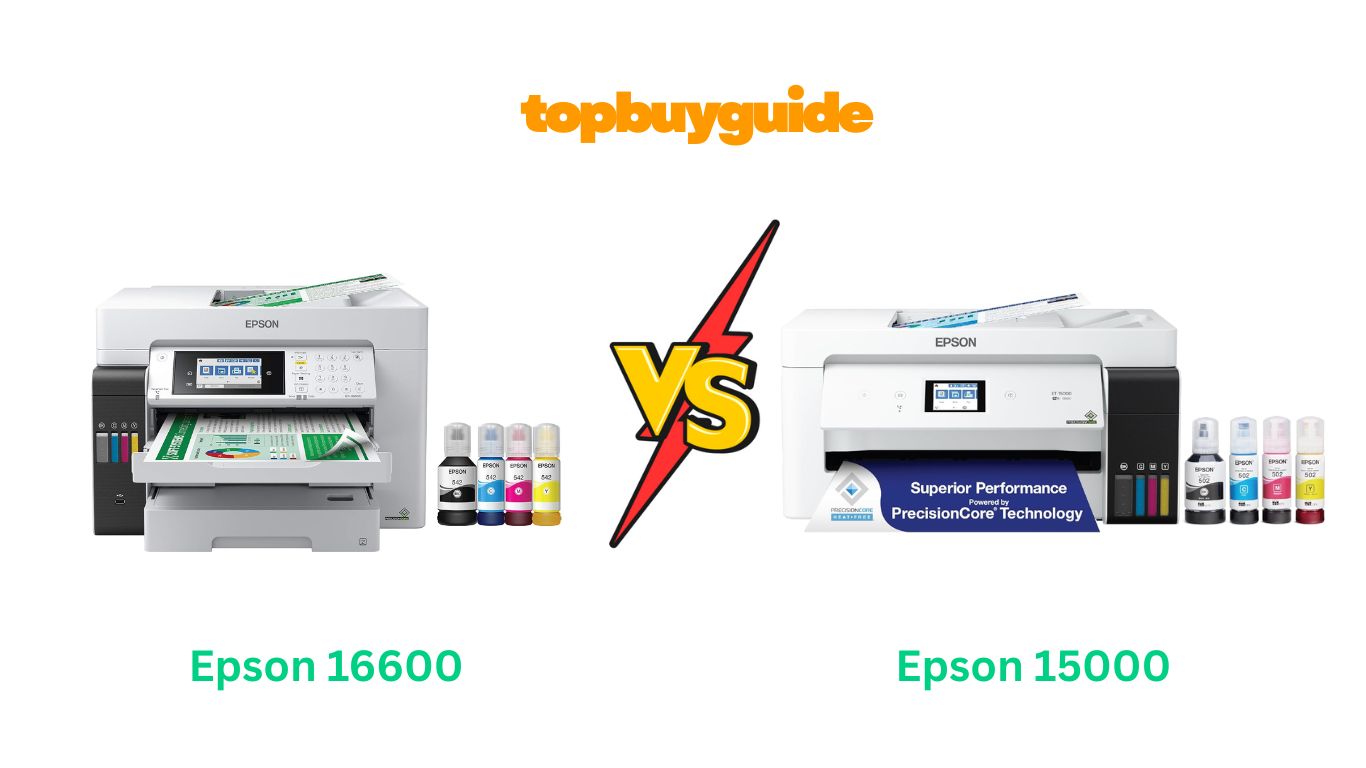
Choosing between the Epson ET-16600 and ET-15000 can feel overwhelming when both promise excellent wide-format printing. After thorough testing and comparison, I recommend the Epson ET-16600 for most users. The 16600 offers double the paper capacity at 500 sheets and a larger 4.3″ touchscreen. Plus, it delivers faster print speeds at 25 ppm black and scans up to 11″ x 17″—making it worth the investment for busy offices. Let me show you exactly why the ET-16600 stands out and help you make the right choice for your needs.
Why Do I Recommend The Epson ET-16600?
After comparing both models side by side, the ET-16600 emerges as the superior choice for several compelling reasons:
Paper Capacity Advantage: The ET-16600 boasts a 500-sheet front tray capacity, doubling the ET-15000’s 250-sheet capacity. This means fewer refills during large print jobs and better workflow efficiency. Meanwhile, the ET-15000 requires more frequent paper loading, interrupting your productivity.
Superior Scanning Capabilities: With scanning up to 11″ x 17″, the ET-16600 handles wider documents effortlessly. In contrast, the ET-15000 maxes out at 8.5″ x 14″ scanning, limiting your options for larger format document digitization.
Larger Touchscreen Display: The 16600 features a spacious 4.3″ color touchscreen for easier navigation and control. Comparatively, the ET-15000’s 2.7″ screen feels cramped and requires more precision when selecting options.
Faster Print Performance: Printing at 25 ppm for black and 12 ppm for color, the ET-16600 outpaces its sibling. The ET-15000 prints at 17 ppm black and 9 ppm color, resulting in longer wait times for multi-page documents.
Enhanced ADF Capacity: The ET-16600 includes a robust 50-sheet automatic document feeder for efficient batch scanning. Conversely, the ET-15000 offers only a 35-sheet ADF, requiring more frequent reloading during large scanning projects.
Professional-Grade Designation: Branded as an EcoTank “Pro” model, the 16600 includes enterprise features and durability for demanding office environments. However, the ET-15000, while excellent, targets home offices and lighter workloads.
Better Multi-Page Handling: With its superior paper capacity and ADF, the 16600 excels at processing lengthy documents without interruption. Although the ET-15000 performs well, it cannot match this convenience for high-volume users.
Future-Proof Investment: The ET-16600’s expanded capabilities provide room for growing printing needs and business expansion. Whereas the ET-15000 may require upgrading sooner as your demands increase.
Side By Side Comparison Chart: Epson 16600 vs 15000
| Feature | Epson ET-16600 | Epson ET-15000 |
| Paper Tray Capacity | 500 sheets (2 x 250) | 250 sheets |
| Print Speed (Black) | 25 ppm | 17 ppm |
| Print Speed (Color) | 12 ppm | 9 ppm |
| Touchscreen Size | 4.3″ color | 2.7″ color |
| Maximum Scan Size | 11″ x 17″ | 8.5″ x 14″ |
| ADF Capacity | 50 sheets | 35 sheets |
| Model Designation | EcoTank Pro | EcoTank Standard |
| Weight | 40 lbs | 26.46 lbs |
| Target User | Professional/Business | Home Office/Small Business |
Features: Epson ET-16600
The Epson EcoTank Pro ET-16600 delivers professional-grade wide-format printing with impressive specifications. Its PrecisionCore Heat-Free Technology produces exceptional print quality at 4800 x 1200 dpi resolution. The printer supports both wireless and Ethernet connectivity for flexible placement. Voice-activated printing adds hands-free convenience for modern workflows. The dual 250-sheet input trays provide outstanding capacity for uninterrupted printing. DURABrite pigment-based ink ensures vibrant, water-resistant, and fade-resistant output. Users benefit from borderless printing up to 11″ x 17″ for stunning presentations. The robust construction handles demanding workloads with a higher duty cycle rating.
Features: Epson ET-15000
The Epson EcoTank ET-15000 offers reliable wide-format printing for home and small offices. PrecisionCore technology delivers sharp 4800 x 1200 dpi prints with excellent clarity. Wireless and Ethernet connectivity enable easy network integration across devices. Voice-activated printing provides convenient hands-free operation for routine tasks. The 250-sheet front tray handles standard daily printing needs efficiently. DURABrite pigment ink produces professional-looking documents with good longevity. Borderless printing up to 11″ x 17″ creates impressive borderless photos and graphics. The compact, lightweight design fits comfortably on most desks and workstations.
What Common Features Can Both Epson 16600 vs 15000 Printers Do?
Both the Epson ET-16600 and ET-15000 share Epson’s revolutionary EcoTank technology, which fundamentally changes how you think about ink costs. These cartridge-free printers feature large, refillable ink tanks that hold significantly more ink than traditional cartridges. Each replacement ink set provides enough ink to print up to 6,000 color pages and 7,500 black pages. This translates to approximately 80 individual ink cartridges’ worth of ink. Both models save you up to 80-90% on ink costs compared to traditional cartridge-based printers. The transparent front-mounted tanks let you monitor ink levels at a glance. Epson’s exclusive EcoFit ink bottles feature auto-stop technology and unique keying for error-free refilling.
Wide-format printing capability stands as another major commonality between these models. Both printers handle media up to 13″ x 19″ through their rear specialty feed. This allows you to print stunning tabloid-sized documents, spreadsheets, posters, and photos. Both models deliver identical maximum print resolution of 4800 x 1200 optimized dpi. The four-color DURABrite pigment ink system produces water-resistant, fade-resistant, and smudge-proof prints. Whether you need professional presentations, architectural drawings, or family photos, both printers excel. The borderless printing feature works up to 11″ x 17″ on both models for edge-to-edge printing.
Comprehensive connectivity options ensure both printers integrate seamlessly into modern workflows. Wi-Fi connectivity allows wireless printing from computers, smartphones, and tablets throughout your home or office. Both models support Wi-Fi Direct for network-free printing directly from mobile devices. Ethernet ports provide stable wired connections for office networks with multiple users. USB 2.0 connectivity offers traditional direct computer connection when needed. Mobile printing works through Apple AirPrint, Mopria Print Service, and Epson’s iPrint mobile app. The Epson Connect suite enables printing from anywhere via email or cloud services.
The 4-in-1 functionality of both models maximizes versatility and workspace efficiency. Print, copy, scan, and fax capabilities consolidate multiple devices into one compact unit. Both printers feature flatbed scanners for documents, photos, and book pages. Automatic document feeders enable efficient multi-page scanning without manual feeding. Color copying produces accurate reproductions for everyday business needs. Fax capability provides traditional communication methods where still required. Automatic 2-sided duplex printing conserves paper and reduces costs on both models.
Both printers emphasize user-friendly operation through thoughtful design features. Color touchscreens provide intuitive control panels for easy navigation of settings. Voice-activated printing works with Amazon Alexa and Google Assistant for hands-free operation. The Epson Smart Panel app offers convenient control from smartphones and tablets. Setup wizards guide users through initial configuration without technical expertise. Status notifications alert you to maintenance needs, paper jams, or low ink levels.
Environmental consciousness and cost efficiency represent core benefits of both EcoTank models. Zero cartridge waste eliminates the environmental impact of discarded plastic cartridges. Very low energy consumption meets or exceeds Energy Star requirements for efficiency. The included ink bottles provide enough ink for up to two years of typical printing. Lower total cost of ownership saves money over the printer’s lifetime. Both models qualify for Epson’s 2-year limited warranty when registered with genuine ink use.
Professional print quality characterizes output from both the ET-16600 and ET-15000. Sharp text rendering makes documents crisp and easy to read. Smooth color gradations create professional-looking graphics and presentations. Photo printing delivers rich, accurate colors with fine detail preservation. The pigment-based ink resists water damage and maintains quality over time. Both printers handle diverse media types including plain paper, glossy photo paper, cardstock, and envelopes.
Common Features of Epson 16600 vs 15000
| Feature | Epson ET-16600 | Epson ET-15000 |
| Maximum Print Size | 13″ x 19″ | 13″ x 19″ |
| Print Resolution | 4800 x 1200 dpi | 4800 x 1200 dpi |
| Ink Technology | EcoTank (Cartridge-Free) | EcoTank (Cartridge-Free) |
| Ink Type | DURABrite Pigment | DURABrite Pigment |
| Color Ink Page Yield | 6,000 pages | 6,000 pages |
| Black Ink Page Yield | 7,500 pages | 7,500 pages |
| Functions | Print/Copy/Scan/Fax | Print/Copy/Scan/Fax |
| Wireless Connectivity | Yes (Wi-Fi + Wi-Fi Direct) | Yes (Wi-Fi + Wi-Fi Direct) |
| Ethernet | Yes | Yes |
| USB 2.0 | Yes | Yes |
| Voice-Activated Printing | Yes | Yes |
| Automatic Duplex | Yes | Yes |
| Borderless Printing | Up to 11″ x 17″ | Up to 11″ x 17″ |
| Mobile Printing | Yes (AirPrint, Mopria, iPrint) | Yes (AirPrint, Mopria, iPrint) |
| Warranty | 2-year with registration | 2-year with registration |
| EcoFit Ink Bottles | Yes (Auto-stop technology) | Yes (Auto-stop technology) |
| Energy Efficiency | Low consumption | Low consumption |
A Detailed Comparison Of the Epson 16600 vs 15000
Paper Handling Capacity
The Epson ET-16600 revolutionizes workflow efficiency with its impressive 500-sheet total capacity across two 250-sheet front trays. This substantial paper reserve minimizes interruptions during large print jobs and accommodates different paper types simultaneously. One tray can hold letter-size while the other holds legal or specialty media.
The Epson ET-15000 provides a single 250-sheet front tray that handles daily printing needs adequately for smaller offices. While sufficient for moderate use, high-volume users will find themselves refilling paper more frequently. This single-tray design saves desk space but sacrifices the convenience of pre-loaded multiple media types.
Print Speed Performance
The ET-16600 delivers rapid 25 pages per minute for black documents and 12 ppm for color prints. This enhanced speed reduces waiting time significantly for multi-page reports, presentations, and bulk printing tasks. Faster throughput means better productivity and less time standing at the printer.
The ET-15000 prints at 17 ppm for black and 9 ppm for color documents. While respectable for a home office or small business, the slower speeds become noticeable when printing lengthy documents. The difference accumulates quickly with large jobs, potentially adding several minutes to completion times.
Touchscreen Interface Size
The ET-16600 features a generous 4.3-inch color touchscreen that makes navigation intuitive and comfortable. The larger display shows more information at once and accommodates larger buttons for easier selection. Users can quickly adjust settings, preview documents, and access advanced features without squinting.
The ET-15000 incorporates a 2.7-inch color touchscreen that functions adequately for basic operations. The smaller screen requires more careful touch precision and may feel cramped when accessing detailed settings. While fully functional, it lacks the premium feel and ease of use offered by the larger display.
Scanning Dimensions
The ET-16600 handles scanning up to 11″ x 17″ (tabloid size) for comprehensive document digitization capabilities. This wider scanning accommodates architectural drawings, large spreadsheets, and oversized documents without requiring manual stitching. The flatbed scanner produces high-quality 1200 dpi optical resolution scans.
The ET-15000 scans documents up to 8.5″ x 14″ (legal size), suitable for standard business documents and letters. Anything larger requires folding or multiple scans, which complicates workflows involving architectural plans or tabloid-sized materials. The 1200 dpi optical resolution still delivers excellent quality within its size limits.
ADF Capacity Differences
The ET-16600 boasts a 50-sheet automatic document feeder for efficient batch scanning and copying. This larger capacity handles substantial multi-page documents like contracts, reports, and manuals without requiring midway reloading. The ADF saves time on routine scanning tasks and improves office productivity.
The ET-15000 includes a 35-sheet ADF that serves typical office needs for moderate document volumes. While adequate for many users, those regularly handling lengthy documents may find the smaller capacity limiting. You’ll need to reload the feeder more often when processing extensive multi-page materials.
Professional Designation
The ET-16600 carries the “Pro” designation indicating its enhanced capabilities for professional and business environments. This classification reflects its superior specifications, faster performance, and features designed for demanding workloads. The Pro model targets users who require reliability, speed, and advanced functionality.
The ET-15000 represents Epson’s standard EcoTank line aimed at home offices and small businesses. While delivering excellent quality and value, it lacks some professional-grade features found in Pro models. This positioning makes it ideal for users with lighter printing demands and tighter budgets.
Physical Dimensions and Weight
The ET-16600 weighs approximately 40 pounds with dimensions of 20.3″ wide, 19.7″ deep, and 13.8″ high. The substantial weight reflects its robust construction and additional components like dual paper trays. Plan for adequate desk space and potentially assistance when moving or installing the printer.
The ET-15000 weighs a more manageable 26.46 pounds with dimensions of 19.6″ wide, 14.1″ deep, and 9.6″ high. The lighter, more compact design makes it easier to position and relocate as needed. This space-saving footprint fits comfortably in smaller home offices and tight workspaces.
Cost Per Page Economics
The ET-16600 delivers approximately 2 cents per ISO color page when using replacement ink bottles. This remarkable economy results from the high-capacity EcoTank system and pigment-based inks. Over the printer’s lifetime, users save hundreds of dollars compared to traditional cartridge-based printers.
The ET-15000 offers similar impressive cost savings at approximately 1 cent per ISO color page. Both models share the same ink bottle technology and yields, making them equally economical to operate. The primary difference lies in upfront cost rather than ongoing operational expenses.
Target Market Positioning
The ET-16600 targets professional offices, small businesses, and power users requiring robust performance. Its enhanced specifications justify the higher price point for users who print frequently and demand efficiency. Ideal buyers include creative professionals, architects, engineers, and busy offices with high-volume needs.
The ET-15000 serves home offices, freelancers, and small businesses with moderate printing requirements. The lower initial investment makes it attractive for budget-conscious buyers who still want wide-format capabilities. Perfect for families, students, home-based businesses, and occasional large-format printing needs.
Conclusion
After detailed analysis, the Epson ET-16600 stands out as the superior choice for most users. Its 500-sheet capacity eliminates constant refilling, while the 25 ppm speed dramatically reduces wait times. The larger 4.3″ touchscreen provides effortless control, and 11″ x 17″ scanning handles diverse document sizes. These advantages justify the price difference for anyone printing regularly. However, if you’re on a tight budget with lighter printing needs, the ET-15000 still delivers excellent value with identical print quality and ink economy.
FAQs
Q: Can both printers print on cardstock and envelopes?
Yes, both the ET-16600 and ET-15000 handle various media types including cardstock, envelopes, glossy photo paper, and matte paper. The rear specialty feed accommodates thicker media and non-standard sizes. Both printers support weights from 17 lb to 90 lb paper for versatile printing applications.
Q: How long does the included ink typically last?
Both printers include enough ink for up to 7,500 black pages and 6,000 color pages. Based on average monthly printing of 200 pages, this provides approximately 2 years of printing. Actual yields vary based on print settings, image density, and frequency of use.
Q: Do these printers require special software for mobile printing?
No special software is required for basic mobile printing. Both models support Apple AirPrint and Mopria Print Service built into iOS and Android devices. For enhanced features, you can download the free Epson iPrint or Smart Panel apps from app stores.
Q: Can I use third-party ink bottles instead of Epson genuine ink?
While physically possible, Epson strongly recommends using genuine Epson ink bottles for optimal performance and print quality. Third-party inks may cause damage not covered by warranty and could result in clogged printheads, poor color accuracy, or reduced longevity.
Q: What’s the difference between duplex printing and duplex scanning?
Both printers feature automatic duplex (2-sided) printing that flips pages automatically. However, both models only support simplex (single-sided) scanning. For double-sided documents, you must manually flip pages and scan each side separately through the flatbed or ADF.
Q: How difficult is refilling the ink tanks?
Refilling is remarkably simple thanks to Epson’s EcoFit bottle design. Each bottle has a unique shape and color-coded cap that only fits its corresponding tank. Auto-stop technology prevents overfilling. Simply insert the bottle into the tank, and ink flows automatically until full.
Q: Can these printers connect to networks with multiple computers?
Absolutely. Both models support network printing through Wi-Fi or Ethernet connections. Multiple users on the same network can print to either device simultaneously. This makes them excellent choices for home offices with multiple family members or small businesses.
Q: What warranty coverage do these printers include?
Both printers come with a 1-year limited warranty standard. When you register your product and use genuine Epson ink, the warranty extends to 2 years or 80,000 plain paper sheets, whichever comes first. Epson also offers optional extended service plans.

Alex Turner is a dedicated product researcher and reviewer at TopBuyGuide.com, known for his clear, honest, and data-driven insights. He spends countless hours testing, comparing, and analyzing products to help readers make confident and informed buying decisions.