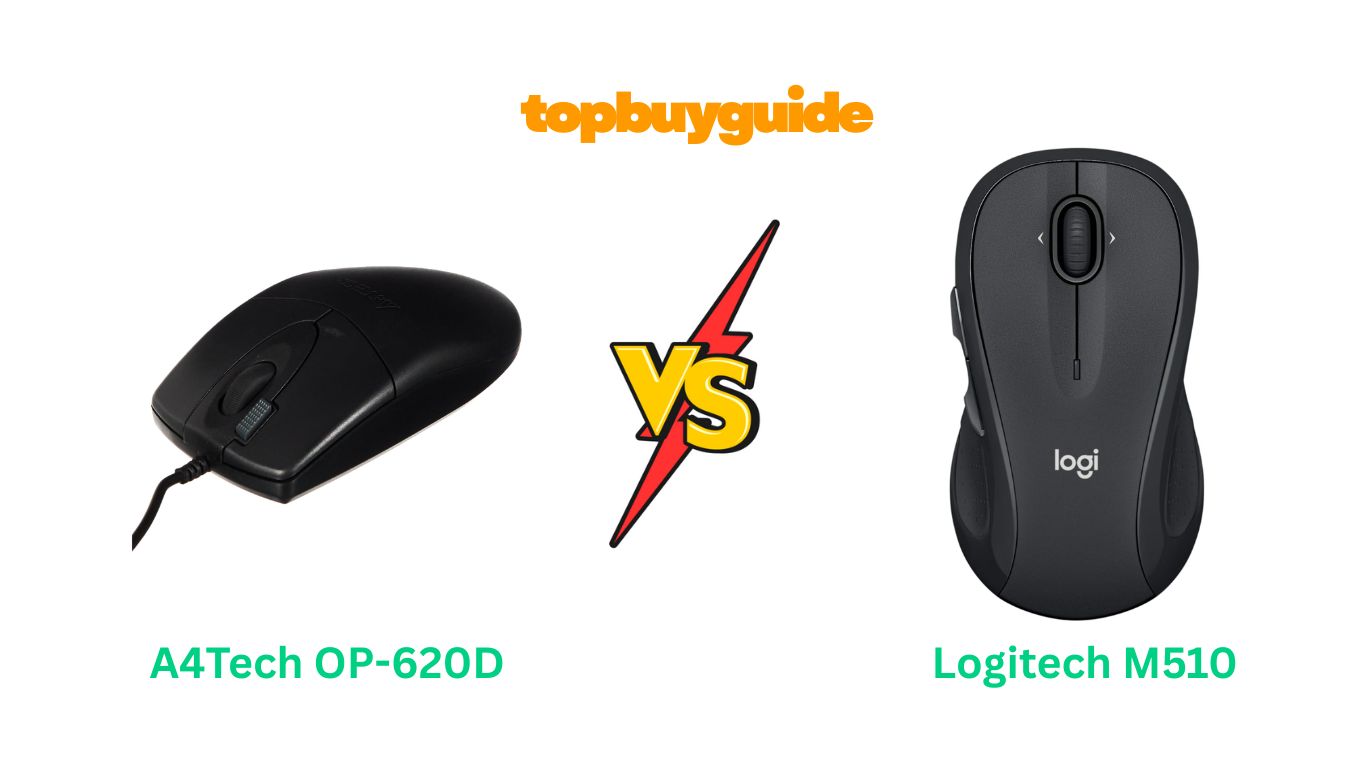
Choosing the right mouse can be a game-changer for your daily productivity. While both A4Tech and Logitech offer compelling options, I recommend the Logitech M510 Wireless Mouse for its superior ergonomic design and wireless freedom. It delivers comfort and convenience that’s hard to beat. But is it the right choice for everyone? Let’s dive into the details to find out which mouse truly deserves a spot on your desk.
Why Do I Recommend The Logitech M510?
When comparing these two mice, the Logitech M510 stands out for its blend of modern features, comfort, and long-term value, making it a superior choice for most users.
- Wireless Freedom: The most significant advantage of the Logitech M510 is its wireless connectivity. It connects via a tiny USB Unifying receiver, eliminating cable clutter and giving you the freedom to work from anywhere. In contrast, the A4Tech OP-620D is a wired mouse, which tethers you to your computer and can sometimes get in the way.
- Ergonomic Design for Comfort: The Logitech M510 is built for all-day comfort. It features a contoured shape with soft rubber grips and a broad palm area. This ergonomic design reduces hand strain during long work sessions. While the A4Tech OP-620D is functional, it has a more basic, ambidextrous shape that may not offer the same level of comfort for extended use.
- Enhanced Navigation Controls: Logitech’s M510 comes with programmable Back/Forward buttons and side-to-side scrolling. These features allow you to navigate through documents and web pages much faster. The A4Tech OP-620D offers a unique “2x Click” button, which opens files with a single click, but it lacks the comprehensive navigation controls of the M510.
- Long Battery Life: The Logitech M510 boasts an impressive battery life of up to 2 years, powered by two AA batteries. It also features a smart sleep mode and an on/off switch to conserve power, meaning you’ll rarely have to think about changing batteries. As a wired mouse, the A4Tech OP-620D doesn’t require batteries, but this comes at the cost of mobility.
- Brand Reputation and Software Support: Logitech is a globally recognized leader in computer peripherals, known for quality and durability. The M510 is supported by Logitech Options software, allowing you to customize buttons for a personalized workflow. A4Tech, while reliable, doesn’t have the same level of brand recognition or advanced software support in the mainstream market.
- Unifying Receiver Technology: The Logitech Unifying receiver is a standout feature. This single, tiny receiver can connect up to six compatible Logitech devices, such as a keyboard, saving precious USB ports. The A4Tech OP-620D, being a wired device, occupies a USB port on its own.
Side By Side Comparison Chart: A4Tech vs Logitech
| Feature | A4Tech OP-620D | Logitech M510 |
| Connectivity | Wired (USB) | Wireless (USB Unifying Receiver) |
| Power Source | USB Cable | 2 AA Batteries |
| Battery Life | N/A | Up to 24 months |
| Ergonomics | Basic, Ambidextrous | Contoured, Right-Handed |
| Buttons | 3 + 2x Click Button | 5 + Side-to-Side Scrolling |
| Programmable Buttons | No | Yes (via Logitech Options software) |
| Special Features | 2x Click, TutorPen | Unifying Receiver, Soft Rubber Grips |
| Price | ~$15.99 | ~$27.99 |
| Dimensions (LxWxH) | 23.62 x 23.62 x 33.46 inches (Likely incorrect on listing) | 5.16 x 2.83 x 1.81 inches |
| Weight | 3.2 ounces | 4.5 ounces (with batteries) |
| Sensor | V-Track Optical | Advanced Optical |
What Common A4Tech vs Logitech Mice Can Do?
Despite their differences, both the A4Tech OP-620D and the Logitech M510 share some fundamental qualities that make them reliable tools for any computer user. They are designed to provide precise and smooth cursor control, ensuring that your movements are accurately translated on-screen. This precision is essential for everything from navigating spreadsheets to editing photos.
Both mice are built with durability in mind. Users of both brands often report that the devices last for years, handling the clicks and scrolls of daily use without issue. They are also designed for plug-and-play simplicity. Whether it’s the wired USB connection of the A4Tech or the wireless receiver of the Logitech, you can expect them to work right out of the box with major operating systems like Windows and macOS without needing complex driver installations.
Common Features of A4Tech vs Logitech
| Feature | A4Tech OP-620D | Logitech M510 |
| Movement Detection | Optical | Optical |
| Scroll Wheel | Yes | Yes |
| Plug-and-Play | Yes | Yes |
| OS Compatibility | Windows, Mac, Linux | Windows, Mac, ChromeOS, Linux |
| Core Functionality | Point, Click, Scroll | Point, Click, Scroll |
A Detailed Comparison Of the A4Tech vs Logitech
Connectivity
The A4Tech OP-620D connects to your computer via a standard USB cable. This wired connection provides a constant power source and a stable, lag-free connection, which some users prefer for its reliability. You never have to worry about batteries dying or signal interference. The downside is the cable itself, which can create clutter on your desk and limit your range of motion.
In contrast, the Logitech M510 operates wirelessly using a 2.4GHz connection via its tiny USB Unifying receiver. This gives you the freedom to use the mouse without being tethered to your desk, creating a cleaner workspace. The Unifying receiver is a major plus, as it can connect multiple Logitech devices, saving USB ports. While wireless technology is very reliable today, it does depend on battery power.
Ergonomics and Design
The A4Tech OP-620D features a simple, symmetrical design. This ambidextrous shape makes it suitable for both left- and right-handed users. However, it lacks the advanced ergonomic contouring needed for maximum comfort during long hours of use. Its plastic body is lightweight and functional, but it doesn’t have the premium feel of more expensive mice.
The Logitech M510 is designed specifically for right-handed users, with a contoured shape, soft rubber grips, and a broad palm area. This ergonomic focus helps reduce wrist strain and provides a more natural fit in the hand. The M510 is slightly heavier than the A4Tech, which can provide a more substantial, controlled feel for many users.
Buttons and Customization
The A4Tech OP-620D comes with a unique feature: the “2x Click” button. This button performs a double-click action with a single press, which can be a time-saver for opening files and applications. Beyond this, it has the standard left, right, and scroll wheel buttons. It does not offer any software for button customization.
The Logitech M510 offers more versatility. It has the standard buttons plus two programmable side buttons, typically used for back and forward navigation. The scroll wheel also supports side-to-side scrolling, which is invaluable for navigating wide spreadsheets or web pages. Using the Logitech Options software, you can customize these buttons to perform a variety of tasks, tailoring the mouse to your specific workflow.
Performance and Sensor
Both mice utilize optical sensors for tracking, providing smooth and accurate cursor movement on most surfaces. The A4Tech mouse features “V-Track” technology, which is designed to enhance tracking on uneven surfaces. This can be beneficial if you often use your mouse without a mousepad.
The Logitech M510 uses an “Advanced Optical Tracking” sensor. This technology ensures precise point-and-click action and responsive control. While it works well on many surfaces, a mousepad is still recommended for optimal performance. Neither mouse is designed for high-end competitive gaming, but both are more than sufficient for general office work, browsing, and casual gaming.
Price and Value
The A4Tech OP-620D is the more budget-friendly option, typically costing almost half the price of the Logitech M510. If you are looking for a simple, reliable wired mouse that gets the job done without any frills, the A4Tech offers excellent value for its low price.
The Logitech M510 comes at a higher price point, but it justifies the cost with its wireless convenience, superior ergonomics, extra programmable buttons, and powerful software support. The 2-year battery life also means a low ongoing cost. For users who spend many hours at their computer, the added comfort and features provide a significant return on investment through improved productivity and reduced physical strain.
Conclusion
For users seeking a reliable and feature-rich mouse that prioritizes comfort and convenience, the Logitech M510 is the clear winner. Its wireless design, ergonomic shape, and customizable buttons offer a superior user experience that justifies its higher price. With an outstanding 4.6-star rating from over 33,000 reviews, it’s a proven performer. This mouse is an investment in your daily comfort and productivity.
FAQs
- Is the Logitech M510 good for left-handed users?
No, the Logitech M510 is ergonomically designed for right-handed users. Left-handed users would find the A4Tech OP-620D, with its ambidextrous design, to be a more comfortable fit. - What is the “2x Click” button on the A4Tech mouse?
The “2x Click” button on the A4Tech OP-620D performs the action of a double-click with a single press. This can be a convenient shortcut for opening files, folders, or applications, potentially saving you time and effort. - How long do the batteries really last in the Logitech M510?
Logitech advertises a battery life of up to two years. Based on thousands of customer reviews, the batteries (two AAs are included) last for many months, even with daily use and without turning the mouse off, making it very low-maintenance. - Can I use the Logitech M510 without a mousepad?
Yes, the Logitech M510’s advanced optical sensor tracks well on most surfaces, including wood desks and fabric. However, for the most consistent and precise performance, using a mousepad is always recommended. - What is a Logitech Unifying receiver?
The Unifying receiver is a small USB dongle that can connect up to six compatible Logitech wireless devices (like mice and keyboards) to your computer simultaneously. This is great for freeing up USB ports and simplifying your setup. - Is the A4Tech OP-620D a good mouse for gaming?
The A4Tech OP-620D is a basic office mouse. While it can be used for casual gaming, it lacks the high DPI, fast polling rates, and programmable buttons that are features of dedicated gaming mice.
7_._ What operating systems are compatible with these mice?
Both the A4Tech OP-620D and Logitech M510 are plug-and-play devices compatible with most modern operating systems, including Windows, macOS, and Linux. The Logitech M510 is also listed as compatible with ChromeOS.
- Does the Logitech M510 have silent clicks?
No, the clicks on the Logitech M510 are audible. While not overly loud, they are not silent. If you need a silent mouse, Logitech offers other models, like the Signature M550, that feature silent click technology.

Alex Turner is a dedicated product researcher and reviewer at TopBuyGuide.com, known for his clear, honest, and data-driven insights. He spends countless hours testing, comparing, and analyzing products to help readers make confident and informed buying decisions.