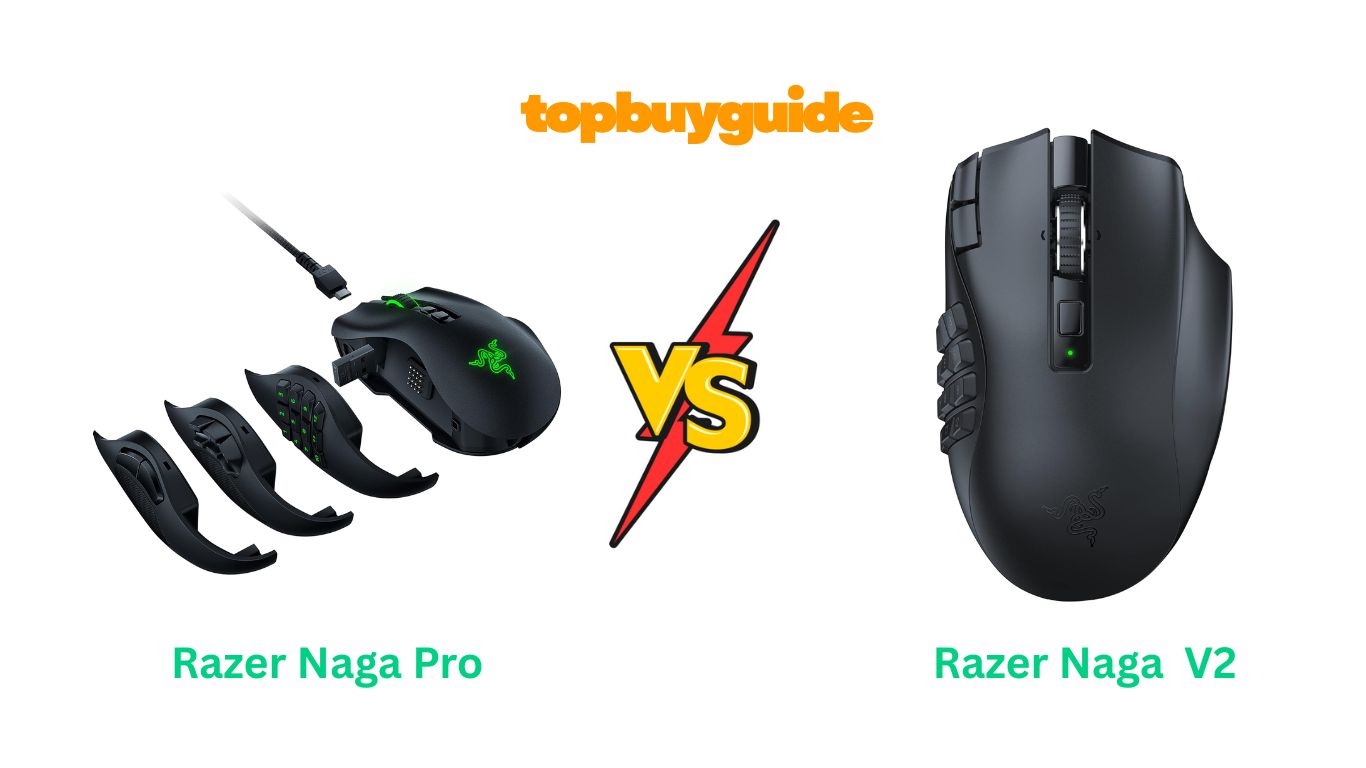
The Razer Naga series has long dominated the MMO gaming mouse market with its signature side button configurations. But with two strong contenders—the Naga Pro and the Naga V2 HyperSpeed—which one deserves a spot on your desk? If you’re after maximum versatility and premium features, the Naga Pro takes the crown. However, the V2 HyperSpeed offers exceptional value with nearly identical performance at a significantly lower price point.
Why Do I Recommend The Razer Naga V2 HyperSpeed?
After extensive comparison, the Razer Naga V2 HyperSpeed emerges as the better choice for most gamers. Here’s why:
- Superior Value: At $75.99, the V2 HyperSpeed costs significantly less than the Pro’s $179 price tag, while delivering comparable performance for MMO gaming.
- Longer Battery Life: The V2 boasts up to 400 hours on Bluetooth and 250 hours on HyperSpeed Wireless, far exceeding the Pro’s 150-hour maximum. Whereas the Pro requires frequent recharging, the V2 uses a replaceable AA battery that lasts months.
- Enhanced Sensor: The V2 features the newer Focus Pro 30K Optical Sensor with 99.8% resolution accuracy, compared to the Pro’s Focus+ 20K sensor. This translates to more precise tracking across various surfaces, including glass.
- Upgraded Switches: The V2 includes Gen-2 Mechanical Mouse Switches rated for 90 million clicks with gold-plated contact points. In contrast, the Pro uses optical switches rated at 70 million clicks, and users frequently report double-clicking issues.
- HyperScroll Technology: The V2’s innovative dual-mode scroll wheel lets you switch between free-spin for rapid scrolling and tactile mode for precision. The Pro lacks this feature entirely.
- Simplified Design: Without interchangeable side plates, the V2 eliminates potential connection issues reported by Pro users when swapping configurations.
- Proven Reliability: Customer reviews show the V2 maintains consistent performance, while the Pro frequently experiences scroll wheel failures and button malfunctions within months.
- 19 vs 20 Programmable Buttons: The difference of one button is negligible for most users, and the V2’s 19 buttons remain more than sufficient for complex MMO rotations.
Side By Side Comparison Chart
| Feature | Razer Naga Pro | Razer Naga V2 HyperSpeed |
| Price | $179.00 | $75.99 |
| Sensor | Focus+ 20K DPI | Focus Pro 30K DPI |
| Battery Life (HyperSpeed) | Up to 150 hours | Up to 250 hours |
| Battery Life (Bluetooth) | Up to 100 hours | Up to 400 hours |
| Battery Type | Rechargeable (built-in) | AA replaceable |
| Switch Type | Optical switches (70M clicks) | Mechanical Gen-2 (90M clicks) |
| Programmable Buttons | Up to 20 | 19 |
| Scroll Wheel | Standard | HyperScroll (dual-mode) |
| Side Plates | 3 interchangeable (2, 6, 12 buttons) | Fixed 12-button plate |
| Weight | 117g | 118g (with battery) |
| Warranty | Standard | Standard |
| Wired Option | USB-C charging/wired use | Not available |
| RGB Lighting | Chroma RGB | Chroma RGB |
| Surface Compatibility | Standard | Enhanced (including glass) |
What Common Features Do Both Mice Share?
Both the Razer Naga Pro and V2 HyperSpeed deliver exceptional MMO gaming performance with shared core features.
Razer HyperSpeed Wireless Technology
Both mice utilize Razer’s HyperSpeed Wireless (2.4GHz) technology, providing lag-free performance that rivals wired connections. The wireless latency is virtually undetectable during gameplay, ensuring your commands execute precisely when needed. Additionally, both offer Bluetooth connectivity as a secondary option for extended battery life or connecting to multiple devices.
Ergonomic MMO Design
The Naga Pro and V2 HyperSpeed share the same ergonomic right-handed design optimized for palm and claw grip styles. Both mice feature the iconic 12-button thumb grid that’s become synonymous with MMO gaming, allowing you to execute complex ability rotations without moving your hand from WASD. The contoured shape fits comfortably in medium to large hands, with textured side grips for secure handling during intense gaming sessions.
Razer Synapse 3 Software
Both models integrate seamlessly with Razer Synapse 3, providing deep customization options. You can remap buttons, create complex macros, adjust DPI settings, customize RGB lighting through Chroma, and save multiple profiles for different games. The software allows on-board memory storage, meaning your settings travel with the mouse when you connect to different computers.
Premium Build Quality
Despite the price difference, both mice maintain Razer’s build quality standards. Each features durable ABS plastic construction, high-quality PTFE mouse feet for smooth gliding, and robust wireless dongles that ensure reliable connectivity. The magnetic side plates (Pro) and fixed plate (V2) both attach securely without wobbling during use.
Chroma RGB Lighting
Both models support Razer’s Chroma RGB ecosystem with 16.8 million color options. You can synchronize lighting effects across all your Razer peripherals, choose from preset profiles, or create custom lighting patterns that react to in-game events or music.
Common Features Comparison Chart
| Feature | Razer Naga Pro | Razer Naga V2 HyperSpeed |
| Wireless Technology | HyperSpeed 2.4GHz + Bluetooth | HyperSpeed 2.4GHz + Bluetooth |
| Ergonomic Design | Right-handed, palm/claw grip | Right-handed, palm/claw grip |
| Software | Razer Synapse 3 | Razer Synapse 3 |
| RGB Lighting | Chroma RGB (16.8M colors) | Chroma RGB (16.8M colors) |
| On-board Memory | Yes | Yes |
| Build Material | ABS plastic | ABS plastic |
| Mouse Feet | PTFE | PTFE |
| Grip Type Support | Palm, Claw | Palm, Claw |
| Multi-device Pairing | Yes (2 devices) | Yes (2 devices) |
| Macro Support | Yes | Yes |
| Profile Storage | Multiple profiles | Multiple profiles |
A Detailed Comparison of Key Differences
Sensor Technology
The Razer Naga V2 HyperSpeed features the Focus Pro 30K Optical Sensor, representing a significant upgrade over the Pro’s Focus+ 20K sensor. This newer sensor delivers 99.8% resolution accuracy and enhanced surface compatibility, including the ability to track reliably on glass surfaces. The improved intelligent functions provide better aim control and cursor precision during both gaming and productivity tasks.
The Naga Pro’s Focus+ 20K sensor remains highly capable for most gaming scenarios, offering on-the-fly DPI adjustment through dedicated buttons. However, it lacks the advanced surface compatibility and intelligent features found in the V2’s newer sensor technology.
Battery Life and Power Management
Battery life represents one of the most significant differences between these mice. The Naga V2 HyperSpeed achieves up to 250 hours on HyperSpeed Wireless and an impressive 400 hours on Bluetooth using a single AA battery. Users report going months between battery changes, with one reviewer noting their battery lasted over a month at 60% capacity with daily professional use.
The Naga Pro’s built-in rechargeable battery provides up to 150 hours on HyperSpeed and 100 hours on Bluetooth. While convenient for those who prefer not to swap batteries, it requires more frequent charging sessions. Some users report the Pro’s wireless performance degrades as the battery depletes, requiring connection to the charging cable during extended gaming sessions.
Switch Technology and Durability
The V2 HyperSpeed employs second-generation Mechanical Mouse Switches with gold-plated contact points, rated for 90 million clicks. These switches deliver tactile feedback and exceptional durability, addressing the double-clicking issues that plagued earlier Razer mice.
The Naga Pro uses optical switches that register clicks via light beam actuation, theoretically providing faster response times and a 70-million-click lifespan. However, customer reviews consistently report reliability problems, including double-clicking, missed clicks, and complete button failures within months of purchase. The V2’s mechanical switches have proven more reliable in real-world use.
HyperScroll Technology
The Naga V2 HyperSpeed introduces HyperScroll Technology with a dual-mode scroll wheel. Free-spin mode allows lightning-fast scrolling through lengthy documents or web pages, while tactile mode provides precise, notched scrolling for in-game actions or selecting specific items. You can switch modes instantly via a dedicated button.
The Naga Pro features a standard scroll wheel without mode switching capability. While functional, it lacks the versatility and speed advantages that HyperScroll provides. Several Pro users report scroll wheel failures within months, with the wheel becoming unresponsive or scrolling erratically.
Side Plate Configuration
The Naga Pro’s defining feature is its three interchangeable magnetic side plates: a 2-button plate for FPS games, a 6-button plate for MOBAs, and the traditional 12-button plate for MMOs. This modularity allows you to optimize button layout for different game genres.
The V2 HyperSpeed commits to the fixed 12-button configuration, which some users find limiting. However, this design eliminates the connection issues some Pro users experience when swapping plates. The V2’s buttons feature slightly better ergonomic positioning and require less pressure to activate, reducing thumb fatigue during extended gaming sessions.
Charging vs. Battery Replacement
The Naga Pro includes USB-C charging and can function as a wired mouse while charging, providing flexibility when the battery runs low. The charging cable attaches magnetically for easy connection and disconnection.
The V2 HyperSpeed uses a replaceable AA battery, which means you cannot use it as a wired mouse. However, the exceptional battery life makes this largely irrelevant—you can keep spare batteries on hand for instant swaps rather than waiting for recharging. Users report that both standard alkaline and rechargeable AA batteries work perfectly.
Weight Distribution
Both mice weigh approximately the same (117g for Pro, 118g for V2 with battery), but weight distribution differs slightly. The Pro’s internal rechargeable battery creates more centralized weight, while the V2’s AA battery compartment shifts weight toward the rear. Most users find both mice well-balanced, though those preferring front-weighted mice may favor the Pro.
Price and Value Proposition
At $179, the Naga Pro positions itself as a premium offering with its interchangeable plates and optical switches. However, the $75.99 V2 HyperSpeed delivers superior sensor technology, better battery life, more reliable switches, and HyperScroll functionality at less than half the price. Unless you absolutely need the swappable side plates for multiple game genres, the V2 provides dramatically better value.
Conclusion
While the Razer Naga Pro offers modularity through interchangeable side plates, the Razer Naga V2 HyperSpeed delivers superior overall performance at a fraction of the cost. With its Focus Pro 30K sensor, exceptional 400-hour battery life, reliable Gen-2 mechanical switches, and innovative HyperScroll technology, the V2 addresses the Pro’s shortcomings while costing $103 less. Unless you’re a competitive player who switches between FPS, MOBA, and MMO genres daily and needs different button configurations, the V2 HyperSpeed is the smarter investment. Its proven reliability, enhanced features, and outstanding value make it the clear winner for most MMO gamers.
FAQs
Can I use the Naga V2 HyperSpeed while it’s “charging”?
No, the Naga V2 HyperSpeed uses a replaceable AA battery and cannot be used as a wired mouse. However, with up to 400 hours of battery life on Bluetooth, you can simply swap in a fresh AA battery in seconds rather than waiting for charging. Many users keep rechargeable AA batteries on hand for instant replacement.
Do both mice work on Mac?
Yes, both mice connect via Bluetooth or the 2.4GHz wireless dongle and work on Mac computers. However, the Razer Synapse software required for button customization has limited Mac support. Some users report success using third-party remapping software like Karabiner-Elements on Mac to achieve full button customization.
Which mouse is better for small hands?
Both mice share similar dimensions and are designed for medium to large hands with palm or claw grip styles. Users with smaller hands may find the 12-button side grid challenging to reach comfortably. If you have small hands, consider trying the mouse in-store or checking return policies, as neither model offers a smaller size variant.
How long do the switches really last?
The Naga V2 HyperSpeed’s Gen-2 mechanical switches are rated for 90 million clicks, while the Pro’s optical switches claim 70 million clicks. In practice, customer reviews show the V2’s mechanical switches perform reliably over extended use, while Pro users frequently report double-clicking and switch failures within 6-12 months of regular use.
Can I change the side plates on the V2 HyperSpeed?
No, the Naga V2 HyperSpeed features a fixed 12-button side configuration and does not support interchangeable plates. This design choice eliminates potential connectivity issues and reduces weight, but limits flexibility for players who want different button layouts for various game genres. If you need swappable configurations, the Naga Pro is your only option.
Which mouse has better wireless performance?
Both mice use identical Razer HyperSpeed Wireless technology and deliver the same low-latency performance. Customer reviews confirm both provide lag-free wireless gaming that rivals wired connections. The V2’s longer battery life means more consistent performance over time, as you won’t experience degraded wireless function from a depleting rechargeable battery.
Are these mice good for productivity work?
Absolutely! Many users purchase these mice specifically for productivity rather than gaming. The programmable buttons excel at creating shortcuts for copy/paste, application switching, and software-specific macros. The V2’s HyperScroll feature particularly shines for scrolling through long documents or spreadsheets. One programmer reviewer noted using the 12-button grid for coding shortcuts dramatically increased their productivity.
What’s the warranty coverage for each mouse?
Both mice come with Razer’s standard warranty coverage. However, customer reviews indicate that Razer’s warranty service can be difficult to navigate, with some users reporting denied claims for products not purchased directly from Razer.com. Purchase from authorized retailers and keep your receipt to ensure warranty protection.

Alex Turner is a dedicated product researcher and reviewer at TopBuyGuide.com, known for his clear, honest, and data-driven insights. He spends countless hours testing, comparing, and analyzing products to help readers make confident and informed buying decisions.