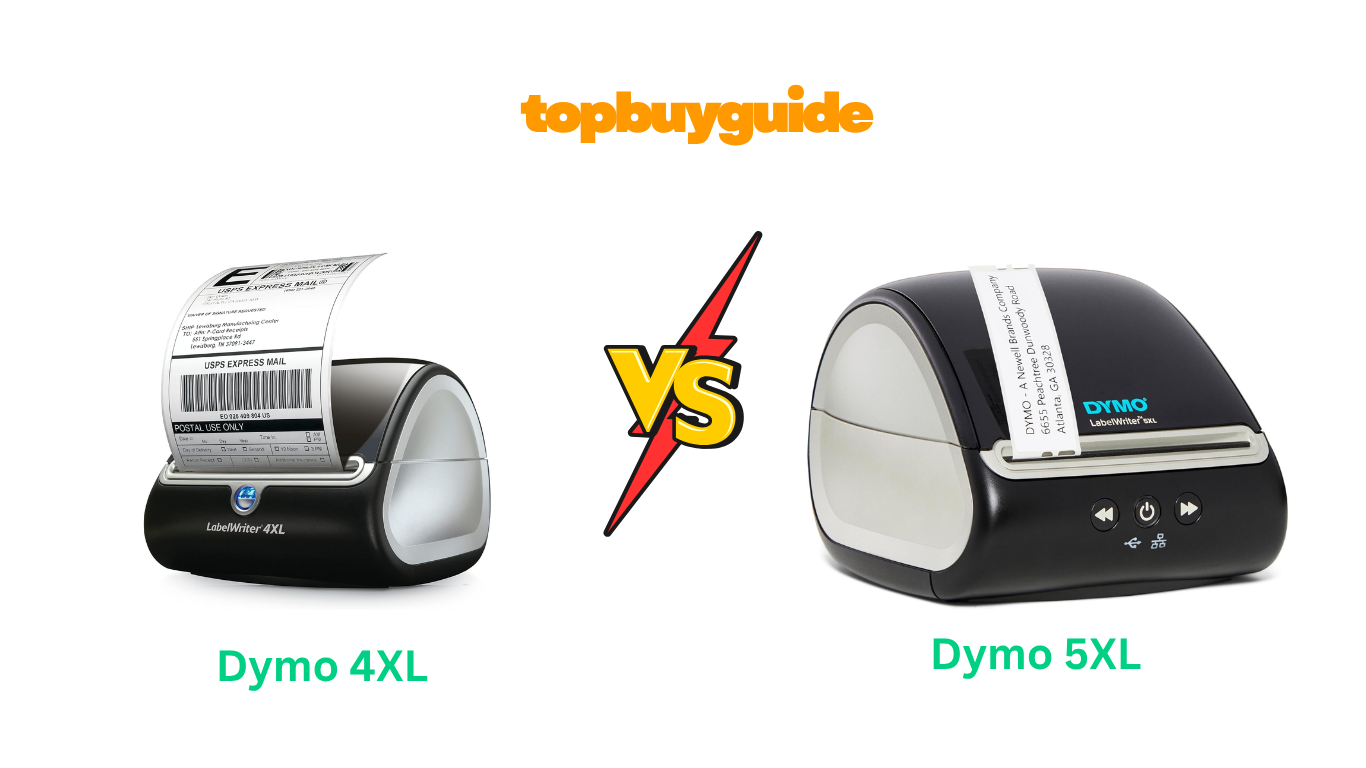
Choosing the right label printer can streamline your business, but making the wrong choice can lead to frustration and wasted money. While both the Dymo 4XL and 5XL are popular thermal printers, I recommend the Dymo 4XL for most users. It offers greater label flexibility and a proven track record, making it a more versatile and reliable choice for your shipping and labeling needs. This review will explore why the older model still holds an edge.
Why Do I Recommend The Dymo 4XL?
When comparing the Dymo 4XL vs 5XL, the older 4XL model stands out for several key reasons, making it my top recommendation. Its flexibility and proven reliability offer significant advantages for both new and established businesses.
- Unrestricted Label Compatibility: The Dymo 4XL’s most significant advantage is its ability to use labels from any manufacturer. This freedom allows you to shop around for the most cost-effective options, drastically reducing your long-term supply costs. In contrast, the Dymo 5XL is equipped with RFID technology that restricts you to using only more expensive, proprietary Dymo-branded labels.
- Proven Reliability and User Base: Having been on the market since 2009, the Dymo 4XL has a long history of solid performance. It has amassed over 8,700 reviews on Amazon with an average of 4.4 stars. This extensive user base means a wealth of community knowledge, troubleshooting guides, and support is available, which isn’t as developed for the newer 5XL.
- Simplified, No-Fuss Technology: The Dymo 4XL features straightforward USB connectivity that is widely compatible and easy to set up. It doesn’t rely on the complex label recognition technology found in the 5XL, which many users have reported as a point of failure, often leading to printing errors and frustration.
- Lower Initial Investment: While prices can fluctuate, the Dymo 4XL is generally available at a lower price point than the 5XL, especially when considering used or refurbished options. This makes it a more accessible entry point for small businesses or individuals starting their e-commerce journey.
- Consistent Software Performance: The Dymo 4XL works seamlessly with the established DYMO Connect software. While the 5XL also uses this software, user reviews indicate that the integration with the 5XL’s new hardware features can be buggy and less reliable than the time-tested performance of the 4XL.
- No Forced “Upgrades”: The Dymo 5XL’s proprietary label system is seen by many as a way to lock customers into an expensive ecosystem. The Dymo 4XL, on the other hand, represents a more customer-friendly approach, trusting users to choose the supplies that best fit their budget and needs without sacrificing functionality.
Side-By-Side Comparison Chart: Dymo 4XL vs 5XL
| Feature | Dymo 4XL | Dymo 5XL |
| Label Compatibility | Works with any brand of direct thermal labels. | Only works with official DYMO-branded labels (with RFID). |
| Connectivity | USB | USB, LAN (Ethernet) |
| Label Recognition | No | Automatic Label Recognition (Size, Type, Count) |
| Price | Generally lower, with many refurbished options. | Generally higher. |
| Date First Available | April 8, 2009 | January 21, 2021 |
| Amazon Rating | 4.4 stars (8,700+ ratings) | 3.5 stars (1,900+ ratings) |
| Special Feature | Email Print | Auto Document Feeder, LAN Connectivity |
| Weight | 5.08 pounds | 3 pounds |
What Common Features Can Dymo 4XL vs 5XL Offer?
Despite their key differences, both the Dymo 4XL and Dymo 5XL share a core set of features that make them powerful tools for any business. They are designed to handle high-volume labeling tasks efficiently, saving you time and money compared to using a standard inkjet or laser printer.
Both printers utilize direct thermal printing technology. This is a major advantage because it means you will never have to buy expensive ink or toner cartridges. The printers use heat to activate specially coated labels, creating a crisp, clear image. This technology not only reduces ongoing supply costs but also eliminates the mess and hassle of dealing with ink. You only need to purchase the labels themselves.
Each model is capable of printing extra-large 4″ x 6″ shipping labels, which is the standard size for major carriers like USPS, UPS, FedEx, and DHL. This makes both printers ideal for e-commerce sellers. You can print shipping labels directly from popular platforms such as Amazon, eBay, Etsy, Shopify, Poshmark, and ShipStation. This integration streamlines your shipping process, allowing you to go from order confirmation to a printed label in just a few clicks.
Both the 4XL and 5XL deliver high-quality prints with a 300 DPI (dots per inch) resolution. This ensures that all text, barcodes, and graphics on your labels are sharp and easy to scan. Clear, scannable barcodes are crucial for avoiding shipping delays and ensuring your packages are tracked correctly. The professional look of these labels also enhances your brand’s image.
Finally, both printers come with the free DYMO Connect software. This application allows you to design and customize your labels. The software includes over 60 professional templates that you can modify with your own text, logos, and graphics. Whether you’re creating shipping labels, warehouse identification tags, or name badges, this software provides the tools you need to create professional-looking labels tailored to your specific requirements.
Common Features of Dymo 4XL vs 5XL
| Feature | Dymo 4XL | Dymo 5XL |
| Printing Technology | Direct Thermal | Direct Thermal |
| Maximum Label Size | 4″ x 6″ | 4″ x 6″ |
| Print Resolution | 300 DPI | 300 DPI |
| Software | Free DYMO Connect | Free DYMO Connect |
| E-commerce Integration | Yes | Yes |
| Ink/Toner Required | No | No |
A Detailed Comparison Of the Dymo 4XL vs 5XL
Let’s break down the most important features to see how these two label printers stack up against each other.
Label Compatibility and Cost
The most critical difference between these two printers lies in label compatibility. The Dymo 4XL gives you the freedom to use direct thermal labels from any manufacturer. This allows you to find competitive pricing and purchase labels in bulk from third-party suppliers at a significant discount, which is a major long-term cost-saving advantage for any business.
Conversely, the Dymo 5XL is designed with a proprietary system. It uses RFID technology to detect whether the labels are “Authentic DYMO Labels.” If they are not, the printer will not function. This locks you into buying only Dymo’s own, often more expensive, labels. Many users see this as a major drawback, as it removes choice and increases operational costs.
Connectivity
The Dymo 4XL connects to your computer via a standard USB cable. This setup is simple, reliable, and has been the standard for years, working well for individual workstations. It is a plug-and-play solution that is easy to manage for a single user or a small office where the printer is connected directly to one computer.
The Dymo 5XL offers an upgrade in this area by including both USB and LAN (Ethernet) connectivity. The LAN port is a significant benefit for larger teams, as it allows the printer to be connected directly to a network. This enables multiple users to access and print labels from their own computers without needing to be physically connected to the printer, enhancing workflow and efficiency in a shared office environment.
Technology and Ease of Use
The Dymo 4XL is a straightforward machine. You load the labels, select the correct size in the software, and print. Its simplicity is its strength, leading to fewer technical issues and a more reliable user experience over its many years on the market. Customer reviews frequently praise its dependable “workhorse” nature.
The Dymo 5XL introduces “Automatic Label Recognition” technology. This feature is intended to make printing easier by automatically detecting the size, type, and number of remaining labels in the printer. However, this is the same technology that enforces the use of Dymo-only labels and is a common point of failure according to user reviews. Many customers report errors where the printer fails to recognize even authentic Dymo labels, causing printing to halt and leading to significant frustration.
Price and Value
The Dymo 4XL, being the older model, is typically available at a lower upfront cost than the 5XL. You can also find a healthy market for used and refurbished 4XL printers, making the initial investment even smaller. When you combine the lower purchase price with the long-term savings from being able to use affordable third-party labels, the overall value proposition of the 4XL is excellent.
The Dymo 5XL has a higher initial purchase price. The true cost, however, comes from the mandatory use of proprietary Dymo labels, which can be two to five times more expensive than generic alternatives. While the printer itself offers some modern features, the ongoing cost of supplies makes the total cost of ownership significantly higher than that of the 4XL, diminishing its overall value for budget-conscious businesses.
Conclusion
For most users, the Dymo 4XL is the clear winner. Its ability to use any third-party thermal labels provides unmatched flexibility and long-term cost savings that are crucial for any business, especially small e-commerce sellers. Despite being an older model, its proven reliability, simple operation, and strong community support make it a smarter, more practical investment. While the Dymo 5XL‘s LAN connectivity is a nice feature, it’s overshadowed by the restrictive and expensive proprietary label system.
FAQs
- Can I use third-party labels with the Dymo 5XL?
No, the Dymo 5XL has an RFID sensor that requires you to use only official, Dymo-branded labels. The Dymo 4XL, however, is compatible with third-party labels, which can save you a significant amount of money on supplies. - Which printer is better for a shared office?
The Dymo 5XL has a slight edge for shared offices due to its built-in LAN connectivity. This allows multiple users to connect to the printer over a network. The Dymo 4XL is limited to a direct USB connection to a single computer. - Is the Dymo 5XL faster than the 4XL?
No, both the Dymo 4XL and Dymo 5XL have the same advertised print speed of up to 53 standard 4-line address labels per minute. The printing speed for 4″ x 6″ shipping labels is comparable between the two models. - Why do so many users report problems with the Dymo 5XL?
Most user complaints about the Dymo 5XL stem from its Automatic Label Recognition feature. This system, which locks the printer to Dymo-only labels, can be buggy and often fails to recognize even authentic labels, preventing the machine from printing. - Is the Dymo 4XL still a good printer in 2024?
Yes, absolutely. Despite being an older model, the Dymo 4XL remains a highly recommended “workhorse” label printer. Its reliability, ease of use, and freedom to use affordable third-party labels make it an excellent and cost-effective choice for businesses today. - Does either printer require ink?
No, both the Dymo 4XL and 5XL are direct thermal printers. They use heat to create an image on special thermal labels, so you will never need to purchase or replace ink or toner cartridges for either model. - Which printer is easier to set up?
Both printers use the DYMO Connect software, but the Dymo 4XL generally has a more straightforward setup process due to its simpler technology. The Dymo 5XL’s added features, like network setup and label recognition, can sometimes complicate the initial installation.

Alex Turner is a dedicated product researcher and reviewer at TopBuyGuide.com, known for his clear, honest, and data-driven insights. He spends countless hours testing, comparing, and analyzing products to help readers make confident and informed buying decisions.