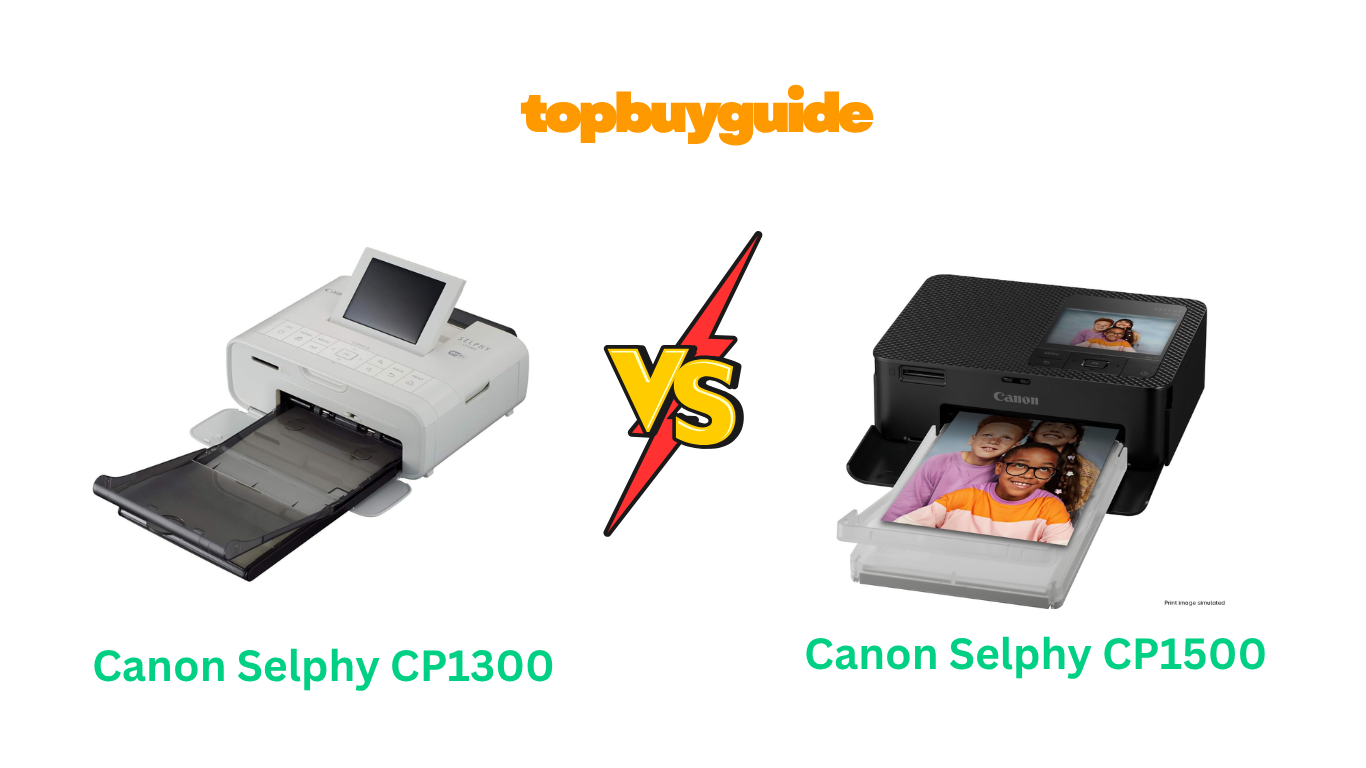
Choosing between the Canon Selphy CP1300 and CP1500 can be challenging. Both deliver exceptional photo prints, but the CP1500 offers enhanced connectivity and a refined design that makes wireless printing even easier. If you prioritize modern features and streamlined operation, the CP1500 is the better choice.
Why Do I Recommend The Canon Selphy CP1500?
The CP1500 represents Canon’s evolution in compact photo printing technology. Here’s why it stands out:
- Enhanced wireless connectivity: The CP1500 features improved Wi-Fi setup and Bluetooth capabilities, making it easier to connect from multiple devices. In contrast, the CP1300’s wireless configuration can be more time-consuming.
- Updated user interface: With a more intuitive menu system and clearer LCD display, the CP1500 simplifies photo selection and editing. The CP1300’s 3.2″ tilting screen is functional but less refined.
- Faster processing: The CP1500 delivers slightly quicker print times, shaving seconds off each 4×6 photo. While both complete prints in under a minute, the CP1500’s efficiency adds up.
- Modern design aesthetics: The CP1500 sports a sleeker, more contemporary look that fits better in modern spaces. The CP1300, while compact, shows its age in design elements.
- Improved power management: Better energy efficiency means the CP1500 consumes less power during standby mode compared to the CP1300.
- Enhanced AirPrint support: iOS users benefit from smoother AirPrint integration with the CP1500, reducing connection hiccups common with the CP1300.
- Better paper handling: The CP1500 features refined paper tray mechanics that reduce jamming incidents compared to the CP1300.
- Future-proof technology: As the newer model, the CP1500 receives firmware updates and support, while the CP1300 may see diminishing manufacturer attention.
Side By Side Comparison Chart: Canon Selphy CP1300 vs CP1500
| Feature | Canon Selphy CP1300 | Canon Selphy CP1500 |
| Release Year | 2017 | 2022 |
| Wireless Connectivity | Wi-Fi, Access Point | Wi-Fi, Bluetooth, Access Point |
| LCD Screen | 3.2″ tilting | 3.2″ tilting (improved resolution) |
| Print Speed | ~47 seconds per 4×6 | ~45 seconds per 4×6 |
| AirPrint Support | Yes | Enhanced |
| Bluetooth | No | Yes |
| Design | Traditional compact | Modern, streamlined |
| Power Consumption | 60W | 60W (better standby efficiency) |
| App Integration | Canon PRINT app | Canon SELPHY Photo Layout app |
| Paper Tray Capacity | 18 sheets | 18 sheets |
| Available Colors | White, Black | White, Black, Pink |
What Common Features Can Canon Selphy CP1300 vs CP1500 Do?
Both printers share the core technology that makes the Selphy line exceptional for home photo printing.
Dye-Sublimation Printing Technology
Both the CP1300 and CP1500 use dye-sublimation printing, which creates lab-quality photos that last up to 100 years. This four-pass process applies cyan, magenta, yellow, and a protective overcoat layer, resulting in water-resistant, fade-resistant prints. The prints emerge instantly dry and ready to handle, unlike inkjet alternatives.
Multiple Print Sizes
Each printer supports 4×6″, 2.1×3.4″ (postcard size), and 2.1×2.1″ square prints. You can also create fun layouts like photo booth strips and 2×6″ prints. Both models handle label sheets for creating stickers, making them versatile for scrapbooking and creative projects.
Memory Card and USB Compatibility
Direct printing from SD cards and USB drives eliminates the need for a computer. Both printers feature convenient card slots on the front panel, allowing you to insert your camera’s memory card and select photos directly from the LCD screen.
Party Shuffle Mode
This unique feature lets multiple users send photos from their smartphones simultaneously. The printer creates a collage from the submitted images, perfect for events and gatherings. Both models handle this feature identically.
Portable Design with Optional Battery
Weighing approximately 1.9 pounds, both printers are highly portable. When paired with Canon’s optional battery pack (sold separately), you can print anywhere without an electrical outlet—ideal for outdoor events, weddings, or travel.
Same Print Quality Standards
Both models produce identical print quality using the same ink and paper cartridge system (KP-108IN). Colors are vibrant, skin tones are accurate, and detail reproduction is excellent. Neither printer has an advantage in output quality.
Common Features of Canon Selphy CP1300 vs CP1500
| Feature | Canon Selphy CP1300 | Canon Selphy CP1500 |
| Printing Technology | Dye-sublimation | Dye-sublimation |
| Print Longevity | Up to 100 years | Up to 100 years |
| Water Resistance | Yes | Yes |
| 4×6″ Print Support | Yes | Yes |
| Square Print Support | Yes | Yes |
| Postcard Print Support | Yes | Yes |
| Photo Booth Layout | Yes | Yes |
| Party Shuffle Mode | Yes | Yes |
| SD Card Slot | Yes | Yes |
| USB Port | Yes | Yes |
| Compatible Paper | KP-108IN, KP-36IP | KP-108IN, KP-36IP |
| Optional Battery Pack | Compatible | Compatible |
| Portability | 1.9 lbs | 1.9 lbs |
| Protective Overcoat | Yes | Yes |
A Detailed Comparison Of the Canon Selphy CP1300 vs CP1500
Wireless Connectivity
The CP1500 introduces Bluetooth connectivity alongside Wi-Fi, offering more flexible printing options. Setting up Bluetooth takes seconds and provides a stable connection for smartphones and tablets. The CP1300 relies solely on Wi-Fi, which can require password entry using the small screen’s on-screen keyboard. While both support Access Point mode for direct connections, the CP1500’s dual connectivity options make it more user-friendly.
User Interface and Controls
The CP1500 features a redesigned menu system with clearer icons and better organization. Navigating through settings feels more intuitive than the CP1300’s interface. Both have 3.2″ tilting LCD screens, but the CP1500’s display offers improved brightness and viewing angles. Photo preview and editing are easier on the newer model.
Print Speed and Efficiency
While both printers complete a 4×6 photo in under a minute, the CP1500 shaves a few seconds off each print. This difference becomes noticeable when printing multiple photos. The CP1500’s improved processor also reduces the time between selecting a photo and starting the print job.
App Integration
The CP1300 works with Canon’s PRINT app, which provides basic printing functionality. The CP1500 uses the newer SELPHY Photo Layout app, offering enhanced editing tools, filters, and layout options. The CP1500’s app includes AR (augmented reality) features for creative photo effects not available with the CP1300.
Build Quality and Design
Both printers use quality plastic construction, but the CP1500 feels more refined. The paper tray slides more smoothly, and the overall fit and finish show improvement. The CP1500’s modern aesthetic looks less dated, particularly in white or the exclusive pink color option.
Power Management
Each printer operates at 60W maximum power consumption. However, the CP1500 includes better standby mode optimization, consuming less electricity when idle. This won’t dramatically impact your electric bill but demonstrates Canon’s attention to efficiency.
AirPrint and Mopria Support
Both printers support AirPrint for iOS devices and Mopria for Android. The CP1500’s implementation is more stable, with fewer connection drops reported by users. Setting up AirPrint on the CP1500 takes fewer steps and maintains connections more reliably.
Conclusion
The Canon Selphy CP1500 is the superior choice for most users. Its enhanced connectivity options, particularly Bluetooth, eliminate setup frustrations common with the CP1300. The improved app experience and faster processing make printing more enjoyable. While both produce identical print quality, the CP1500’s modern features and refined design justify choosing it over the aging CP1300. If you can find the CP1300 at a significantly discounted price, it remains capable, but the CP1500’s improvements are worth the investment for hassle-free photo printing.
FAQs
Q: Can I use CP1300 paper and ink with the CP1500?
Yes, both printers use the same KP-108IN ink and paper cartridge system. This means you can stock up on supplies that work with either model without compatibility concerns.
Q: Is the print quality different between the two models?
No, print quality is identical. Both use the same dye-sublimation technology and produce lab-quality 4×6 photos with the same color accuracy, detail, and 100-year longevity.
Q: Does the CP1500’s Bluetooth work with all smartphones?
The CP1500’s Bluetooth is compatible with most modern iOS and Android devices. You’ll need to download the Canon SELPHY Photo Layout app for full functionality.
Q: How many photos can I print with one ink cartridge?
Both printers produce approximately 108 4×6 photos with the KP-108IN cartridge set, or 36 photos with the KP-36IP set. Actual yield depends on your specific print settings.
Q: Can I print directly from Instagram or Facebook?
Yes, both printers support printing from social media through the Canon mobile apps. The CP1500’s newer app offers a smoother experience with more direct integration options.
Q: Is the optional battery pack the same for both printers?
Yes, Canon’s optional battery pack (NB-CP2LH) works with both the CP1300 and CP1500, providing portability for outdoor events and travel photography.
Q: How long do the printed photos last?
Both printers produce photos rated to last up to 100 years when stored properly. The protective overcoat layer also makes them water-resistant and fingerprint-resistant.
Q: Can I print borderless photos?
Yes, both models support borderless 4×6 printing. The photo paper has perforated edges that you tear off after printing to create clean, borderless edges.

Alex Turner is a dedicated product researcher and reviewer at TopBuyGuide.com, known for his clear, honest, and data-driven insights. He spends countless hours testing, comparing, and analyzing products to help readers make confident and informed buying decisions.