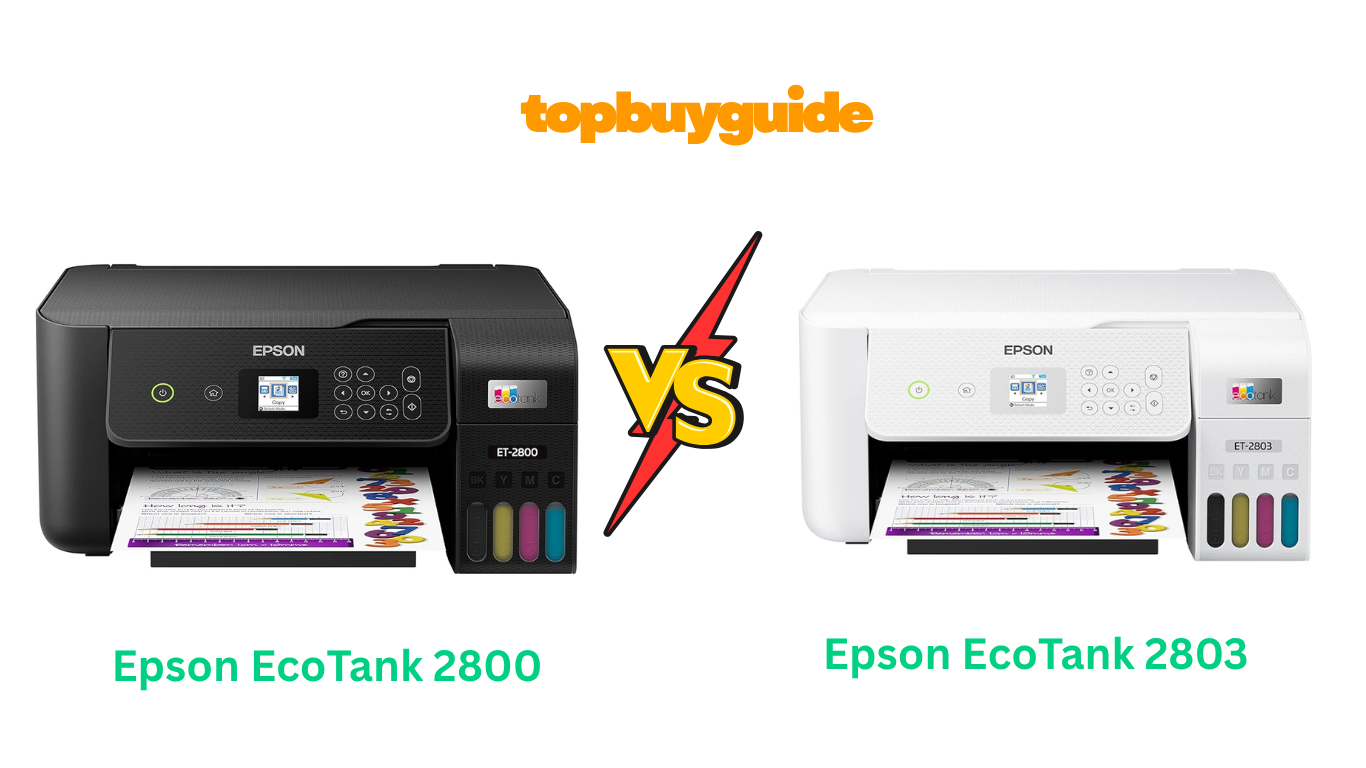
Choosing between the Epson EcoTank 2800 and 2803 can be tricky since they are nearly identical. Both offer cartridge-free printing to save you money on ink. However, the Epson EcoTank 2803 often comes at a lower price point, making it the smarter buy for budget-conscious users. But is a lower price the only difference? Let’s dive deeper to see which of these popular printers is right for you.
Why Do I Recommend The Epson EcoTank 2803?
When comparing two products that are almost identical, the decision often comes down to price. The Epson EcoTank 2803 consistently offers the same core features and performance as the 2800 but at a more budget-friendly price. Here are the reasons why it’s my top pick:
- Cost-Effectiveness: The Epson EcoTank 2803 is generally priced lower than the 2800. For shoppers looking for the best value without sacrificing essential features, the 2803 is the clear winner, putting money back in your pocket.
- Identical Core Functionality: The ET-2803 delivers the same high-quality printing, scanning, and copying functions as the ET-2800. You don’t lose any of the fundamental capabilities that make the EcoTank series great.
- Same Ink Savings: Both models use the same high-capacity, low-cost ink bottles, providing up to 90% savings on replacement ink compared to traditional cartridges. You get the same long-term value with the 2803.
- Color Availability: While the ET-2800 is available in both black and white, the ET-2803 is typically offered in white. If color isn’t a deciding factor, the savings with the 2803 make it the more logical choice.
- User-Friendly Design: Like the 2800, the Epson EcoTank 2803 features a compact design and a front-facing color display, making it easy to set up and operate. The user experience is virtually indistinguishable between the two.
Side-By-Side Comparison Chart: Epson EcoTank 2800 vs 2803
| Feature | Epson EcoTank 2800 | Epson EcoTank 2803 |
| Model Number | ET-2800 (C11CJ66201/C11CJ66202) | ET-2803 (C11CJ66203) |
| Color Options | Black, White | White |
| Typical Price | Generally higher | Generally lower |
| Weight | 11.4 lbs | 8.8 lbs |
| Product Dimensions | 14.8″D x 22.8″W x 10″H | 22.8″D x 14.8″W x 10″H |
What Common Features Can Epson EcoTank 2800 vs 2803 Do?
The Epson EcoTank 2800 and 2803 are built on the same foundation, meaning they share a host of excellent features designed for modern home use. Their primary selling point is the innovative cartridge-free printing system, which uses large, refillable ink tanks to dramatically reduce waste and long-term costs. With up to two years of ink included in the box, you can print up to 4,500 black-and-white pages or 7,500 color pages before needing a refill.
Both printers are all-in-one devices, equipped to handle printing, high-resolution flatbed scanning, and copying. This makes them versatile workhorses for any home office or for family projects. They also feature Epson’s unique Micro Piezo Heat-Free Technology, which ensures sharp text and vibrant color photos and graphics on almost any type of paper. This technology also contributes to their low power consumption.
Wireless connectivity is another key shared feature. You can easily print from your computer, tablet, or smartphone using Wi-Fi Direct. Both models are compatible with the Epson Smart Panel app, which allows you to set up, monitor, print, and scan directly from your mobile device. They also support voice-activated printing with Alexa, adding another layer of convenience to your printing tasks.
Common Features of Epson EcoTank 2800 vs 2803
| Feature | Epson EcoTank 2800 | Epson EcoTank 2803 |
| Printing Technology | Inkjet | Inkjet |
| Connectivity | USB, Wi-Fi | USB, Wi-Fi |
| Printer Output | Color | Color |
| Max Print Speed (Mono) | 10 ppm | 10 ppm |
| **Max Print Speed (Color) | 5 ppm | 5 ppm |
| Max Resolution | 5760 x 1440 dpi | 5760 x 1440 dpi |
| Scanner Type | Flatbed | Flatbed |
| Max Input Sheet Capacity | 100 sheets | 100 sheets |
| Mobile Printing | Epson Smart Panel App, Wi-Fi Direct | Epson Smart Panel App, Wi-Fi Direct, AirPrint |
| Voice-Activated Printing | Yes (with Alexa) | Yes (with Alexa) |
| Ink System | Refillable Ink Tanks (EcoTank) | Refillable Ink Tanks (EcoTank) |
| Included Ink Yield | 4,500 black / 7,500 color pages | 4,500 black / 7,500 color pages |
A Detailed Comparison Of the Epson EcoTank 2800 vs 2803
Design and Build
The Epson EcoTank 2800 is available in both black and white, giving users a choice to match their office decor. It weighs around 11.4 pounds, making it a relatively lightweight but sturdy machine for a home office. Its dimensions are standard for an all-in-one printer, designed to fit comfortably on a desk without taking up too much space. The front-facing ink tanks are a signature of the EcoTank line, allowing you to easily see ink levels at a glance.
In contrast, the Epson EcoTank 2803 is typically only available in white. According to its product specifications, it is significantly lighter at just 8.8 pounds, which could be a factor if you need to move the printer frequently. Despite the weight difference, its physical footprint is identical to the 2800. Both models share the same 1.44-inch color display and button layout, ensuring the operational experience is consistent across both.
Price and Value
The most significant difference between these two printers is the price. The Epson EcoTank 2800 is generally listed at a higher price point. This model is often found in more brick-and-mortar retail stores and has been part of Epson’s lineup for a bit longer, which can contribute to its standard pricing.
The Epson EcoTank 2803, however, is frequently sold for a lower price, often positioned as a more budget-friendly entry into the EcoTank family. Since it shares all the core functionalities and ink-saving benefits, the 2803 offers superior value for money. For a user focused on getting the most bang for their buck, the 2803 is the smarter investment, delivering the same long-term savings on ink for a lower initial cost.
Mobile Connectivity
Both the Epson EcoTank 2800 and 2803 offer robust wireless and mobile printing options. They are compatible with the Epson Smart Panel app, which turns your iOS or Android device into a powerful command center. From the app, you can handle setup, monitoring, printing, and scanning. Both also support Wi-Fi Direct, allowing you to connect your device to the printer without needing a network.
However, the product listing for the Epson EcoTank 2803 explicitly mentions support for Apple AirPrint. This feature allows for seamless printing from Apple devices like iPhones, iPads, and Macs without the need for additional drivers or apps. While the 2800 likely supports this as well through Epson’s drivers, the explicit mention for the 2803 is a reassuring point for Apple users looking for out-of-the-box compatibility.
Weight and Portability
Weight might not be a primary concern for a stationary office printer, but it can be a deciding factor for users with limited space or who may need to move their printer occasionally. The Epson EcoTank 2800 weighs 11.4 pounds, which is still manageable but heavier than its counterpart.
The Epson EcoTank 2803 comes in at just 8.8 pounds. This nearly 3-pound difference makes the 2803 noticeably lighter and easier to handle during setup or relocation. If you’re a student in a dorm or someone with a multi-purpose workspace, the lighter weight of the 2803 adds a degree of convenience without compromising on any of the printer’s capabilities.
Conclusion
After a thorough comparison, the Epson EcoTank 2803 emerges as the recommended choice for most users. Both printers offer the same exceptional ink savings, print quality, and all-in-one features that define the EcoTank series. However, the ET-2803 typically comes at a lower price point, making it an unbeatable value. The added bonus of being lighter and explicitly mentioning AirPrint support sweetens the deal. Unless the black color option of the ET-2800 is a must-have for your setup, the Epson EcoTank 2803 delivers the same performance and saves you money from day one.
FAQs
- Are the Epson 2800 and 2803 the same printer?
Essentially, yes. The Epson EcoTank 2800 and 2803 share the same core features, including printing, scanning, copying, and the EcoTank ink system. The main differences are the model number, color availability, and typically the price, with the 2803 often being more affordable. - Can I use the same ink for both the ET-2800 and ET-2803?
Yes, both printers use the same Epson 522 series ink bottles. This means you can purchase the same refills regardless of which of these two models you own, and you’ll enjoy the same low cost-per-page. - Does the Epson 2803 support double-sided printing?
No, neither the Epson EcoTank 2803 nor the 2800 supports automatic double-sided (duplex) printing. You would need to manually flip the pages to print on both sides. If this feature is important, you would need to look at a higher-end EcoTank model. - Is the print quality different between the 2800 and 2803?
No, the print quality is identical. Both models feature a maximum print resolution of 5760 x 1440 dpi and use Epson’s Micro Piezo Heat-Free Technology, ensuring sharp text and vibrant color photos on a variety of paper types. - Why is the Epson 2803 often cheaper than the 2800?
The price difference is likely due to retail strategy. The ET-2803 is often sold through specific retailers or online as a slightly more budget-focused option to attract new customers to the EcoTank line, despite being functionally the same as the ET-2800. - Which printer is better for sublimation?
Both the Epson ET-2800 and ET-2803 are popular choices for converting to sublimation printing because of their EcoTank system. Since their internal mechanics are the same, either would work equally well. The decision would likely come down to which model you can find at a better price. - Does the weight difference between the ET-2800 and ET-2803 matter?
The ET-2803 is listed as being about 2.6 pounds lighter than the ET-2800. While this may not be a major factor for a printer that stays in one spot, it could make the ET-2803 slightly easier to unbox, set up, or move if needed. - Can I print from my phone on both models?
Yes, both printers are fully compatible with mobile printing. You can use the Epson Smart Panel app, Apple AirPrint, or other mobile printing services to easily print documents and photos directly from your smartphone or tablet.

Alex Turner is a dedicated product researcher and reviewer at TopBuyGuide.com, known for his clear, honest, and data-driven insights. He spends countless hours testing, comparing, and analyzing products to help readers make confident and informed buying decisions.