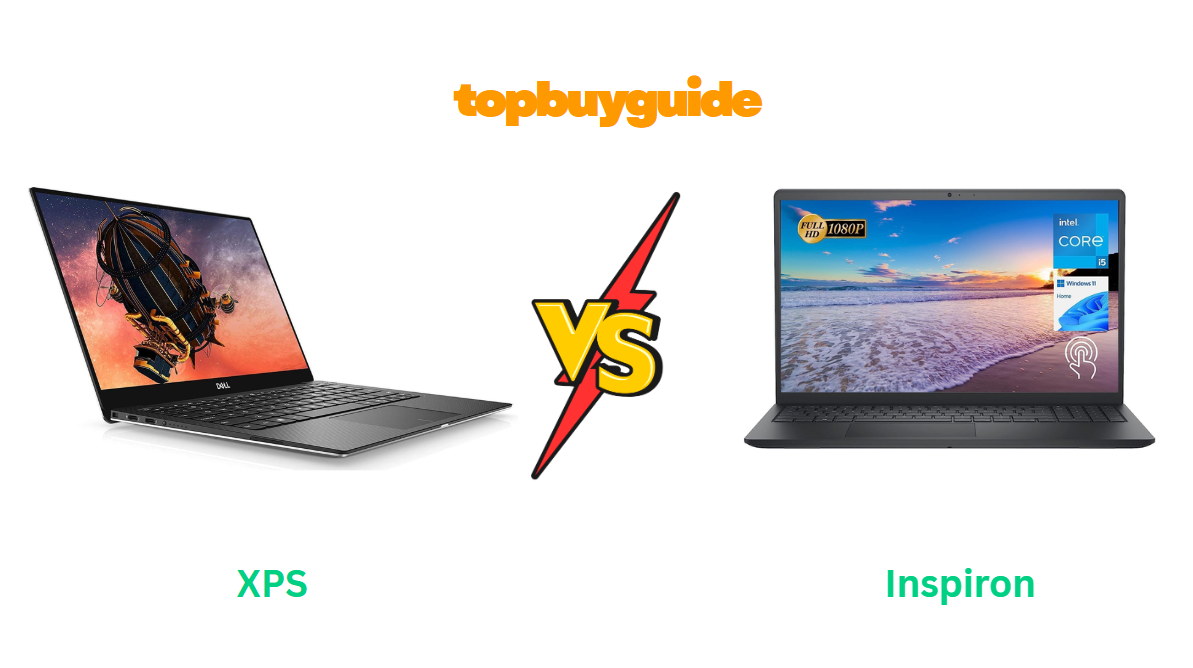
When it comes to Dell laptops, the two names that always pop up are XPS and Inspiron — both solid, but made for very different users. If you’re torn between the two, this guide will help. I recommend the Dell XPS, and here’s why: it offers premium performance, a stunning display, and a sleek design that outshines the Inspiron for both work and travel. Let’s break it down.
Why Do I Recommend the Dell XPS?
The Dell XPS 13 (2024) is Dell’s flagship ultrabook, designed for professionals, creators, and power users who want beauty and brains in one sleek package. The Inspiron 15, on the other hand, is a more budget-friendly option for everyday use — reliable, yes, but not quite at the same level in terms of craftsmanship and performance.
Here’s why the XPS 13 stands out and earns my recommendation:
- Premium Build & Sleek Design:
The XPS features an aluminum chassis with a carbon-fiber palm rest, giving it a truly premium feel. Compared to the Inspiron’s mostly plastic construction, the XPS simply looks and feels more durable and stylish. It’s also thinner and lighter, perfect for on-the-go users. - Gorgeous InfinityEdge Display:
The XPS 13 offers a 13.4-inch Full HD+ or 3.5K OLED InfinityEdge display with nearly no bezels, delivering sharp colors and deep contrast. The Inspiron’s display is good, but it doesn’t reach that level of brilliance or clarity — especially for design work or streaming. - Faster Performance with Latest Processors:
Equipped with Intel Core i7-1360P (13th Gen) and up to 32GB RAM, the XPS handles multitasking, video editing, and heavy workloads effortlessly. In contrast, most Inspiron 15 models max out at 16GB RAM and use lower-tier processors designed for general use. - Longer Battery Life:
The XPS’s efficient hardware and OLED panel allow up to 13 hours of battery life, while the Inspiron typically averages around 8–9 hours under similar conditions. That’s a big difference if you work away from a power outlet. - Superior Audio and Webcam Quality:
The XPS 13 has Waves MaxxAudio Pro speakers and a 1080p IR webcam with AI noise reduction — ideal for meetings or content creation. The Inspiron still uses a 720p webcam and basic stereo speakers, which sound flatter and less immersive. - Advanced Features for Productivity:
The XPS supports Windows Hello facial recognition, fingerprint unlock, and Dell’s ExpressSign-In that detects when you’re nearby and automatically wakes the system. The Inspiron lacks these smart sensors. - Faster Storage and Ports:
The XPS includes a PCIe Gen 4 SSD for ultra-fast load times and dual Thunderbolt 4 ports, while Inspiron uses older USB 3.2 ports and slower SSD configurations. For professionals who rely on fast data transfers, this is a huge edge. - Environmentally Conscious Design:
Dell has built the new XPS using recycled aluminum and ocean-bound plastics, making it one of the most eco-friendly premium laptops available. Inspiron is improving in this area but hasn’t caught up yet.
Side-by-Side Comparison Chart: XPS vs Inspiron
| Features | Dell XPS 13 (2024) | Dell Inspiron 15 (2023) |
| Build Material | Aluminum + Carbon Fiber | Plastic/Aluminum mix |
| Display | 13.4” FHD+ / 3.5K OLED, InfinityEdge | 15.6” FHD IPS |
| Processor | Intel Core i7-1360P (13th Gen) | Intel Core i5-1235U / i7-1255U |
| RAM | Up to 32GB LPDDR5 | Up to 16GB DDR4 |
| Storage | Up to 1TB PCIe Gen 4 SSD | Up to 1TB PCIe Gen 3 SSD |
| Graphics | Intel Iris Xe | Intel UHD / Iris Xe |
| Battery Life | Up to 13 hours | Around 8–9 hours |
| Weight | ~2.6 lbs | ~3.8 lbs |
| Ports | 2x Thunderbolt 4, microSD, Audio | USB 3.2, HDMI, SD card |
| Webcam | 1080p IR w/ AI | 720p Standard |
| Audio | Waves MaxxAudio Pro | Stereo Speakers |
| Fingerprint Reader | Yes (Built-in) | Optional (select models) |
| Environmentally Friendly Design | Yes (Recycled materials) | Partially |
| Best For | Professionals, Creators | Students, Casual Users |
What Common XPS vs Inspiron Can Do?
Despite their differences in performance and design, the Dell XPS and Inspiron series share several solid traits that make both worth considering. Dell’s engineering ensures even its budget-friendly models deliver dependable performance, making both options reliable for work, study, or entertainment. Let’s explore their shared strengths in detail.
Excellent Build Quality and Durability
Both laptops are built to last. The Dell XPS takes the lead with its all-aluminum and carbon fiber design, but the Inspiron also offers solid structural integrity, especially in the newer models that use aluminum lids. Both are resistant to flex and can handle daily use, travel, and office environments without wear issues.
Great Display Options
Whether you’re editing documents, streaming, or working on creative projects, both laptops deliver crisp and clear visuals. The XPS offers a higher-end OLED option, while the Inspiron’s FHD panel still provides good color accuracy and brightness for its price range. Both come with anti-glare coatings, making them suitable for bright environments.
Reliable Keyboard and Touchpad
Typing comfort is excellent on both models. The XPS has a premium backlit keyboard with better key travel and a responsive glass touchpad, while the Inspiron provides a comfortable, slightly larger layout ideal for long typing sessions. Both support multi-touch gestures smoothly and are optimized for Windows 11 shortcuts.
Solid Battery Life for Everyday Use
Battery life is another shared win. While the XPS can reach up to 13 hours under light tasks, the Inspiron still manages a respectable 8–9 hours. Both are efficient enough for a full workday of browsing, document editing, and media playback without requiring frequent charging.
Great Audio and Connectivity
Dell equips both models with decent speakers and audio tuning. The XPS provides more depth thanks to Waves MaxxAudio Pro, but Inspiron’s dual speakers perform well for calls and streaming. Both laptops also come with Wi-Fi 6 and Bluetooth 5.2, ensuring smooth connectivity for wireless accessories and fast internet.
Common Features of XPS vs Inspiron
| Features | Dell XPS 13 (2024) | Dell Inspiron 15 (2023) |
| Operating System | Windows 11 Home / Pro | Windows 11 Home / Pro |
| Connectivity | Wi-Fi 6, Bluetooth 5.2 | Wi-Fi 6, Bluetooth 5.2 |
| Keyboard Type | Backlit, Precision Touchpad | Backlit, Precision Touchpad |
| Storage Type | NVMe SSD | NVMe SSD |
| Integrated Graphics | Intel Iris Xe | Intel Iris Xe |
| Webcam Privacy Shutter | Yes | Yes |
| Audio Tuning | MaxxAudio | MaxxAudio |
| Software Support | Dell Mobile Connect, MyDell | Dell Mobile Connect, MyDell |
Both laptops benefit from Dell’s software ecosystem, allowing users to sync their phones, optimize performance, and manage power profiles easily. This makes either model user-friendly and efficient right out of the box.
A Detailed Comparison of the XPS vs Inspiron
Design and Build
The Dell XPS 13 focuses on elegance and portability. Its CNC-milled aluminum body and carbon fiber palm rest give it a high-end aesthetic that feels luxurious. The Inspiron 15, on the other hand, has a more practical build—slightly thicker and heavier, with a plastic-aluminum mix. It’s sturdy but lacks the refined feel of the XPS. For those who value aesthetics and portability, the XPS wins.
Display Quality
The XPS display is exceptional, featuring a nearly borderless InfinityEdge design and optional 3.5K OLED panel with HDR support. The Inspiron’s Full HD display provides solid brightness and accurate color for its price but falls short of OLED’s vivid contrast and sharpness. Designers, photographers, and streamers will clearly see the advantage of the XPS display.
Performance and Speed
The XPS is powered by Intel’s latest 13th Gen Core i7 processor with LPDDR5 RAM, offering blazing multitasking and responsiveness. It’s ideal for heavy workloads, photo editing, or running multiple applications simultaneously. The Inspiron, with its 12th Gen i5 or i7 processor and DDR4 RAM, is more suited for everyday tasks like browsing, office work, and light media editing. For demanding users, the XPS is far more capable.
Battery Life
Battery life is often a deciding factor, and while both are good, the XPS takes the lead again. Thanks to its efficient hardware and display optimization, it lasts up to 13 hours, whereas the Inspiron typically averages around 8 to 9 hours. Frequent travelers and remote workers will find the XPS far more dependable throughout the day.
Port Selection
The Inspiron provides more traditional ports—USB-A, HDMI, and an SD card reader—making it versatile for those who prefer plug-and-play connections. The XPS is focused on modern minimalism, offering Thunderbolt 4 ports and a microSD slot. Professionals using external monitors or fast drives will appreciate the Thunderbolt ports, while casual users might prefer the Inspiron’s legacy ports.
Audio and Camera
The Dell XPS 13 integrates a 1080p IR webcam with AI noise reduction and superior stereo speakers. This makes it excellent for video conferencing or streaming. The Inspiron includes a 720p webcam and average speakers, which are serviceable but not impressive. If audio-visual quality matters, the XPS offers a significant upgrade.
Upgradability and Maintenance
Inspiron laptops typically offer easier upgrade options, allowing users to expand RAM or storage. The XPS, being ultra-slim, limits upgradability but uses faster soldered components. Those who prefer long-term flexibility might lean toward the Inspiron, while users prioritizing performance and design efficiency should go for the XPS.
Conclusion
After comparing the Dell XPS 13 and the Dell Inspiron 15, the XPS emerges as the better all-around choice for professionals, creators, and users who value high performance, premium design, and superior display quality. It’s faster, more compact, and delivers exceptional visual and build quality that justifies its higher price tag.
The Inspiron, however, remains a smart buy for students and everyday users who prioritize affordability and practicality. It offers dependable performance for standard computing tasks without stretching your budget.
If you want a laptop that delivers long-term value, incredible visuals, and a premium experience, go for the Dell XPS 13 — it’s a machine that feels every bit worth its investment.
FAQs
- Which laptop is better for students, Dell XPS or Inspiron?
The Inspiron is better suited for students due to its affordable price and reliable performance for basic tasks. The XPS is ideal if you need higher processing power or plan to use demanding creative software. - Is the Dell XPS worth the higher price?
Yes. The XPS justifies its cost with superior build quality, display, performance, and portability. It’s designed for professionals and power users who need long-term reliability. - Can the Dell Inspiron handle gaming?
The Inspiron can manage light gaming or older titles, but it’s not built for high-end gaming. The XPS performs better in this area thanks to its faster RAM and more efficient CPU. - Does the XPS have better battery life than the Inspiron?
Yes. The XPS can last up to 13 hours on moderate use, compared to the Inspiron’s 8–9 hours. - Which has a better display, XPS or Inspiron?
The XPS wins with its OLED and InfinityEdge display options, offering richer colors and sharper visuals than the Inspiron’s standard FHD screen. - Can you upgrade the RAM on Dell XPS?
No. The XPS has soldered LPDDR5 RAM, so it’s not upgradeable. Inspiron models often allow RAM expansion. - Which one is more portable?
The XPS is lighter and thinner, making it more convenient for travel and mobile work. The Inspiron is larger and better suited for desk-based use. - Which laptop is better for business professionals?
The Dell XPS is a better fit for professionals due to its performance, battery life, and high-end display that supports demanding workloads and presentations.
Would you like me to format this for your affiliate website next (with proper headings, internal linking suggestions, and optimized HTML tags for SEO)?

Alex Turner is a dedicated product researcher and reviewer at TopBuyGuide.com, known for his clear, honest, and data-driven insights. He spends countless hours testing, comparing, and analyzing products to help readers make confident and informed buying decisions.