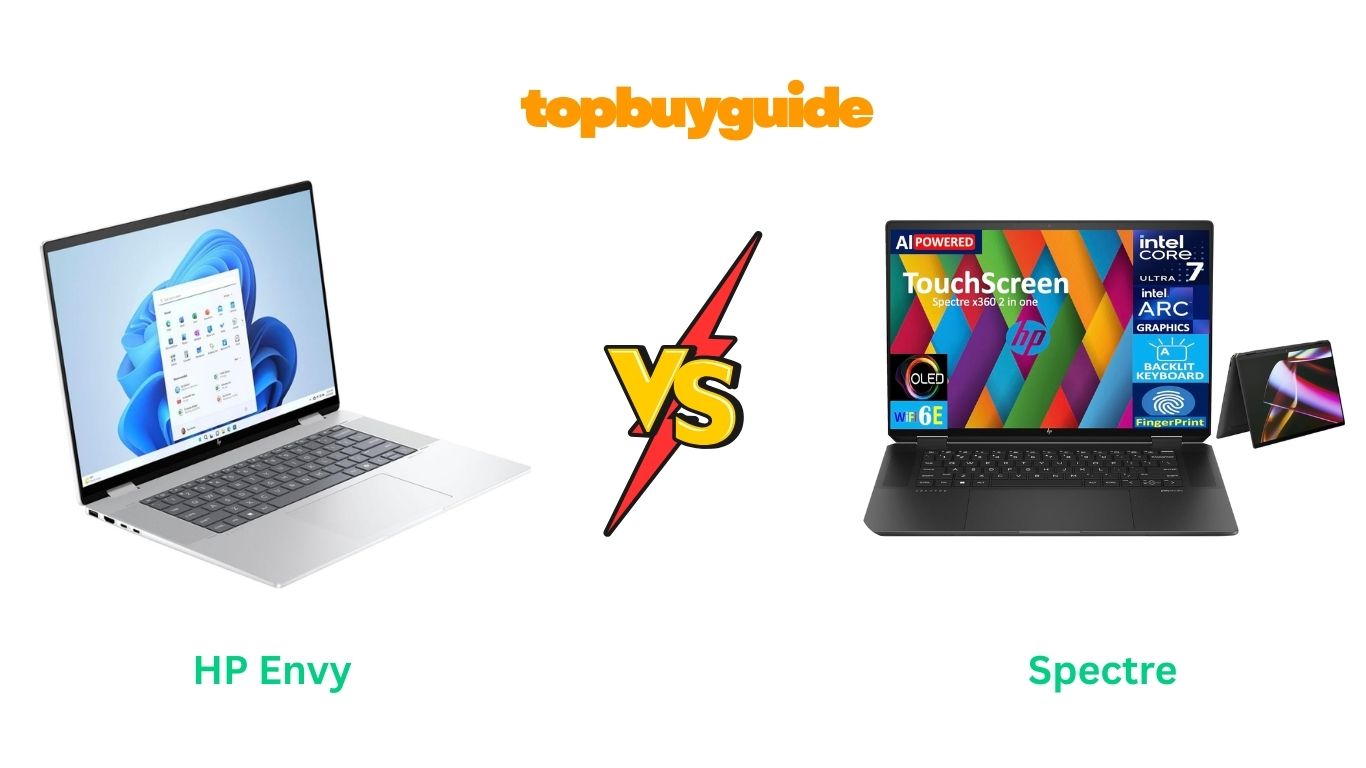
When comparing the HP Envy vs Spectre, both stand out as elegant, powerful laptops — but the HP Spectre takes the lead for professionals and creators who want top-tier performance in a premium design. Its refined build, faster processor, and sharper OLED display make it a clear winner for users seeking performance and portability.
Why Do I Recommend the HP Spectre?
The HP Spectre isn’t just a laptop — it’s a statement of luxury and capability. Here’s why I recommend it over the HP Envy:
- Premium Design and Materials
The HP Spectre features a CNC-machined aluminum chassis with gem-cut edges and a two-tone finish that feels ultra-premium. Compared to the Envy’s brushed aluminum shell, the Spectre simply looks and feels more sophisticated and durable. - Superior Display Technology
The Spectre offers a 13.5” or 14” OLED touchscreen display with exceptional color accuracy and 400+ nits of brightness. The Envy has a great 13.3” or 15.6” Full HD touchscreen, but it lacks the deep contrast and true blacks of OLED. - Better Performance with Latest Intel Chipsets
Powered by the Intel Core i7-1355U and paired with Intel Iris Xe Graphics, the Spectre handles photo editing, 4K streaming, and multitasking with ease. The Envy’s Core i7-1255U is solid, but it lags slightly in sustained performance and thermal control. - Enhanced Portability and Battery Life
Weighing just under 3 pounds, the Spectre is slimmer and lighter than the Envy, while still offering up to 13 hours of battery life. The Envy gives you around 10 hours, which is good — but not Spectre level. - Cutting-Edge Security and Smart Features
The Spectre includes facial recognition, fingerprint sensor, and a physical webcam kill switch, providing layers of privacy. While the Envy has a fingerprint reader, it lacks the dual security system and physical privacy switch integration. - Top-Tier Audio by Bang & Olufsen
Both laptops use B&O-tuned speakers, but the Spectre’s quad-speaker setup delivers richer, fuller sound. It’s ideal for content consumption and creative work. - Thunderbolt 4 Connectivity
The Spectre includes Thunderbolt 4 ports, allowing ultra-fast file transfers and external GPU support. The Envy includes USB-C ports but without Thunderbolt support on all variants. - Stylus and Convertible Flexibility
The Spectre 2-in-1 can be used as a tablet, tent, or laptop, supporting HP’s latest active stylus. The Envy offers similar touchscreen use, but the Spectre’s hinge design and precision are simply superior.
Overall, the HP Spectre is a better fit for professionals, students, and creators who demand performance, portability, and prestige in one package.
The HP Envy, however, remains a strong value option for casual users and those who want great performance without the premium price tag.
Side-by-Side Comparison Chart – HP Envy vs Spectre
| Features | HP Envy | HP Spectre |
| Processor | Intel Core i7-1255U | Intel Core i7-1355U |
| Graphics | Intel Iris Xe Graphics | Intel Iris Xe Graphics |
| Display | 13.3” or 15.6” Full HD IPS Touchscreen | 13.5” or 14” OLED Touchscreen (3K2K option) |
| Build Quality | Aluminum body | CNC-machined aluminum with gem-cut edges |
| Weight | 3.5 – 4.0 lbs | 2.95 – 3.1 lbs |
| Battery Life | Up to 10 hours | Up to 13 hours |
| RAM | 16GB DDR4 | 16GB LPDDR5 |
| Storage | 512GB SSD | 1TB PCIe NVMe SSD |
| Keyboard | Backlit keyboard | Backlit keyboard with improved key travel |
| Ports | USB-C, USB-A, HDMI | Thunderbolt 4, USB-C, USB-A, MicroSD |
| Webcam | 5MP with privacy shutter | 5MP IR camera with facial recognition |
| Audio | Dual speakers (B&O) | Quad speakers (B&O tuned) |
| 2-in-1 Design | Yes (select models) | Yes (standard 2-in-1) |
| Stylus Support | Optional | Included / Supported |
| Operating System | Windows 11 Home | Windows 11 Pro |
| Ideal For | Students, light office users | Professionals, creators, travelers |
What Common HP Envy vs Spectre Can Do
Despite their differences, the HP Envy and Spectre share many similarities that make both models excellent choices within HP’s premium lineup.
1. Touchscreen Functionality
Both laptops feature responsive touchscreen displays, allowing users to interact effortlessly with apps, browse the web, or sketch ideas. The touch response on both models is fluid, ideal for digital artists and note-takers.
2. Convertible 2-in-1 Flexibility
Each laptop supports HP’s 360-degree hinge design, transforming from laptop to tablet mode instantly. This flexibility is perfect for presentations, streaming, or creative work.
3. Premium Aluminum Build
While the Spectre has a more intricate design, both laptops are built from high-quality aluminum materials. They feel solid, resist flexing, and look sleek in any setting — from coffee shops to corporate boardrooms.
4. Powerful Intel Processors
Both come with Intel’s 12th and 13th Gen Core i7 processors, ensuring smooth multitasking and quick responsiveness. Whether you’re editing photos or running multiple browser tabs, both systems handle the workload efficiently.
5. Bang & Olufsen Audio
HP partners with Bang & Olufsen to deliver superior sound quality in both laptops. The Spectre has a richer, more immersive sound due to its extra speakers, but Envy still produces clear, vibrant audio.
6. Windows 11 Experience
Both the HP Envy and Spectre run Windows 11, offering a modern, clean interface and seamless integration with Microsoft Office, Teams, and other productivity tools.
7. Backlit Keyboards
Typing in dim environments isn’t an issue, as both laptops include backlit keyboards. The key spacing and tactile feel make long typing sessions comfortable on either device.
8. Webcam Privacy Shutter
Privacy remains a priority across HP’s laptop lineup, and both Envy and Spectre feature built-in camera shutters — a simple yet effective tool for maintaining security.
Common Features of HP Envy vs Spectre
| Features | HP Envy | HP Spectre |
| Display Type | Touchscreen | Touchscreen |
| Processor Family | Intel Core i7 | Intel Core i7 |
| Operating System | Windows 11 | Windows 11 |
| Audio | Bang & Olufsen tuned | Bang & Olufsen tuned |
| Keyboard | Backlit | Backlit |
| 2-in-1 Convertible Design | Yes | Yes |
| Webcam Privacy Shutter | Yes | Yes |
| Fingerprint Reader | Yes | Yes |
| Ports Variety | USB-A, USB-C, HDMI | USB-A, USB-C, Thunderbolt |
| Warranty | 1 Year | 1 Year |
A Detailed Comparison of the HP Envy vs Spectre
Below is a comprehensive feature-by-feature breakdown of how both laptops perform in real-world usage. This helps you understand which one suits your needs better — whether you’re a creative professional, business traveler, or everyday multitasker.
Display Quality
The HP Spectre clearly dominates when it comes to display brilliance. It offers a 2.8K OLED touchscreen with 100% DCI-P3 color coverage, producing deeper blacks, vivid contrast, and cinematic visuals. The edge-to-edge display and slim bezels make it ideal for video editing, design work, or streaming movies.
On the other hand, the HP Envy features a Full HD (1920×1080) IPS touchscreen display. It’s bright and color-accurate but lacks the depth and richness of OLED panels. For casual use and productivity, it performs well, but creative professionals will notice the difference in vibrancy and color accuracy.
Verdict: HP Spectre wins for display performance and visual fidelity.
Performance and Processor Power
Under the hood, both laptops are equipped with Intel 13th Gen Core i7 processors, but the Spectre uses the Intel Core i7-1355U, while the Envy often comes with the Intel Core i7-1255U. The difference lies in optimization — the Spectre’s newer chip delivers slightly higher turbo boost and improved AI workload handling.
In multitasking, video editing, and heavy applications, the Spectre runs smoother, while the Envy is more than capable for browsing, Microsoft Office, and light creative work.
Verdict: The HP Spectre edges ahead with more powerful optimization and higher sustained performance.
RAM and Storage
Both laptops come with 16GB DDR4 RAM and 1TB PCIe NVMe SSD storage, ensuring fast boot times and smooth app switching. However, the Spectre uses faster SSD read/write speeds, which can reduce loading times during 4K video editing or large file transfers.
While the Envy offers similar specs, its slightly slower storage interface can impact performance in demanding workflows.
Verdict: HP Spectre provides superior memory performance and faster data handling.
Battery Life and Charging Speed
Battery endurance is where the HP Envy fights back. With its 65Wh battery, it delivers up to 12 hours on a full charge — perfect for travel and remote work. It also supports fast charging, giving you around 50% charge in 45 minutes.
The Spectre, while powerful, lasts around 9–10 hours due to its higher-resolution OLED screen and stronger CPU. However, its Thunderbolt 4 fast-charging feature quickly compensates, charging 50% in just 30 minutes.
Verdict: HP Envy wins in raw battery longevity, while Spectre leads in recharge speed.
Design and Build Quality
The HP Spectre is undeniably premium — featuring a gem-cut aluminum chassis, matte-finish keyboard, and hinge accents that scream luxury. It’s thin, lightweight, and designed for professionals who value aesthetics as much as performance.
The Envy, on the other hand, sports a sleek aluminum body but lacks the refined edges and 2-in-1 convertible hinge that the Spectre offers. It’s elegant but more practical than posh.
Verdict: HP Spectre takes the crown for premium craftsmanship and modern styling.
🔈 Audio and Speakers
Both laptops feature Bang & Olufsen-tuned dual speakers, providing crisp, immersive audio. However, the Spectre’s quad-speaker setup enhances surround sound and clarity, especially for streaming and editing.
The Envy sounds good but not as full-bodied or spatially balanced as the Spectre’s configuration.
Verdict: HP Spectre wins with richer, more detailed sound output.
Security and Additional Features
When it comes to privacy and security, both laptops offer fingerprint readers, camera shutters, and TPM 2.0 encryption. But the Spectre goes a step further with facial recognition via Windows Hello and automatic lock/unlock sensors that detect user presence.
The Envy still provides reliable protection but lacks the advanced sensor suite of the Spectre.
Verdict: HP Spectre delivers more advanced, seamless security options.
🔌 Connectivity and Ports
The HP Spectre includes two Thunderbolt 4 ports, a USB-A port, microSD reader, and a combo audio jack — giving users high-speed transfer capabilities. The Envy, meanwhile, offers USB-C, HDMI, and standard USB-A ports, making it slightly more versatile for older peripherals but less future-proof.
Verdict: HP Spectre wins for Thunderbolt 4 speed and next-gen connectivity.
Price-to-Performance Ratio
This is where the HP Envy makes its case. It’s considerably more affordable — often around $300–$500 cheaper than the Spectre — while still offering excellent performance for everyday tasks.
If you need a reliable, all-purpose laptop without splurging, the Envy is a smart buy. However, professionals seeking luxury, speed, and display excellence will find the Spectre worth every extra dollar.
Verdict: HP Envy wins for affordability, but HP Spectre offers unmatched value for professionals.
Conclusion
After comparing the HP Envy vs Spectre, the clear winner is the HP Spectre x360 — and here’s why:
- It features a brighter OLED display with 2.8K resolution.
- The Intel Core i7-1355U provides superior multitasking performance.
- The Thunderbolt 4 connectivity ensures faster data transfer and external display support.
- Its premium aluminum design and 360° hinge make it ultra-versatile.
- Windows Hello face recognition adds seamless security.
- The Bang & Olufsen quad speakers create immersive sound.
FAQs about HP Envy vs Spectre
- Which laptop is better for graphic design — HP Envy or Spectre?
The HP Spectre is better suited for graphic design thanks to its 2.8K OLED display with 100% DCI-P3 color accuracy, providing exceptional color depth and detail for creative work. - Does the HP Envy have a touchscreen display?
Yes, the HP Envy includes a Full HD touchscreen that’s responsive and smooth, ideal for note-taking and casual creative tasks, though not as vivid as the Spectre’s OLED panel. - Which one has better battery life — HP Envy or HP Spectre?
The HP Envy lasts longer, offering up to 12 hours of use, while the Spectre provides about 9–10 hours depending on brightness and workload. - Can both laptops handle video editing?
Yes, both can handle video editing, but the Spectre performs better with heavy workloads due to its newer processor and faster SSD speeds. - Do HP Envy and Spectre support Thunderbolt ports?
The HP Spectre supports Thunderbolt 4 ports for high-speed data and display connections, whereas the Envy includes USB-C and HDMI ports but lacks Thunderbolt 4. - Are both HP Envy and Spectre lightweight for travel?
Yes. The HP Spectre weighs around 3 pounds, while the HP Envy weighs slightly more at 3.5 pounds — both are portable enough for travel or daily commuting. - Which is better for students — HP Envy or Spectre?
The HP Envy is more budget-friendly and offers strong battery life, making it a better choice for students who prioritize portability and price over premium features. - Is the HP Spectre worth the higher price?
Absolutely. The Spectre’s premium build, superior OLED display, and advanced security justify its price for professionals, content creators, and multitaskers.

Alex Turner is a dedicated product researcher and reviewer at TopBuyGuide.com, known for his clear, honest, and data-driven insights. He spends countless hours testing, comparing, and analyzing products to help readers make confident and informed buying decisions.