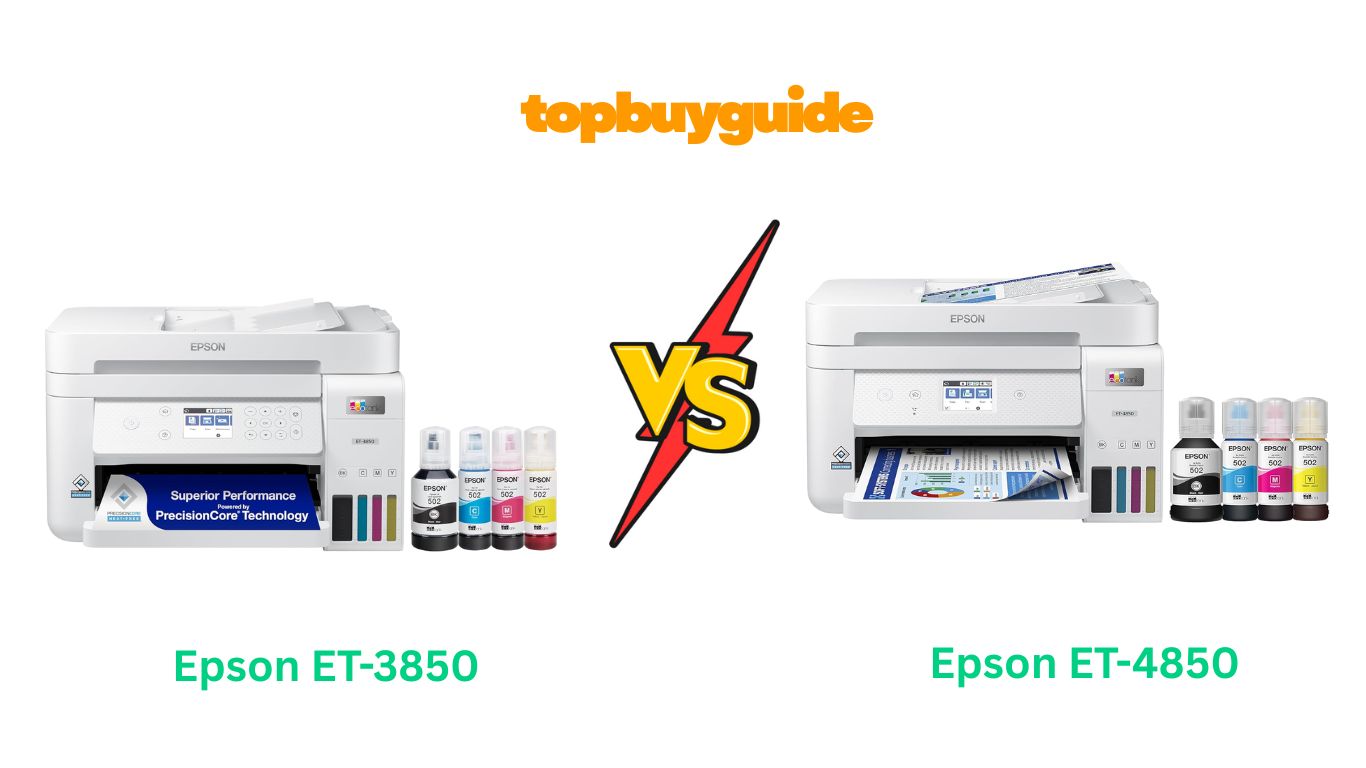
Choosing the right printer can be tough. The Epson ET-3850 and ET-4850 are both excellent choices. However, for most home offices, I recommend the Epson EcoTank ET-4850. It offers a touchscreen display and fax capabilities, providing greater versatility for just a small price increase. This small upgrade makes your daily tasks much smoother and more efficient. Let’s dive into why it might be the better fit for you.
Why Do I Recommend The Epson ET-4850?
When comparing the Epson ET-3850 vs ET-4850, the ET-4850 model consistently comes out on top for its superior features and user experience, making it my top recommendation.
- Epson ET-4850: Touchscreen Convenience. The ET-4850 features a 2.4-inch color touchscreen. This makes navigation intuitive and fast. You can easily access settings and functions with a simple tap. In contrast, the ET-3850 uses a standard color display with button controls, which is less modern and can be slower to operate.
- Epson ET-4850: Fax Functionality. This printer includes a built-in fax machine. This is a crucial feature for many small businesses and home offices. The ET-3850, on the other hand, does not have fax capabilities at all. This makes the ET-4850 a more complete all-in-one solution.
- Epson ET-4850: Lighter and More Compact. The ET-4850 weighs only 14.8 pounds. Its compact design is ideal for smaller office spaces. Conversely, the ET-3850 is heavier, weighing 19.1 pounds. This extra weight can make it more difficult to move and position.
- Epson ET-4850: Higher Perceived Value. Despite its additional features, the price difference between the two models is relatively small. The inclusion of a touchscreen and fax function offers significant value. This makes the ET-4850 a smarter long-term investment for productivity. The ET-3850 lacks these key office-centric features.
- Epson ET-4850: Enhanced User Experience. The touchscreen on the ET-4850 streamlines the entire user experience. From setup to daily tasks, it feels more modern and efficient. While the ET-3850 is functional, its button-based interface feels dated in comparison.
- Epson ET-4850: Office-Ready Features. With its fax machine, the ET-4850 is ready for a wider range of office tasks right out of the box. You won’t need a separate machine for faxing. The ET-3850 is more suited for users who are certain they will never need to send or receive a fax.
- Epson ET-4850: Slightly More Advanced Connectivity Support. Both printers offer great connectivity, but the ET-4850 also explicitly supports Mopria Print Service and Mopria Scan. This offers another layer of convenient mobile printing and scanning for Android users, which is not highlighted for the ET-3850.
- Epson ET-4850: Better for Business. For anyone running a business from home, the fax and touchscreen are not just minor upgrades; they are productivity boosters. The ET-3850, while a solid printer, is more of a basic home-use model in this comparison.
Side By Side Comparison Chart: Epson ET-3850 vs ET-4850
| Feature | Epson ET-3850 | Epson ET-4850 |
| Fax Capability | No | Yes |
| Display Type | 2.4″ Color Display (Buttons) | 2.4″ Color Touchscreen |
| Weight | 19.1 lbs | 14.8 lbs |
| Mobile App Support | Epson Smart Panel App | Epson Smart Panel, Mopria Print/Scan |
| Price | ~$419.97 | ~$455.99 |
| Specific Use | Home Office | Office |
| Control Method | Voice, Buttons | Voice, Touchscreen |
What Common Features of Epson ET-3850 vs ET-4850 Can Do?
Both the Epson ET-3850 and ET-4850 are part of the EcoTank family. This means they share a core set of powerful and cost-effective features. They are designed to make printing easy and affordable. Let’s explore the impressive capabilities that are common to both models.
Cartridge-Free Printing
Say goodbye to small, expensive ink cartridges. Both the ET-3850 and ET-4850 use large, refillable ink tanks. This innovative system means you won’t have to worry about running out of ink at a critical moment. Each set of replacement ink bottles is equivalent to about 80 individual cartridges, dramatically reducing waste and hassle.
Dramatic Savings on Replacement Ink
One of the biggest advantages of these printers is the cost savings. You can save up to 90% on replacement ink compared to traditional ink cartridges. Both models come with enough ink in the box to print up to 7,500 pages in black and 6,000 pages in color. This is up to two years of ink right from the start.
Impressive Print Quality
Both printers use Epson’s unique PrecisionCore Heat-Free technology. This technology, combined with pigment-based black ink, produces exceptionally sharp text. Color photos and graphics are also impressive and vibrant. You can expect high-quality results on virtually any type of paper.
Robust Paper Handling
Productivity is a key focus for both models. They each feature a 30-sheet Auto Document Feeder (ADF) for scanning and copying multipage documents. They also support automatic 2-sided printing to save paper. A large, 250-sheet front paper tray means you’ll refill paper less often.
Built-In Scanner & Copier
The ET-3850 and ET-4850 are true all-in-one machines. They include a high-resolution flatbed scanner for sharp, detailed scans. This also allows for easy document copying. You can handle all your printing, scanning, and copying needs with a single device.
Modern Connectivity Options
Stay connected with flexible options. Both printers feature Ethernet for a stable, wired connection to your network. They also have built-in Wi-Fi for wireless printing from any device. You can even use hands-free, voice-activated printing with Alexa for added convenience. The Epson Smart Panel app allows you to print and manage your printer directly from your smartphone or tablet.
Zero Cartridge Waste
By choosing an EcoTank printer, you are making an environmentally conscious decision. The refillable ink tank system helps reduce the amount of cartridge waste that ends up in landfills. This makes both the ET-3850 and ET-4850 a more sustainable printing solution.
Common Features of Epson ET-3850 vs ET-4850
| Feature | Epson ET-3850 | Epson ET-4850 |
| Printing Technology | Inkjet with PrecisionCore | Inkjet with PrecisionCore |
| Ink System | EcoTank Refillable Ink Bottles | EcoTank Refillable Ink Bottles |
| Page Yield (Included Ink) | 7,500 Black / 6,000 Color | 7,500 Black / 6,000 Color |
| Auto 2-Sided Printing | Yes | Yes |
| Scanner Type | Flatbed | Flatbed |
| Auto Document Feeder (ADF) | Yes, 30-sheet capacity | Yes, 30-sheet capacity |
| Paper Tray Capacity | 250 Sheets | 250 Sheets |
| Max Print Speed (Mono) | 15.5 ppm | 15.5 ppm |
| Max Print Speed (Color) | 8.5 ppm | 8.5 ppm |
| Connectivity | Wi-Fi, Ethernet, USB | Wi-Fi, Ethernet, USB |
| Voice-Activated Printing | Yes (Alexa) | Yes (Alexa) |
| Mobile Printing App | Epson Smart Panel App | Epson Smart Panel App |
| Zero Cartridge Waste | Yes | Yes |
A Detailed Comparison Of the Epson ET-3850 vs ET-4850
Display and Navigation
The Epson ET-4850 truly excels with its 2.4-inch color touchscreen. This modern interface allows you to navigate menus and settings with intuitive taps and swipes. It simplifies tasks like copying, scanning, and configuring Wi-Fi, making the printer feel more user-friendly and efficient for a busy office environment.
In contrast, the Epson ET-3850 features a 2.4-inch color display controlled by physical buttons. While it gets the job done, navigating through menus can be more cumbersome. You have to press arrow keys repeatedly to find the setting you need, which feels less streamlined compared to the ET-4850’s modern touchscreen.
Fax Capability
A key differentiator is the inclusion of fax functionality in the Epson ET-4850. For many home offices and small businesses, faxing remains a necessary function for sending official documents. Having this feature built into the all-in-one printer saves space and eliminates the need for a separate fax machine.
The Epson ET-3850 completely lacks fax capabilities. If your work never requires sending or receiving faxes, this omission might not be a dealbreaker. However, for those who need a comprehensive office machine, the absence of a fax function is a significant limitation.
Physical Design and Weight
The Epson ET-4850 is the more lightweight and compact option of the two. It weighs just 14.8 pounds, making it easier to handle and place in a tight workspace. Its design is sleek and modern, fitting well into a contemporary home office setup without taking up too much room.
The Epson ET-3850, weighing 19.1 pounds, is noticeably heavier and slightly bulkier. While the dimensions are similar, the extra weight can make moving it a bit more of a chore. For users with limited space or who might need to relocate their printer, the lighter design of the ET-4850 is a clear advantage.
Price and Overall Value
When it comes to cost, the Epson ET-3850 is the more affordable option, priced at around $419.97. It offers excellent core features like cartridge-free printing and an ADF, providing great savings on ink. It is a fantastic choice if your budget is tight and you don’t need the extra office features.
The Epson ET-4850 is priced slightly higher, at approximately $455.99. However, for that small price increase, you gain a color touchscreen and built-in fax capabilities. These features significantly enhance productivity and convenience, offering a superior overall value and making it a smarter investment for most home office users.
Conclusion
Both the Epson ET-3850 and ET-4850 are outstanding printers that will save you a fortune on ink. However, for most users, the Epson ET-4850 is the clear winner. For a small additional cost, you get a convenient touchscreen and crucial fax functionality. These features transform it from a basic printer into a true all-in-one office workhorse. If you want the most value and productivity, the ET-4850 is the superior choice.
FAQs
- Is the print quality different between the ET-3850 and ET-4850?
No, both printers use Epson’s PrecisionCore Heat-Free technology and the same 502 ink bottles. This means they produce identical, high-quality prints with sharp text and vibrant colors. Your documents and photos will look great with either model. - Do both printers support automatic double-sided printing?
Yes, both the Epson ET-3850 and ET-4850 support automatic 2-sided printing. This feature helps you save paper and is convenient for printing multi-page documents. You do not have to manually flip the pages. - Which printer is better for a very small office space?
The Epson ET-4850 is slightly lighter and more compact, weighing 14.8 pounds. While the dimensions are similar, its lighter weight makes it easier to manage and fit into a tight spot compared to the 19.1-pound ET-3850. - Can I print from my phone with both printers?
Absolutely. Both printers are compatible with the Epson Smart Panel app. This allows you to easily print, scan, and manage your printer functions directly from your smartphone or tablet, whether it’s an iOS or Android device. - What is the main reason to choose the ET-4850 over the ET-3850?
The two main reasons are the touchscreen display and the built-in fax machine. The touchscreen makes the ET-4850 easier to use, while the fax is an essential feature for many office environments, making it a more complete all-in-one solution. - How much ink comes included with these printers?
Both the ET-3850 and ET-4850 come with a full set of ink bottles in the box. This provides enough ink to print up to 7,500 black pages and 6,000 color pages, which Epson estimates is about two years’ worth of ink for the average user. - Is the setup process difficult for these printers?
Both printers have a guided setup process that you can follow using your smartphone. Users report that as long as you follow the on-screen instructions carefully, the setup is straightforward. It includes filling the ink tanks and aligning the printheads. - Can both printers scan multi-page documents automatically?
Yes, both models feature a 30-sheet Auto Document Feeder (ADF). This allows you to load multiple pages and have them scanned or copied automatically. However, neither model supports automatic double-sided scanning through the ADF.

Alex Turner is a dedicated product researcher and reviewer at TopBuyGuide.com, known for his clear, honest, and data-driven insights. He spends countless hours testing, comparing, and analyzing products to help readers make confident and informed buying decisions.