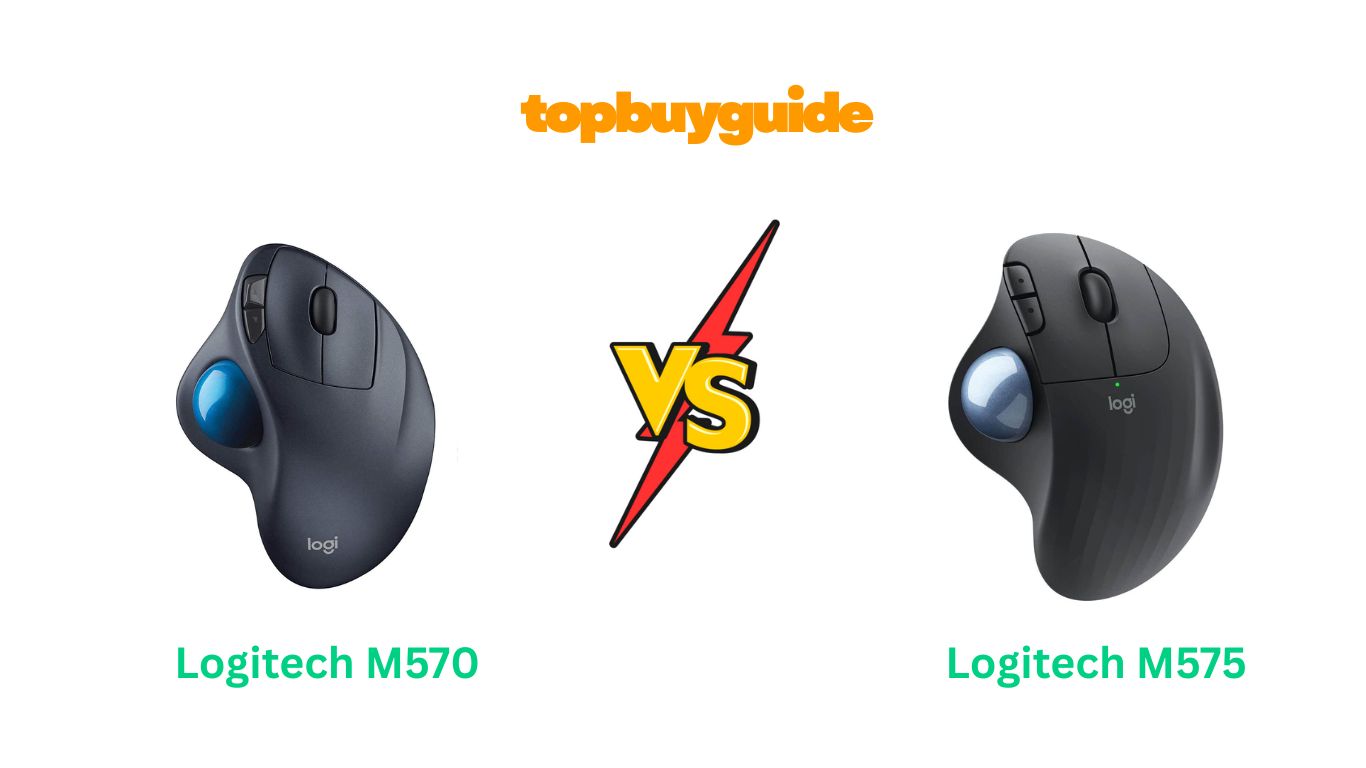
Choosing between the Logitech M570 and M575 can be tough, as both are excellent trackball mice. However, for most users, I recommend the Logitech ERGO M575. It offers superior connectivity with both a USB receiver and Bluetooth, a longer battery life, and a more modern, textured design for better grip. While the M570 is a classic, the M575’s updates provide a better overall experience for today’s user.
Why Do I Recommend The Logitech ERGO M575?
The Logitech ERGO M575 stands out as the superior choice for several compelling reasons, building upon the legacy of its predecessor with meaningful upgrades. Here’s a breakdown of why it earns my recommendation over the M570.
- Dual Connectivity: The M575 offers both a Logi Bolt USB receiver and Bluetooth Low Energy technology. This dual connectivity provides incredible flexibility, allowing you to connect to multiple devices without needing to move the receiver. In contrast, the M570 relies solely on its older Unifying USB receiver, limiting its versatility.
- Significantly Longer Battery Life: One of the most impressive features of the M575 is its battery life. It can last up to 24 months with the included USB receiver and 20 months on Bluetooth from a single AA battery. The M570, while still good, offers a maximum of 18 months, making the M575 a more convenient, set-and-forget option.
- Improved Ergonomics and Design: The M575 features a refined ergonomic shape with a textured surface that provides a more secure grip and enhanced comfort during long work sessions. While the M570 is comfortable, the M575’s updated design feels more modern and better suited to prevent hand fatigue.
- Wider DPI Range for Precision: The ERGO M575 boasts a higher and wider Dots Per Inch (DPI) range, adjustable up to 2000 DPI via the Logitech Options software. This allows for more precise cursor control, which is beneficial for tasks requiring fine detail. The M570 has a fixed DPI, which may not suit all users or screen sizes.
- Modern and Sustainable Materials: Logitech made a conscious effort with the M575 by incorporating post-consumer recycled plastic into its construction (50% for graphite/black, 21% for off-white). This commitment to sustainability is a significant advantage for environmentally-conscious consumers, a feature not highlighted in the M570.
- Enhanced Stability and Tracking: The M575 has a slightly angled design that provides a more natural hand posture, reducing muscle strain. Customer feedback also points to its smooth and precise tracking, which feels like a step up from the already reliable performance of the M570.
- Broader OS Compatibility: The M575 is officially compatible with a wider range of modern operating systems, including Windows, macOS, iPadOS, ChromeOS, and Linux. This ensures seamless plug-and-play functionality across nearly any device you own, whereas the M570’s compatibility might be more limited with newer systems.
Side By Side Comparison Chart: Logitech M570 vs M575
| Feature | Logitech M570 | Logitech M575 |
| Connectivity | 2.4 GHz Unifying USB Receiver | Bluetooth & Logi Bolt USB Receiver |
| Battery Life | Up to 18 months (1 AA) | Up to 24 months (1 AA) |
| DPI Range | Fixed DPI (up to 1000) | Adjustable (400-2000 DPI) |
| Ergonomic Design | Sculpted shape | Angled, textured sculpted shape |
| Materials | Standard plastic | Recycled plastic (50% Graphite) |
| OS Compatibility | Windows, Mac, ChromeOS | Windows, Mac, iPadOS, ChromeOS, Linux |
| Color Options | Black/Grey | Graphite, Off-white, Black |
What Common Features Can Logitech M570 vs M575 Do?
Despite their differences, the Logitech M570 and M575 share a core DNA that makes them both excellent choices for trackball enthusiasts. They are designed to provide a comfortable and efficient alternative to traditional mice, reducing hand and wrist movement. Here are some of the key features they have in common.
Both mice are built around a time-tested ergonomic, sculpted shape designed to fit naturally in your right hand. This design philosophy minimizes muscle strain by keeping your hand in a more relaxed position. Instead of moving the entire mouse, you use your thumb to control the trackball, which means your arm and wrist can remain stationary. This is particularly beneficial for users with limited desk space or those who suffer from repetitive strain injuries like carpal tunnel syndrome. The stationary nature of the mouse ensures consistent comfort and control, no matter how cluttered your workspace becomes.
Another shared feature is the inclusion of programmable forward and back buttons. Located conveniently near the trackball, these buttons allow for quick and easy navigation between web pages or documents without needing to move the cursor to the browser’s navigation arrows. Through Logitech’s software (Logitech Options for the M575 and older software for the M570), you can customize these buttons to perform other functions, such as opening applications, controlling media playback, or executing keyboard shortcuts. This level of customization allows you to tailor the mouse to your specific workflow, enhancing productivity.
The core of both devices is, of course, the trackball itself. Both the M570 and M575 use a smooth, high-quality ball that allows for fluid and precise cursor control across various surfaces. Because the cursor movement is dictated by the ball, not a sensor on the bottom of the mouse, you can use these devices on virtually any surface—from a glass table to your pant leg. This provides unparalleled freedom and flexibility, making them ideal for non-traditional work environments. The trackball is also easily removable for cleaning, ensuring that performance remains smooth and consistent over time.
Common Features of Logitech M570 vs M575
| Feature | Logitech M570 | Logitech M575 |
| Ergonomic Shape | Yes | Yes |
| Thumb-Operated Trackball | Yes | Yes |
| Forward/Back Buttons | Yes | Yes |
| Wireless Operation | Yes | Yes |
| Scroll Wheel | Yes | Yes |
| Stationary Design | Yes | Yes |
| Right-Handed Use | Yes | Yes |
A Detailed Comparison of the Logitech M570 vs M575
Design and Ergonomics
The Logitech M570 established a much-loved ergonomic design, with a sculpted shape that cradles the hand comfortably. It has a smooth plastic finish and provides a solid, reliable feel. For years, users have praised its ability to reduce wrist strain by keeping the hand in a more natural, stationary position. Its design has become the benchmark for thumb-operated trackballs, offering all-day comfort for office work and general navigation.
In comparison, the Logitech M575 takes that beloved design and refines it. It features a new, angled shape that places your hand in an even more natural posture, further reducing muscle fatigue. The surface of the M575 is ridged and textured, providing a superior grip that prevents your hand from slipping during use. This subtle but significant enhancement makes the M575 feel more secure and comfortable, especially during prolonged use.
Connectivity
The Logitech M570 connects to your computer using a 2.4 GHz wireless signal via its Unifying USB receiver. This technology is known for its reliable and stable connection, allowing you to pair up to six compatible Logitech devices to a single receiver. This is convenient for users who are already invested in the Logitech ecosystem. However, it requires a free USB port and is limited to devices that support the Unifying receiver.
The Logitech ERGO M575 significantly upgrades the connectivity options by offering both Bluetooth Low Energy and a modern Logi Bolt USB receiver. This dual-mode connectivity makes the M575 far more versatile. You can connect it via Bluetooth to devices like tablets or laptops without using a USB port, or use the highly secure and stable Logi Bolt receiver for your primary desktop. The ability to switch between devices adds a layer of convenience that the M570 lacks.
Battery Life and Power
The Logitech M570 is powered by a single AA battery and boasts an impressive battery life of up to 18 months. This long lifespan is one of its key selling points, as it means users rarely have to think about swapping batteries. The mouse also features an on/off switch and a battery indicator light to help you manage power effectively, ensuring you’re never caught off guard by a dead battery.
The Logitech ERGO M575 pushes the boundaries even further. It also runs on a single AA battery, but its power efficiency is superior, offering up to 24 months of use with the Logi Bolt USB receiver and up to 20 months via Bluetooth. This extended battery life means you can go for two years without needing a replacement, making the M575 an incredibly low-maintenance device that is always ready when you are.
Conclusion
After a thorough comparison, the Logitech ERGO M575 is the clear winner for most users. It builds on the classic comfort of the M570 with superior dual connectivity, a remarkable 24-month battery life, a wider adjustable DPI range, and a more refined ergonomic design. While the M570 remains a reliable trackball, the M575’s modern features and commitment to sustainability make it a smarter, more versatile investment for just a slightly higher price.
FAQs
Is the Logitech M575 a good replacement for the M570?
Yes, the M575 is an excellent replacement for the M570. It retains the core ergonomic feel that users love while adding modern features like Bluetooth connectivity, longer battery life, and an improved design. Most M570 users will find the transition seamless and the upgrades well worth it.
Can I use the trackball from the M570 in the M575?
While the trackballs are similar in size, they are not officially interchangeable between the M570 and M575. For optimal performance and tracking accuracy, it is best to use the ball that comes with each specific mouse model, as they are calibrated for their respective sensors.
Is the M575 good for gaming?
While the M575 offers precise control, it is not primarily designed for gaming. Most competitive gamers prefer traditional high-DPI mice with faster response times. However, for casual gaming or strategy games that don’t require rapid, twitchy movements, the M575 can be a comfortable and effective option.
How do you clean the Logitech trackball mice?
Cleaning is simple for both models. The trackball can be easily popped out from the bottom of the mouse (using a pen tip or similar object). Once removed, you can wipe the ball and the internal sensors with a soft, lint-free cloth to remove any dust or debris.
Does the Logitech M575 work with Mac and iPad?
Yes, the Logitech M575 is fully compatible with both macOS and iPadOS via Bluetooth. This makes it a great choice for Apple users who want an ergonomic pointing device that can work seamlessly across their desktop, laptop, and tablet.
What is the main difference between the Unifying and Logi Bolt receivers?
The main difference is security and performance. The Logi Bolt receiver, used by the M575, offers a more secure, encrypted wireless connection based on Bluetooth Low Energy technology. It’s designed for reliability in congested wireless environments, whereas the older Unifying receiver (M570) does not feature the same level of security.
Is there a left-handed version of the M570 or M575?
Unfortunately, both the Logitech M570 and ERGO M575 are designed exclusively for right-handed users. Logitech has offered other trackball models for left-handed users in the past, but these specific models are not ambidextrous.

Alex Turner is a dedicated product researcher and reviewer at TopBuyGuide.com, known for his clear, honest, and data-driven insights. He spends countless hours testing, comparing, and analyzing products to help readers make confident and informed buying decisions.