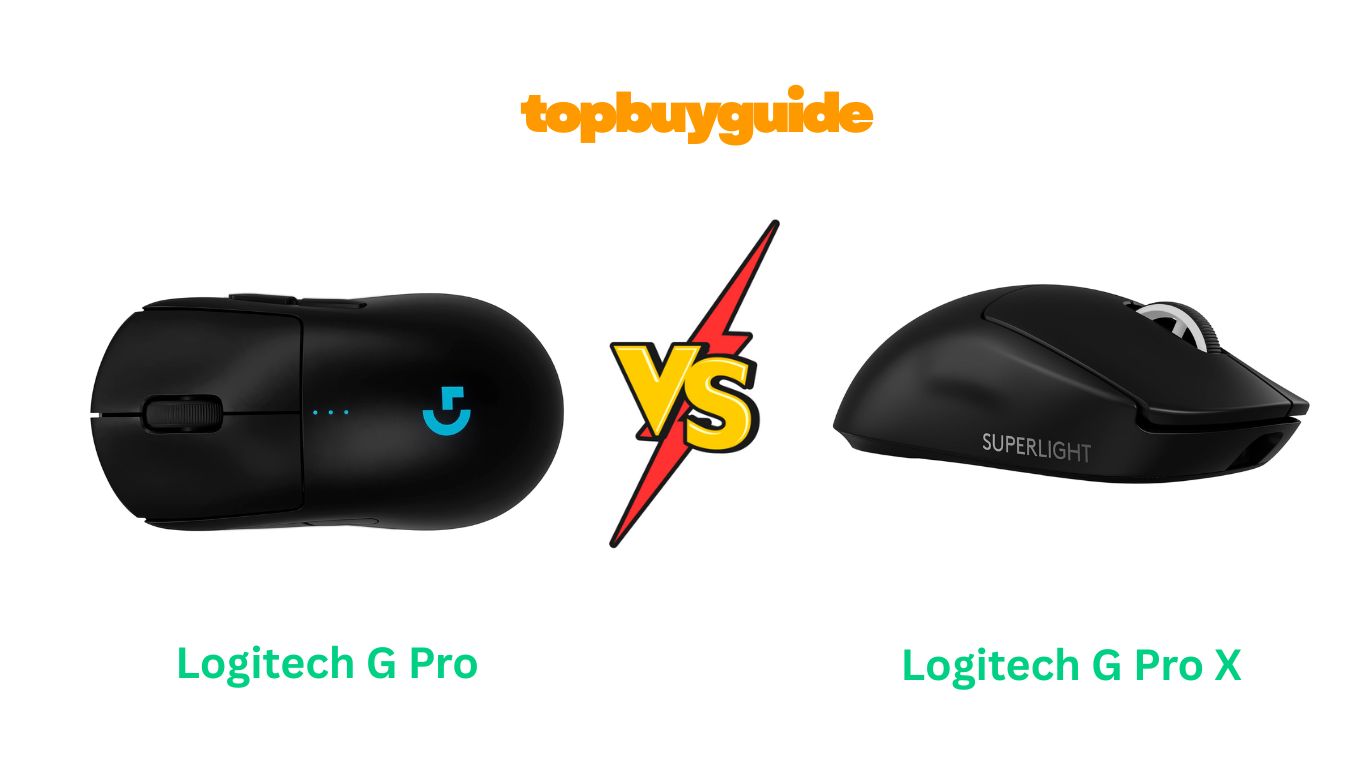
Choosing a pro-grade gaming mouse is a critical decision for competitive play. The Logitech G Pro Wireless and the G Pro X Superlight are both industry-leading esports contenders. They share the same core, but the Superlight is a dedicated refinement of the original design. I suggest the Logitech G Pro X Superlight for one simple reason. Its significantly lower weight offers a massive advantage in fast-paced competitive shooters. This review will detail all the essential differences, features, and benefits of both mice.
Why Do I Recommend The Logitech G Pro X Superlight?
The Logitech G Pro X Superlight is the superior choice for serious FPS gamers. It was designed with a “ZERØ OPPOSITION” philosophy. This extreme weight-saving approach removes non-essential features. The resulting mouse is the pinnacle of speed and performance.
- Significantly Lighter Weight: The Superlight weighs less than 63 grams. This is a dramatic 25% reduction from the G Pro Wireless’s 80 grams. Less mass means quicker flicks and reduced fatigue in extended gaming sessions.
- Superior Battery Life: The Superlight boasts up to 70 hours of continuous motion battery life. In contrast, the G Pro Wireless achieves only up to 60 hours without RGB lighting. The Superlight’s streamlined design allows for a more efficient power draw.
- Enhanced PTFE Mouse Feet: It uses large, zero-additive Polytetrafluoroethylene (PTFE) feet. These feet cover a greater surface area on the base. This design provides an ultra-smooth, low-resistance glide across your mouse pad.
- Dedicated Right-Handed Design: The Superlight is optimized for right-handed users only. Removing the right-side magnetic button plates saved significant internal weight. It provides a simpler, non-ambidextrous, focused design.
- Minimalist Aesthetic (No RGB): The Superlight removes the G Pro Wireless’s LIGHTSYNC RGB lighting. This aesthetic change contributes directly to its ultra-light design. It also removes a potential source of distraction for competitive players.
- Higher DPI Ceiling (Out of the box): While both use a HERO sensor, the G Pro X Superlight initially ships with the HERO 25K sensor. The original G Pro Wireless often shipped with the HERO 16K sensor. This provides a minor edge in maximum resolution for the Superlight.
- Reduced Programmable Buttons: The Superlight has a focused five-button layout. This is down from the G Pro Wireless’s full eight-button ambidextrous layout. The reduced button count is part of the weight-saving, performance-first strategy.
- Less Onboard Memory: The Superlight has one onboard memory profile. However, the G Pro Wireless features five onboard memory profiles. This difference highlights the Superlight’s single-purpose, focused use. It assumes a pro player only needs one perfect setting.
Side By Side Comparison Chart (Logitech Gaming Mouse)
This chart focuses on the key features that differentiate the Logitech G Pro Wireless and G Pro X Superlight.
| Feature | Logitech G Pro Wireless (GPW) | Logitech G Pro X Superlight (GPX) |
| Weight | 80 grams | < 63 grams (Approx. 25% lighter) |
| Programmable Buttons | 4 to 8 (Ambidextrous, removable side buttons) | 5 (Non-removable, left-side only) |
| RGB Lighting | Yes (LIGHTSYNC RGB, 1 zone) | No (Single LED indicator only) |
| Battery Life (Max) | 60 hours (No lighting) | 70 hours (Constant motion) |
| Ambidextrous Design | Yes (Includes removable right-side buttons) | No (Right-handed shape only) |
| Mouse Feet Material/Size | Smaller PTFE feet | Large, zero-additive PTFE feet |
| Onboard Profiles | 5 | 1 |
| DPI Switch Placement | Underside of the mouse | None (Must be configured in G HUB) |
What Common Logitech Gaming Mouse Can Do?
Despite their differences, both the G Pro Wireless and the G Pro X Superlight share a powerful foundation. This unified core ensures they deliver professional-grade performance and reliability. Every shared feature is essential for competitive gaming.
HERO 25K Sensor Technology
Both mice utilize the advanced HERO 25K optical sensor. This is Logitech G’s most accurate and efficient gaming sensor available. The HERO sensor is capable of tracking mouse movement with sub-micron precision. This means it accurately registers even the most minute movements. It operates across a sensitivity range of 100 to 25,600 DPI. Importantly, the sensor boasts zero smoothing, acceleration, or filtering. This ensures an authentic, direct translation of hand movement to on-screen action. The HERO 25K sensor is also remarkably power efficient. It consumes up to 10 times less power than earlier Logitech sensors. This increased efficiency is what allows both mice to have such long battery lives despite their lightweight designs. The sensor’s maximum tracking speed is over 400 inches per second (IPS). It can also handle accelerations greater than 40 G. These specifications guarantee flawless tracking, even during the fastest and most aggressive flicks.
LIGHTSPEED Wireless Connectivity
Both mice feature Logitech’s proprietary LIGHTSPEED wireless technology. This is a cornerstone feature for both of the Pro models. LIGHTSPEED is an end-to-end wireless solution optimized for speed. It delivers a 1ms (1000 Hz) report rate, which is on par with high-performance wired mice. This innovative technology overcomes the traditional limitations of wireless mice, such as latency and connectivity issues. It ensures a consistent and lag-free connection, which is crucial for professional esports. The robust, pro-grade wireless signal provides confidence that crucial inputs will not be missed. Gamers gain the freedom of wireless movement without any performance compromise. This is what makes both mice viable for tournament play.
POWERPLAY Wireless Charging Compatibility
A significant shared feature is compatibility with the Logitech G POWERPLAY Wireless Charging System. This accessory is a specialized mouse pad that continuously charges the mouse. The POWERPLAY module replaces the small circular weight door on the underside of both mice. Once installed, the mouse will charge wirelessly while in use or at rest on the pad. This effectively eliminates any need to ever plug in a charging cable. POWERPLAY compatibility means that the concept of “battery life” becomes irrelevant. This provides absolute peace of mind during long competitive sessions. It delivers an essential convenience for pro players.
Onboard Memory Profiles
Both the G Pro Wireless and the G Pro X Superlight feature onboard memory. This memory allows users to save custom settings directly to the mouse. These saved profiles include DPI settings, button assignments, and other customized parameters. This feature is particularly vital for tournament play. Players can take their mouse to any computer without needing to reinstall or reconfigure the Logitech G HUB software. The custom profiles are instantly accessible. This ensures a consistent, personalized gaming experience, regardless of the host PC setup.
Mechanical Button Tensioning System (MTS)
Both PRO mice feature a Mechanical Button Tensioning System. This engineering design uses metal springs to tension the separated left and right keyplates. The system’s goal is to reduce the pre-travel distance and the actuation force required for a click. This design results in a crisp, clean, and near-instantaneous click feel. The immediate and reliable tactile feedback is vital for precise control. It also ensures long-term click durability and consistency, which is a common requirement for high-level competitive gaming.
Common Features of Logitech Gaming Mouse
This chart highlights the technical and functional features that are identical between the G Pro Wireless and the G Pro X Superlight.
| Feature | Logitech G Pro Wireless (GPW) | Logitech G Pro X Superlight (GPX) |
| Sensor | HERO 25K | HERO 25K |
| Resolution (DPI) | 100 – 25,600 DPI | 100 – 25,600 DPI |
| Wireless Technology | LIGHTSPEED Wireless (1ms) | LIGHTSPEED Wireless (1ms) |
| Max Acceleration | >40 G | >40 G |
| Max Speed | >400 IPS | >400 IPS |
| Tracking Fidelity | Zero Smoothing, Acceleration, Filtering | Zero Smoothing, Acceleration, Filtering |
| Powerplay Compatibility | Yes | Yes |
| Microprocessor | 32-bit ARM | 32-bit ARM |
| Primary Button Switches | Mechanical Button Tensioning System | Mechanical Button Tensioning System |
| Dimensions (L x W x H) | 125.0mm x 63.5mm x 40.0mm | 125.0mm x 63.5mm x 40.0mm |
A Detailed Comparison Of the Logitech Gaming Mouse
Comparing the G Pro Wireless and the G Pro X Superlight reveals Logitech’s design evolution. The newer Superlight is a masterclass in focused, competitive-grade minimalism. It sacrifices versatility for an unparalleled performance edge.
Weight and Glide
The most significant distinction is the mouse’s weight and its associated glide performance. The Logitech G Pro Wireless weighs a respectable 80 grams. This weight was considered exceptionally light at the time of its release. Its mass provides a balanced, solid feel that many users prefer for a wider range of activities.
The Logitech G Pro X Superlight redefines this category, shedding over 17 grams to achieve a final weight below 63 grams. This substantial weight reduction dramatically lowers the effort needed for rapid movements and stops. The Superlight also features larger, no-additive PTFE feet, providing minimal friction. This combination creates a “zero resistance” feeling, which is an advantage in high-stakes FPS titles.
Button Customization and Ambidexterity
The Logitech G Pro Wireless was designed to be fully ambidextrous. It includes two removable side buttons for both the left and right sides. These optional buttons can be swapped with plastic covers for customized setups. This makes it an excellent choice for left-handed players and those who play multiple game genres.
The Logitech G Pro X Superlight abandons ambidexterity and removable buttons entirely. It features only two fixed side buttons on the left side of the mouse. This simpler, right-handed design eliminates the internal components required for the magnetic button system. This simplification is another major contributing factor to its extreme weight reduction.
Aesthetics and RGB Lighting
The Logitech G Pro Wireless incorporates Logitech’s LIGHTSYNC RGB technology. It features a customizable light-up “G” logo and three small LED indicator dots. This allows for personalized color schemes and synchronization with other Logitech G peripherals.
In the pursuit of lightness, the Logitech G Pro X Superlight eliminates all RGB lighting zones. It retains only a small LED indicator. This indicator shows battery life and the current DPI profile. This minimalist design choice saves both power and weight, appealing to professionals who value absolute performance over flashy aesthetics.
Battery Life and Power Efficiency
The Logitech G Pro Wireless provides robust battery life, up to 60 hours with the RGB disabled. The HERO sensor is highly efficient. This battery endurance is perfectly sufficient for days of gaming before needing a recharge.
The Logitech G Pro X Superlight pushes the standard further, offering up to 70 hours of constant motion. This 10-hour improvement is a direct result of stripping away components like the RGB light system. The extended battery life ensures the mouse is even more reliable for lengthy practice sessions and weekend tournaments.
Onboard Memory for Profiles
The Logitech G Pro Wireless includes enough storage for five customizable onboard memory profiles. This allows users to save completely different button maps and DPI settings. It is useful for quickly switching between different games or work environments without software.
The Logitech G Pro X Superlight simplifies its onboard memory to just one profile. This minimalist approach reflects its design philosophy as a pure competitive tool. It assumes the user will only need one perfectly tuned setting for their primary competitive title. This again sacrifices flexibility for the sake of simplicity.
Sensor Naming Convention
At its launch, the Logitech G Pro Wireless often shipped with the HERO 16K sensor. This original sensor had a maximum resolution of 16,000 DPI. However, most modern production runs of the GPW now include the updated HERO 25K sensor.
The Logitech G Pro X Superlight was introduced with the HERO 25K sensor. This sensor is the most advanced version of the technology. While both mice now largely share the same ultimate sensor, the Superlight was the first to adopt the latest iteration. This reinforces its status as the most refined professional tool.
Conclusion
The choice between the two is simple: performance versus versatility. The Logitech G Pro X Superlight is definitively superior for pure, high-level competitive FPS gaming. Its sub-63-gram weight and enhanced PTFE feet offer an undeniable speed advantage. If your primary goal is winning tournaments and reducing hand fatigue, buy the Superlight today. However, if you are a multi-genre gamer or a left-handed user, the ambidextrous Logitech G Pro Wireless is the better, more flexible option. Click here to secure the optimal version for your gaming style and immediately improve your competitive edge.
FAQs
Q: What is the main difference between the Logitech G Pro Wireless and the G Pro X Superlight?
A: The primary difference is weight and buttons. The G Pro X Superlight weighs less than 63 grams, making it about 25% lighter than the G Pro Wireless (80 grams). The Superlight also removes the G Pro Wireless’s ambidextrous, removable right-side buttons and all RGB lighting to achieve this weight saving.
Q: Does the Logitech G Pro X Superlight have a DPI switch button?
A: No, the G Pro X Superlight does not have a dedicated DPI switch button. The function is intentionally removed to reduce weight. DPI can only be changed via the Logitech G HUB software or by assigning the function to one of the five existing buttons, which must be configured in advance.
Q: Which mouse is better for players who use a claw or fingertip grip?
A: Both mice share the same neutral, symmetrical chassis shape, suitable for all grip styles. However, players who use a claw or fingertip grip often prefer the G Pro X Superlight due to its exceptionally low weight. The lighter mass makes quick micro-adjustments and lifts easier and less tiring.
Q: Are both the G Pro Wireless and the G Pro X Superlight compatible with POWERPLAY charging?
A: Yes, both the G Pro Wireless and the G Pro X Superlight are fully compatible with the Logitech G POWERPLAY wireless charging system. This allows the mouse to charge continuously while you are using it on the POWERPLAY mouse pad, eliminating the need for a charging cable.
Q: Why does the G Pro X Superlight have better battery life despite being lighter?
A: The G Pro X Superlight achieves its better battery life of up to 70 hours by removing components that consume power. Specifically, the removal of the customizable LIGHTSYNC RGB lighting from the mouse significantly improves its power efficiency over the G Pro Wireless, which offers up to 60 hours without RGB.
Q: Is the shape of the G Pro Wireless identical to the G Pro X Superlight?
A: The outer shell dimensions are virtually identical: 125.0mm (L) x 63.5mm (W) x 40.0mm (H). The core shape is the same “potato” style favored by many pros. The Superlight’s right side is fixed, making it strictly right-handed, whereas the G Pro Wireless maintains its fully ambidextrous shell by using removable buttons.
Q: Do both mice use the same sensor?
A: Both mice currently use the acclaimed Logitech HERO 25K sensor. This sensor provides extreme precision and a maximum resolution of 25,600 DPI. They share the same maximum acceleration (>40G) and tracking speed (>400 IPS), ensuring identical, flawless tracking performance in competitive play.
Q: Is the G Pro Wireless still a good mouse, or is it outdated?
A: The G Pro Wireless is absolutely still a top-tier gaming mouse. It uses the same core technology—HERO 25K sensor and LIGHTSPEED wireless—as the Superlight. Its eight-button ambidextrous design and RGB lighting make it a more versatile option for gamers who need more customization or an ambidextrous form factor.

Alex Turner is a dedicated product researcher and reviewer at TopBuyGuide.com, known for his clear, honest, and data-driven insights. He spends countless hours testing, comparing, and analyzing products to help readers make confident and informed buying decisions.