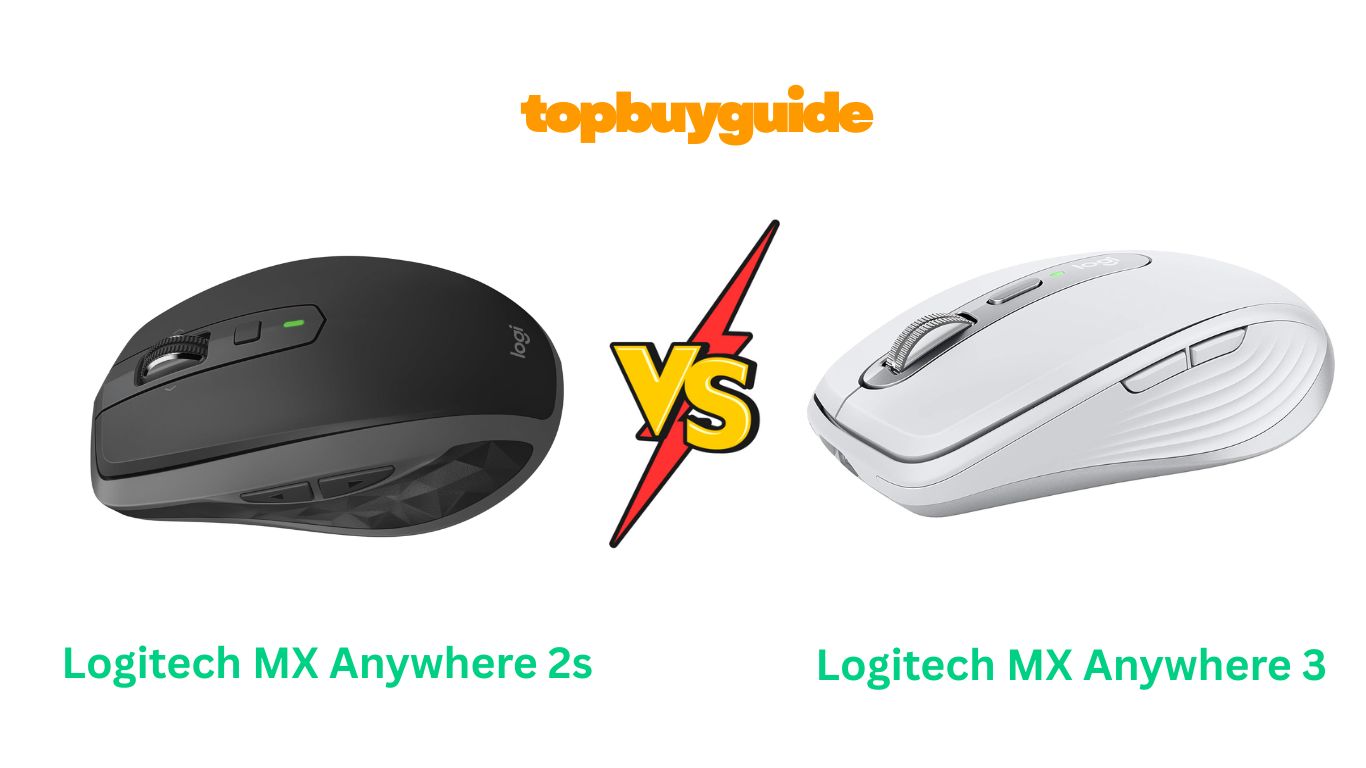
Deciding between the Logitech MX Anywhere 2S and the MX Anywhere 3? This in-depth comparison covers design, charging, scrolling, and more to help you choose the best mouse for your workflow.
Logitech MX Anywhere 2S vs 3: What Should You Choose?
When comparing the Logitech MX Anywhere 2S and the MX Anywhere 3, the choice becomes clear. The Logitech MX Anywhere 3 is the superior mouse, offering significant upgrades like USB-C charging and the ultra-quiet, precise MagSpeed scroll wheel. While the 2S is still a capable device, the modern enhancements of the 3 make it the better investment for anyone serious about their productivity and comfort. Let’s dive into the details.
Why Do I Recommend The Logitech MX Anywhere 3?
The Logitech MX Anywhere 3 stands out as the clear winner due to several key upgrades that enhance user experience and future-proof your setup. While both mice are excellent for portability and performance, the MX 3’s refinements make it a more compelling choice for today’s user.
- Superior Scrolling with MagSpeed: The MX Anywhere 3 features Logitech’s electromagnetic MagSpeed scroll wheel. This technology allows you to scroll 1,000 lines per second in hyper-fast mode and stop on a single pixel in ratchet mode. It is also nearly silent. In contrast, the MX Anywhere 2S has a more traditional mechanical hyper-fast scroll wheel, which is functional but lacks the precision and quiet operation of the MagSpeed wheel.
- Modern USB-C Charging: The MX Anywhere 3 has been updated with a USB-C charging port, aligning it with modern device standards. This means you can use the same cable as your laptop, tablet, or phone. The MX Anywhere 2S, on the other hand, still uses the older Micro-USB port, which can be an inconvenience as fewer devices use this standard.
- Enhanced Ergonomics and Grip: The MX Anywhere 3 features ultra-soft silicone side grips that provide a more comfortable and secure hold during long work sessions. The MX Anywhere 2S uses a textured rubber grip with a faceted pattern, which some users have reported can become sticky or degrade over time.
- Quieter Clicks: The MX Anywhere 3S model (a slight variant of the 3) introduces “Quiet Clicks,” which significantly reduce click noise. This feature is perfect for shared office spaces or quiet home environments. The standard MX Anywhere 3 also has softer clicks than the MX Anywhere 2S, which has a more traditional, audible click.
- Refined Design and Premium Materials: The MX Anywhere 3 boasts a more modern aesthetic with a machined steel scroll wheel and a sleeker, low-profile design. While the 2S is well-built, the 3 feels more premium and is built to withstand the rigors of mobile work.
- Horizontal Scrolling: The MX Anywhere 3 implements horizontal scrolling by holding one of the side buttons and using the scroll wheel. The MX Anywhere 2S achieves this by tilting the scroll wheel left and right. Many users find the button-hold combination on the 3 to be more deliberate and less prone to accidental clicks.
Side By Side Comparison Chart: Logitech MX Anywhere 2S vs 3
| Feature | Logitech MX Anywhere 2S | Logitech MX Anywhere 3 |
| Scroll Wheel | Mechanical hyper-fast scroll | Electromagnetic MagSpeed scroll |
| Charging Port | Micro-USB | USB-C |
| Horizontal Scrolling | Tilt Wheel | Hold side button + scroll wheel |
| Side Grips | Textured rubber with a faceted pattern | Soft silicone grips |
| Design | Classic compact design | Modern, low-profile design with a steel scroll wheel |
| Click Sound | Standard audible click | Quieter click (even quieter on 3S model) |
| Included Cable | Micro-USB to USB-A | USB-C to USB-C (for Mac version) or USB-C to USB-A |
| Price | Generally lower | Generally higher |
What Common Features Can Logitech MX Anywhere 2S vs 3 Do?
Despite their differences, both the MX Anywhere 2S and MX Anywhere 3 share a core set of powerful features that have made this series a favorite among professionals and travelers. These commonalities ensure a high-quality experience regardless of which model you choose.
Multi-Device Control with Logitech Flow
Both mice are equipped with Logitech Flow, a game-changing feature for users who work across multiple computers. With Flow enabled through the Logi Options+ software, you can control up to three computers with a single mouse. Simply move your cursor to the edge of one screen, and it seamlessly flows onto the next. This functionality extends to copying and pasting text, images, and files between machines, even between Windows and macOS operating systems. This eliminates the need for cloud services or emailing files to yourself, creating a truly integrated and efficient workflow.
Track Anywhere with Darkfield Sensor
A standout feature for both the 2S and the 3 is the 4000 DPI Darkfield High Precision sensor. This advanced technology allows the mice to track flawlessly on virtually any surface, including glass (with a minimum thickness of 4mm). Whether you’re working at a polished desk, a glass café table, or an airport lounge seat, you can count on precise and reliable cursor control without needing a mousepad. This makes them the ultimate go-anywhere productivity tool.
Long-Lasting, Rechargeable Battery
Forget about swapping batteries. Both the MX Anywhere 2S and 3 come with a rechargeable 500mAh Li-Po battery that lasts up to 70 days on a full charge. This impressive battery life means you can go for months without thinking about recharging. Even better, a quick 3-minute charge provides enough power for a full day of use, so you’ll never be caught without a working mouse. The front-facing charge port on both models also allows you to continue working while the mouse is plugged in.
Compact, Ergonomic Shape
Both mice are designed for portability and comfort. Their compact, sculpted shape is crafted to fit naturally in your hand, providing the control you need at home, at work, or on the go. This design helps reduce hand fatigue during extended use, making them a great choice for professionals who spend hours on their computers.
Easy-Switch Technology
Both models can be paired with up to three devices simultaneously via Bluetooth Low Energy. A button on the bottom of each mouse allows you to instantly switch between your paired laptop, tablet, or desktop computer. This feature is incredibly convenient for users who frequently move between different devices throughout their day.
Common Features of Logitech MX Anywhere 2S vs 3
| Feature | Logitech MX Anywhere 2S | Logitech MX Anywhere 3 |
| Sensor Technology | 4000 DPI Darkfield | 4000 DPI Darkfield |
| Tracking on Glass | Yes (4mm minimum) | Yes (4mm minimum) |
| Battery Life | Up to 70 days | Up to 70 days |
| Quick Charge | 3 minutes for a day’s use | 3 minutes for a day’s use |
| Logitech Flow | Yes | Yes |
| Multi-Device Pairing | Up to 3 devices | Up to 3 devices |
| Customizable Buttons | Yes (via Logi Options+) | Yes (via Logi Options+) |
| Connectivity | Bluetooth / USB Receiver* | Bluetooth / USB Receiver* |
*The Logitech MX Anywhere 2S and 3 are primarily Bluetooth mice. Some packages include a Unifying or Logi Bolt receiver, but many do not. Check the product listing to confirm.
A Detailed Comparison Of the Logitech MX Anywhere 2S vs 3
Let’s break down the key differences to help you make the best decision for your needs.
Scroll Wheel: Mechanical vs. MagSpeed
The most significant upgrade in the Logitech MX Anywhere 3 is the MagSpeed electromagnetic scroll wheel. This technology, inherited from the larger MX Master series, uses magnets to provide two distinct scrolling modes. It can switch from a precise, line-by-line ratchet scroll to a silent, free-spinning hyper-fast mode that can zip through 1,000 lines in a second. This makes navigating long documents or web pages effortless and exceptionally quiet. It’s a premium feature that you can truly feel.
The Logitech MX Anywhere 2S features a more conventional mechanical scroll wheel. It also offers both click-to-click and hyper-fast scrolling modes, but the transition is mechanical and audible. While it is very effective and a huge step up from a standard mouse, it lacks the refined precision, speed, and silence of the MagSpeed wheel. For users who value a quiet and ultra-smooth experience, the MX 3’s wheel is a major selling point.
Charging Port: Micro-USB vs. USB-C
The charging port is a practical difference that impacts daily convenience. The Logitech MX Anywhere 3 features a modern USB-C port. As most new laptops, tablets, and smartphones now use USB-C, this means you can likely use a single cable to charge all your devices. This simplifies your travel kit and desk setup. The Mac-specific version even includes a USB-C to USB-C cable for direct connection to MacBooks.
Conversely, the Logitech MX Anywhere 2S relies on the older Micro-USB standard for charging. While it gets the job done, it means you’ll need to keep a separate, outdated cable on hand just for your mouse. As the tech world moves further away from Micro-USB, this makes the 2S feel less future-proof and slightly more cumbersome to manage.
Design and Ergonomics
Both mice are compact and designed for portability, but the Logitech MX Anywhere 3 introduces some subtle but important ergonomic improvements. It features soft, grippy silicone side panels that provide a more comfortable and secure hold. Its low-profile shape is contoured to fit the hand, and the overall design feels more modern and durable, with a premium machined steel scroll wheel.
The Logitech MX Anywhere 2S uses a faceted, textured rubber on its sides for grip. While functional, some users report that this material can wear down or become sticky over time. The design, while classic, doesn’t feel as premium as the MX 3. For users with smaller hands or those who prioritize a comfortable grip for long sessions, the silicone grips on the MX 3 are a noticeable improvement.
Conclusion
So, Logitech MX Anywhere 2s vs 3: which should you choose?
While both are fantastic portable mice, the Logitech MX Anywhere 3 is the clear winner and my top recommendation. The upgrade to a USB-C charging port aligns it with modern standards, and the silent, ultra-precise MagSpeed scroll wheel is a game-changer for anyone who works with long documents or spreadsheets. The improved silicone grips and quieter clicks add a layer of comfort and refinement that justifies the higher price tag. With a 4.7-star rating from over 1,700 reviews on Amazon, it’s clear that users agree this mouse delivers an exceptional experience.
If you are on a tighter budget, the Logitech MX Anywhere 2S is still a very solid option. It shares many of the core features of the 3, including the Darkfield sensor and excellent battery life, and its 4.5-star rating from over 2,300 reviews confirms its quality. However, if you can stretch your budget, the modern features and superior user experience of the MX Anywhere 3 make it the smarter long-term investment that will enhance your productivity for years to come.
FAQs
1. Is the Logitech MX Anywhere 3 worth the extra cost over the 2S?
Yes, for most users, it is. The upgrade to USB-C charging, the superior MagSpeed scroll wheel, and the more comfortable silicone grips provide a significantly better user experience. These features make the MX Anywhere 3 more convenient and enjoyable for daily use.
2. Can I use the Logitech MX Anywhere 3 with a Windows PC if it’s the “for Mac” version?
Yes, the “for Mac” version of the MX Anywhere 3 works perfectly with Windows PCs via Bluetooth. The main difference is that it comes with a USB-C to USB-C charging cable instead of a USB-C to USB-A cable and may not include a receiver.
3. Do I need a Logi Bolt or Unifying receiver for these mice?
Both mice are designed to work primarily over Bluetooth. Some packages may include a receiver, but many newer versions, especially the “Bluetooth Edition” of the 2S and the “for Mac” version of the 3, do not. Always check the product description to see if a receiver is included if you require one.
4. How does the scrolling compare between the MX Anywhere 2S and 3?
The MX Anywhere 3’s MagSpeed scroll wheel is a major upgrade. It’s electromagnetic, allowing for nearly silent, ultra-fast scrolling. The 2S has a mechanical hyper-fast wheel, which is effective but louder and less precise than the MagSpeed wheel.
5. Are both mice comfortable for small hands?
Yes, both mice are known for their compact design, making them an excellent choice for users with small to medium-sized hands or those who prefer a “claw” or “fingertip” grip. The contoured shape is designed for portability and comfort.
6. What is Logitech Flow and do both mice have it?
Logitech Flow is a software feature that allows you to control multiple computers with one mouse, including copying and pasting files between them. Both the MX Anywhere 2S and MX Anywhere 3 support this feature through the Logi Options+ software.
7. Does the horizontal scroll feature work the same on both mice?
No, it’s different. The MX Anywhere 2S has a tilt wheel, where you physically tilt the scroll wheel left or right for horizontal scrolling. The MX Anywhere 3 accomplishes this by having you hold a side button while scrolling the wheel. Some users prefer the button-based method on the 3 as it prevents accidental tilting.
8. What’s the difference between the MX Anywhere 3 and the MX Anywhere 3S?
The MX Anywhere 3S is a minor refresh of the 3. The main difference is that the 3S features “Quiet Clicks,” which are significantly quieter than the standard clicks on the 3. The 3S also features an 8K DPI sensor, though most users won’t notice a difference from the 4K DPI on the standard 3.

Alex Turner is a dedicated product researcher and reviewer at TopBuyGuide.com, known for his clear, honest, and data-driven insights. He spends countless hours testing, comparing, and analyzing products to help readers make confident and informed buying decisions.